
Ad Spy costs and common questions
What Ad Spy costs today, who can use it, why a search can come back short, and answers to common questions.
#What it is
This page covers what Ad Spy costs, who can use it, how searches are limited, and what the messages mean when a search comes back short.
#Who can use it
Everyone. Free and Pro both search Meta, Google and LinkedIn, with no daily limit on the number of searches. TikTok and X are coming soon.
| Part of Ad Spy | Free | Pro |
|---|---|---|
| Search Meta, Google and LinkedIn | Yes | Yes |
| Daily search count limit | None | None |
| Searches running at once | 3 | 3 |
| Browse stored ads and save them | Yes | Yes |
Starting a search needs a workspace role that can spend. Viewers and commenters cannot start one.
#Cost
Free, no credits. Today every live platform quotes 0 credits, so a normal search costs nothing and a search that finds no ads costs nothing.
The app still has its price step. If a search ever has a price, a box titled Search fresh competitor ads? shows Maximum charge, and you must choose Confirm search. You pay the real cost up to that maximum. A search that finds no ads still counts. A search that cannot run costs nothing. See Price before you confirm.
#Where to find it
Open Library, then Spy. Or use the Ad Spy tab on Home.
#Buttons and controls
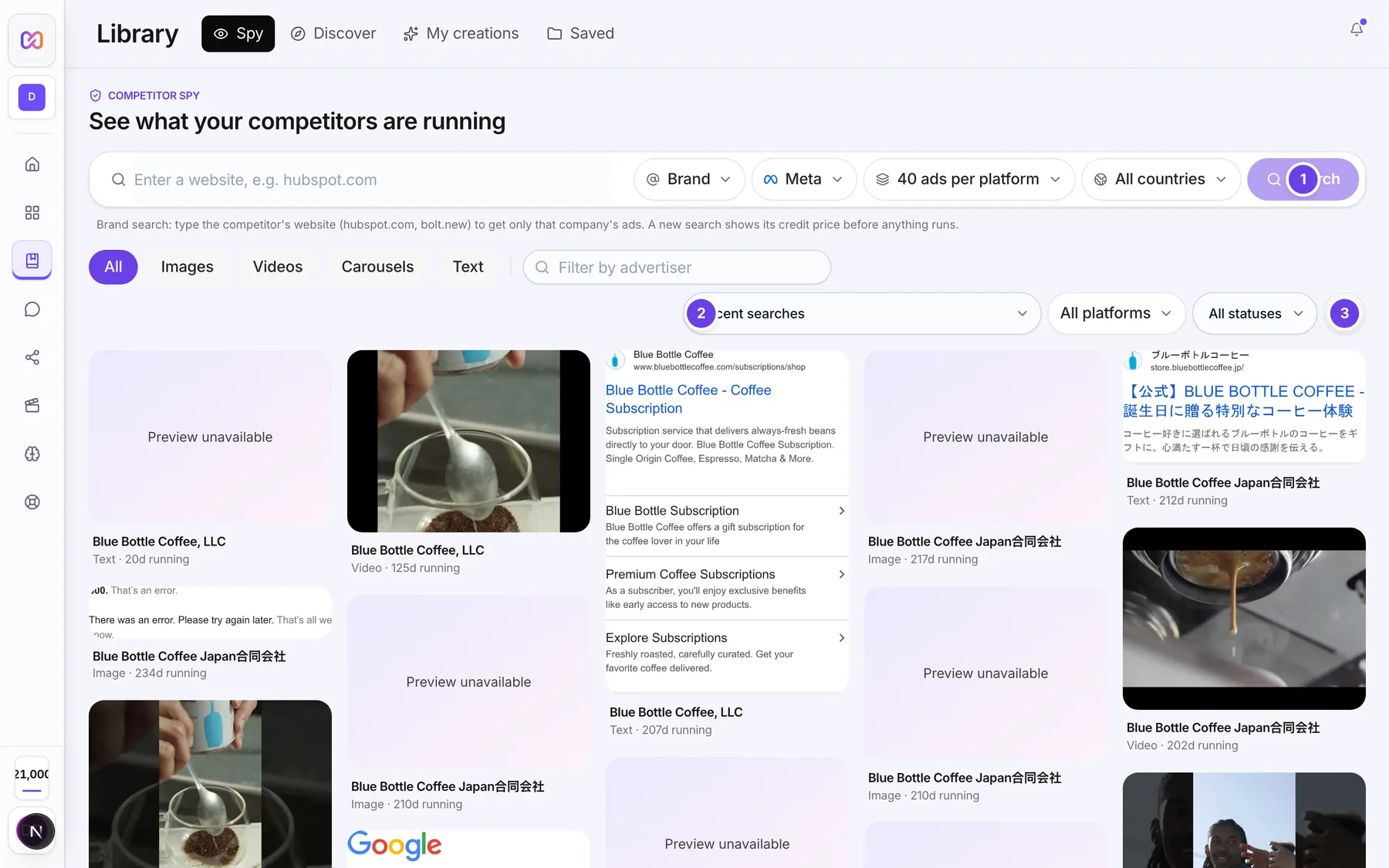
| # | Name in the app | What it does | Plan |
|---|---|---|---|
| 1 | Search | Starts a search. Free today. | Both |
| 2 | Recent searches | Reopens a past search with no new search. | Both |
| 3 | Refresh | Reloads the list. Free. | Both |
| Confirm search | In the quote box. Runs a refreshed search. | Both | |
| Cancel | In the quote box. Closes it. | Both |
#How to check what a search will cost
- Fill in the search bar in Library > Spy.
- Choose Search.
- If the app shows Search fresh competitor ads?, read Maximum charge.
- Choose Confirm search to go ahead, or Cancel.
- If no box shows, the search was free and started on its own.
#Options explained
Stored results. If the same search was run within the last 24 hours, the stored results open at once and cost nothing. If they are older, you see the stored results first and can refresh them.
When a platform comes back short. Under the results you see a line per platform. These are the reasons you may see.
| Line in the app | What it means |
|---|---|
| busy right now, try again in a few minutes | Google was busy. Try again soon. |
| no advertiser account matched this brand | The platform has no advertiser with that name. Try the exact website. |
| no ads found for this brand | The platform found no ads. |
| the ad library is blocking our reader right now, try again later | The platform's ad library did not allow the read. |
| the ad library did not answer, try again later | The platform did not reply. |
| our reader for this platform is not available on this server | That platform cannot be read right now. |
| extra search capacity is paused, so only our own reader ran | A backup search is paused, so fewer ads may show. |
| extra search capacity for today is used up, so only our own reader ran | The backup search is used up for today. |
| the backup search did not answer, try again later | The backup search failed. |
| took too long, try again | The platform did not finish in time. |
| could not start, try again | A platform could not start in an all platforms search. |
#Limits
- No daily count limit on Free or Pro.
- Up to 3 searches can run at once.
- Results per platform: 40 to 200.
- The search box takes up to 200 characters.
- A stored search is reused for 24 hours.
- A search waits up to 5 minutes on screen and keeps running after that.
- Your last 20 searches are listed in Recent searches.
#When something goes wrong
| Message in the app | What it means | What to do |
|---|---|---|
| Not enough credits. Top up, then try again. | A priced search needs more credits than you have. | Add credits. Searches are free today, so this is rare. |
| The search price changed. Review the new quote. | The price moved after you saw it. | Read the new price and confirm again. |
| Competitor search is paused while we top up data capacity. | The data service is out of capacity. The full message adds that no credits were charged. | Do not retry now. Browse stored ads and try later. |
| The competitor search service is temporarily unavailable. Please try again. | The search could not start. | Try again in a few minutes. |
| You already have the maximum number of searches running. | You are at the limit of searches running together. | Wait for one to finish. |
| Competitor Spy is at capacity right now. Please try again later. | The service is busy. | Try again later. |
| Competitor Spy is coming soon. | Ad Spy is off on the server right now. | Try again later. |
#Questions
#Is Ad Spy a Pro feature?
No. The code lets Free and Pro search the same platforms. Only buying extra account connections for ads is tied to Pro, and that is a different feature.
#Will searches stay free?
Searches are free today. The price step stays in the app, so if a search is ever priced you see the maximum and confirm before anything runs.
#Why did a search find fewer ads than I asked for?
The platform may have fewer ads, or a platform came back short. Read the line under the results for the reason.
#Why is the same brand showing old results?
A search from the last 24 hours is reused. Older stored results show first, and you can refresh them.
#What do TikTok and X do?
They are coming soon. You cannot search them yet.
#Is there a way to track a competitor over time?
There is no tracking button in the app today. Search the brand again to see what is new.
#Why can I not start a search?
Your workspace role may not be allowed to spend, or you may already have the maximum number of searches running.
Last checked against the app on . View as Markdown