
Connect social accounts
Connect Instagram, Facebook, LinkedIn and more so posts publish by themselves and messages come to one inbox. See the price before you confirm.
#What it is
A social profile is an account like your Instagram, Facebook page or LinkedIn page. Once you connect it, Infinall can publish posts to it, bring its messages and comments into your inbox, and read its results.
#Who can use it
Adding a new social profile is Pro only. A Free account sees a box that says "Connecting accounts is a Pro feature", with an Upgrade to Pro button, and tapping a platform opens the same message.
Accounts you already connected keep working if your plan changes, and you can still reconnect them.
Pro includes 2 free connections. Social profiles and ad accounts share them. After that, each account costs 300 credits a month.
#Cost
Mixed. The first 2 connections are free. After that each account uses 300 credits a month, charged when you connect and then again every 30 days. You see the exact price before you confirm. On a team, the account owner's balance pays.
A free connection is used once. Disconnecting does not give it back, and there is no refund for the current month.
#Where to find it
Open Distribution, then Account, then the Accounts tab. The Connect pill at the top right of the hub also takes you there.
#Buttons and controls
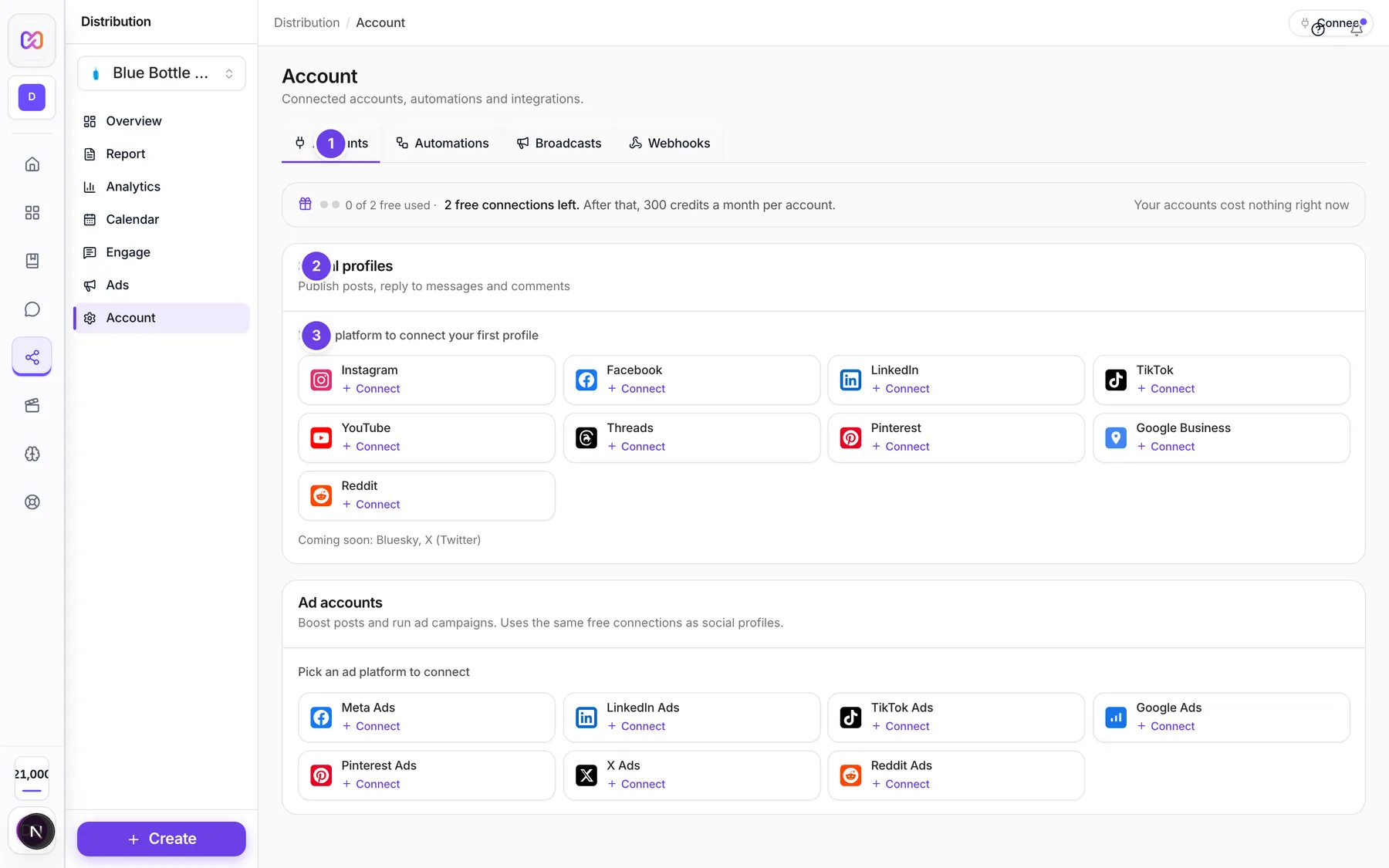
| # | Name in the app | What it does | Plan |
|---|---|---|---|
| 1 | Accounts | The tab that holds both your social profiles and your ad accounts. | Both |
| Connecting accounts is a Pro feature | A box shown only on Free. Its Upgrade to Pro button opens Billing. | Free | |
| (number) of (number) free used | Shown on Pro. Dots and text show how many free connections you used, and the monthly price of the next one. | Pro | |
| (number) accounts need attention | An amber box shown only when an account is paused or needs reconnecting. | Both | |
| 2 | Social profiles | The section for your social accounts. A green pill shows how many are connected. | Both |
| 3 | Pick a platform to connect your first profile | The row of platform buttons. Once you have a profile the title says Connect a profile. Each platform shows Connect, or how many you already connected. | Pro |
| Account row | Shows the name, the platform and handle, what the account can do (Posting, DMs, Comments, Reviews) and a status badge. | Both | |
| Resume | Shown on a paused account. Charges the next month and turns the account on again. | Pro | |
| Reconnect | Shown on an account whose login expired. Opens the platform to sign in again. | Both | |
| Actions for (platform) | The three dots on a row. Has Resume (paused accounts only), Reconnect and Disconnect. | Both | |
| Coming soon | A line under the platform buttons listing platforms you cannot connect yet. | Both |
#How to connect a social profile
- Open Distribution > Account > Accounts.
- Check the brand name in the hub menu. The account is connected to that brand.
- Under Social profiles, click the platform you want.
- In Connect a social profile, read the price box. It says Free. or how many credits you will pay.
- Click the platform tile. A new tab opens on the platform.
- Sign in and allow access.
- You come back to Infinall. It shows "Finishing the connection..." and then "Account connected."
If your browser blocks the new tab, the sign in opens in the same tab instead.
#How to fix an account that needs attention
- Open Accounts. Accounts that need you show an amber badge.
- If the badge says Reconnect, click Reconnect and sign in again.
- If the badge says Paused, add credits, then click Resume.
#How to disconnect an account
- Click the three dots (Actions for the platform) on the row.
- Click Disconnect.
It happens right away. The app does not ask you to confirm. Scheduled posts for that account will not publish, and a free connection you used stays used.
#Options explained
What each platform can do. The row shows what Infinall can do for the account.
| Platform | Posting | Direct messages | Comments | Reviews |
|---|---|---|---|---|
| Yes | Yes | Yes | No | |
| Yes | Yes | Yes | No | |
| Yes | No | Yes | No | |
| TikTok | Yes | No | Yes | No |
| YouTube | Yes | No | Yes | No |
| Threads | Yes | No | Yes | No |
| Yes | No | No | No | |
| Google Business | Yes | No | No | Yes |
| Yes | Yes | Yes | No | |
| Bluesky | Soon | Soon | Soon | Soon |
| X (Twitter) | Soon | Soon | Soon | Soon |
Bluesky and X show a Soon tag and cannot be picked yet.
Auto, Connect and Reminder. When you pick platforms for a post in the calendar, each one gets a badge:
| Badge in the composer | Badge in Publishing | Meaning |
|---|---|---|
| Posts by itself | Auto | The platform has an active connected account. The post is published at the scheduled time. |
| Connect first | Connect | No active account yet, or it needs reconnecting or is paused. You get a reminder until you connect. |
| We remind you | Reminder | This platform is not posted for you. You get a reminder and post it yourself. X is always a reminder. |
Instagram, Facebook, LinkedIn, TikTok, YouTube, Pinterest and Threads can post by themselves. Google Business and Reddit can be connected, but you cannot schedule them from the calendar.
Status badges. Active (working), Reconnect (login expired), Paused (not enough credits at renewal), Disconnected.
#Limits
- Free connections: 2, shared by social and ad accounts.
- Each connection after that: 300 credits a month.
- A renewal reminder comes 3 days before the next charge.
- A connect attempt works for 30 minutes. After that, start again.
#When something goes wrong
| Message in the app | What it means | What to do |
|---|---|---|
| Connecting accounts is a Pro feature. Upgrade to Pro to connect this account. | Your plan is Free. | Upgrade in Billing. |
| Not enough credits to connect this account. Top up and try again. | Your balance is below the monthly price and your free connections are used. | Add credits, then connect again. |
| You need (price) credits to connect another account. | The connect dialog is blocked until you have enough. | Click Top up. |
| Not enough credits to resume this account. Top up and try again. | A paused account needs a month of credits first. | Add credits, then click Resume. |
| This connection took too long. Please try connecting again. | You waited too long on the platform's sign in page. | Click the platform again. |
| The connection was cancelled. | You closed or refused the sign in. | Try again and allow access. |
| The platform did not finish the connection. Please try again. | The sign in did not complete. | Try again. |
| No account was connected. Please try again. | Nothing new came back from the platform. | Try again and pick the account when asked. |
| Could not disconnect this account. | The disconnect failed. | Try again in a minute. |
#Questions
#Which accounts can I connect on Free?
None. Adding new accounts is Pro only. See Free vs Pro.
#Do disconnected accounts give my free connection back?
No. A free connection is used once. The connect dialog says so.
#What happens when credits run out at renewal?
The account is paused. Posts and replies for it are on hold until you add credits and click Resume.
#Will it post for me or just remind me?
It depends on the badge. Auto posts by itself. Reminder sends you a note to post it yourself.
#Can I connect two accounts on the same platform?
Yes. The platform button shows how many of that platform you have connected, and each one counts as a connection.
#Does an ad account count as a connection?
Yes, it uses the same free connections. See Ad accounts.
Last checked against the app on . View as Markdown