
Recreate a competitor ad
Turn a competitor ad into your own: save its layout to your creative library, or open a new ad with the copy filled in.
#What it is
In an opened ad you get two actions: Save to creative library and Recreate and boost. Both start from the competitor's copy and picture, and you edit it so it is yours.
You need a connected ad account. Without one, these two buttons do not show.
#Who can use it
Free and Pro can both see the buttons if they have an ad account connected. Connecting a new ad account is a Pro feature. Accounts you connected before a downgrade stay connected.
#Cost
Mixed. Save to creative library is free. Recreate and boost is free until you run it. A campaign you run spends money on the ad platform, and Infinall also uses 2 credits a month while an ad is live. Save paused spends nothing.
#Where to find it
Open Library > Spy, choose an ad, and look at the buttons at the bottom of the right panel.
#Buttons and controls
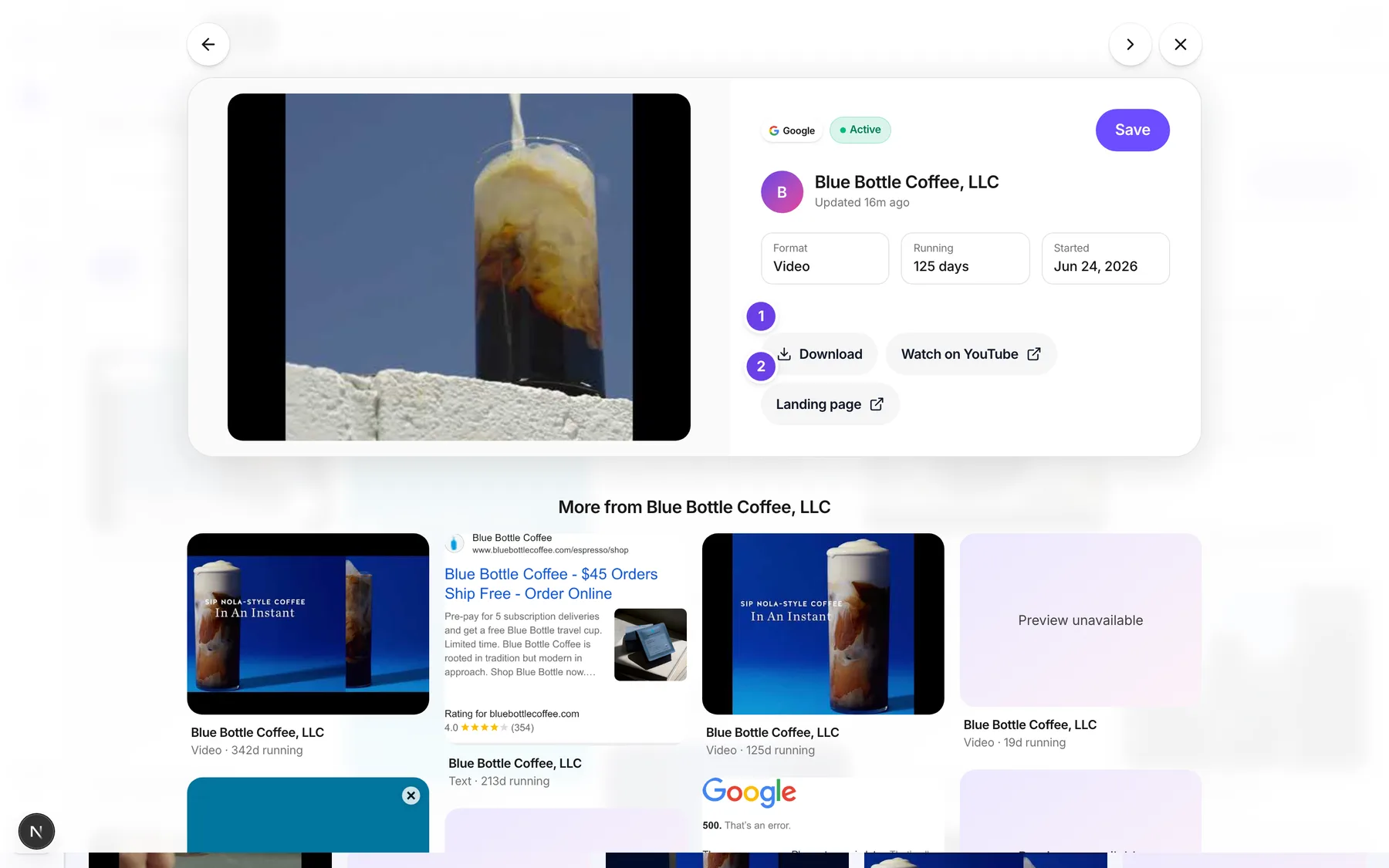
| # | Name in the app | What it does | Plan |
|---|---|---|---|
| 1 | Download | Downloads the ad's image. | Both |
| 2 | Landing page | Opens the ad's own page. | Both |
| 3 | Save to creative library | Opens a form to save the ad as a creative in one of your ad accounts. Shows only when an ad account is connected. | Both |
| 4 | Recreate and boost | Opens the New ad composer with the competitor's copy and media filled in. Shows only when an ad account is connected. | Both |
#In the Save to creative library form
| # | Name in the app | What it does | Plan |
|---|---|---|---|
| 1 | Ad account | The account to save into. | Both |
| 2 | Headline * | Your headline. It starts with the competitor's. Required. | Both |
| 3 | Body * | Your ad copy. Required. | Both |
| 4 | Your landing URL * | Your own page. Must start with http:// or https://. | Both |
| 5 | Call to action | The button text, for example Learn more or Shop now. | Both |
| 6 | Cancel | Closes the form. | Both |
| 7 | Save creative | Saves it. Works only when the ad has an image. | Both |
#In the Recreate and boost composer
| # | Name in the app | What it does | Plan |
|---|---|---|---|
| Ad account | Which account the ad runs in. | Both | |
| What should the ad do? | The goal: Website visits, Get leads, Sell a product, Engagement, Brand awareness or Video views. | Both | |
| Headline | Your headline. | Both | |
| Text | Optional body text. | Both | |
| Link | Your landing page. | Both | |
| Button | The call to action. | Both | |
| Add image or video | Adds or changes the media. | Both | |
| Where do they live? | Pick at least one country. | Both | |
| Age | Minimum age and Maximum age. | Both | |
| Gender | Everyone, Women or Men. | Both | |
| Budget per day | Your daily budget. | Both | |
| For how many days | How long the ad runs. | Both | |
| Start | Right away or On a date. | Both | |
| Back | Goes to the previous step. On step 1 it says Cancel. | Both | |
| Next | Goes to the next step. | Both | |
| Save draft | Saves your work without running. | Both | |
| Save paused | Creates the campaign but keeps it paused. Nothing is spent. | Both | |
| Run campaign | Starts it. Needs the spend tick box to be ticked. | Both |
#How to save a competitor ad to your creative library
- Open an ad in Library > Spy.
- Choose Save to creative library.
- Pick the Ad account.
- Rewrite the Headline * and Body * so they are yours.
- Type Your landing URL *.
- Choose Save creative.
- You see Saved to your creative library.
#How to recreate and boost
- Open an ad.
- Choose Recreate and boost.
- Step 1, The ad: pick a goal, edit the Headline, Text, Link and Button, and check the media.
- Choose Next.
- Step 2, Who sees it: pick countries, Age and Gender.
- Choose Next.
- Step 3, Money & run: set Budget per day, For how many days and Start.
- To run it, tick the spend box, then choose Run campaign. To keep it safe, choose Save paused.
#Options explained
Competitor copy. The headline, body, link and button start filled in from the competitor. Edit them so the ad is about your business.
Image or video. The picture or video of the competitor ad is attached when one is available. Replace it with your own if you prefer.
Spend box. Before you can run, you tick a box that states the most the campaign can spend. Until it is ticked, Run campaign stays off.
Recreate as an image. The Spy screen does not open Image Studio from an ad. To make your own picture, use Create an image and describe what you want. You can also clone a Discover image: see Clone into Image.
#Limits
- A campaign runs for 1 to 90 days.
- A headline holds up to 255 characters. Text holds up to 2,000 characters.
- A live ad uses 2 credits a month.
#When something goes wrong
| Message in the app | What it means | What to do |
|---|---|---|
| The landing URL must start with http:// or https://. | Your link is missing the start. | Add https:// at the front. |
| Could not save the creative. | The save failed. | Try again. |
| Choose an ad account. | No ad account is picked. | Pick one in Ad account. |
| Write a headline. | The headline is empty. | Type a headline. |
| Add a link that starts with https:// | The link is not a full web address. | Type a full link. |
| Add an image or a video. | The ad has no media. | Add one with Add image or video. |
| Pick at least one country. | Step 2 has no country. | Choose a country. |
| Budget per day must be at least 1. | The budget is too low. | Raise it. |
| Run it for 1 to 90 days. | The number of days is out of range. | Pick a number of days in range. |
| Pick a future start date. | The start date is in the past. | Choose a later date. |
| Could not save the draft. Try again. | The draft did not save. | Try again. |
#Questions
#Why do I not see Save to creative library or Recreate and boost?
They show only when you have a connected ad account. Connect one first. Connecting a new one needs Pro.
#Does Recreate and boost make a copy of the competitor's picture?
It starts from the competitor's copy and media so you can edit them. Make your own media before you run.
#Will it spend money straight away?
No. Nothing runs until you tick the spend box and choose Run campaign. Save paused never spends.
#Can I recreate the ad as an image or video here?
Not from Spy. This page covers Recreate and boost. For an image, use Image Studio.
#Can I run a copy of the exact same ad?
Edit it first so the copy is your own.
Last checked against the app on . View as Markdown