
Reply to messages in the inbox
Read and answer direct messages from your connected accounts in one place, with Infinall AI reply suggestions.
#What it is
The Messages tab shows the direct messages sent to your connected accounts. You read a conversation, reply, and mark it done without leaving Infinall.
#Who can use it
Free and Pro accounts both see the Messages tab. The tab itself is not locked to a plan.
You need a connected account for messages to appear. Connecting an account is a Pro feature. Without one, the tab shows a prompt to connect an account.
Direct messages work on Instagram, Facebook and Reddit. Bluesky is listed as supporting messages, but it cannot be connected yet. LinkedIn does not let tools like Infinall read or send its messages, so LinkedIn messages never appear here.
On a team, only people with a role that can edit can send replies, mark conversations done, snooze, assign and react. The Viewer role can read.
#Cost
Uses credits for the AI reply only. You see the exact price in the message that appears once the suggestion is ready. Reading, sending, attaching files, assigning, snoozing and marking done are free, no credits.
An account that ran out of credits at its monthly renewal is paused. Messages for a paused account stay blocked until you add credits.
#Where to find it
Open Distribution, then Engage, then the Messages tab. The address is /distribution/engage?tab=messages. Old links to the inbox go to the same place.
When you have unread messages, a red number shows on the Messages tab.
#Buttons and controls
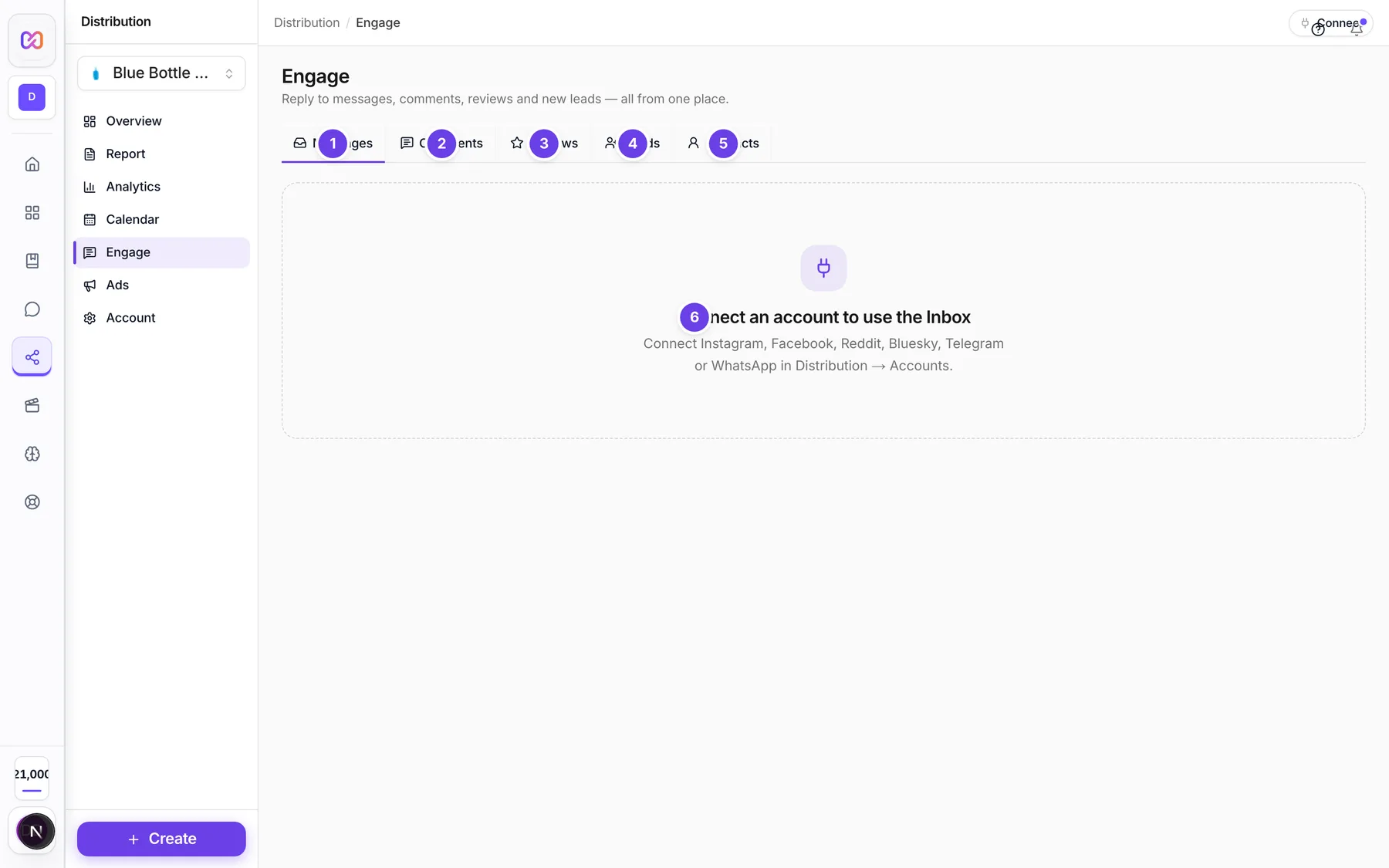
| # | Name in the app | What it does | Plan |
|---|---|---|---|
| 1 | Messages | The tab for direct messages. A red number on it counts your unread messages. | Both |
| 2 | Comments | Opens the Comments tab. See Comments and reviews. | Both |
| 3 | Reviews | Opens the Reviews tab for Google Business reviews. | Both |
| 4 | Leads | Opens the Leads tab, for people who filled in an ad lead form. See Lead forms. | Both |
| 5 | Contacts | Opens the Contacts tab. See Contacts. | Both |
| 6 | Connect an account to use the Inbox | The prompt you see when no account that supports messages is connected. | Both |
| Filter by platform | Shows All platforms or only one platform that you have connected. | Both | |
| Filter by connected account | Shows All accounts or one account. The list follows the platform you chose. | Both | |
| Search conversations | Finds conversations by name or keyword. Type at least 2 characters. | Both | |
| Clear search | Empties the search box. Shows when the box has text. | Both | |
| LinkedIn messaging is not available. | A note that shows when LinkedIn is connected. Publishing and analytics still work. | Both | |
| Newest first | Switches the list order. The button then says Oldest first. | Both | |
| Refresh conversations | Loads the list again. | Both | |
| All | Every conversation, except snoozed ones. | Both | |
| Unread | Conversations with unread messages, not done and not snoozed. | Both | |
| Mine | Conversations assigned to you that are not done. | Both | |
| Done | Conversations you marked done. | Both | |
| Load more | Shows older conversations. Shows when there are more. | Both | |
| Back to conversations | Closes the open conversation on a phone. | Both | |
| Open on (platform name) | Opens the conversation on the platform's own site. Shows when a link exists. | Both | |
| Conversation actions | Opens the menu with Mark done, the three snooze options and Assign to. | Both | |
| Load earlier messages | Shows older messages in the open conversation. | Both | |
| Add reaction | Adds an emoji reaction to a message. Appears when you hover a message. Not on Reddit or Bluesky. | Both | |
| Insert emoji | Opens a small emoji picker for your reply. | Both | |
| Attach a file | Attaches an image, video, audio file or PDF to your reply. | Both | |
| AI reply | Asks Infinall AI to write a reply. The button's full name is Write a reply with AI. | Both | |
| Remove attachment | Removes the file you attached. | Both | |
| Dismiss suggestion | Closes the AI suggestion box. | Both | |
| Send message | Sends your reply. Pressing Enter also sends. | Both |
#How to reply to a message
- Open Distribution, then Engage, then Messages.
- Choose a conversation in the list. The messages open beside it.
- Type in Write a reply....
- Choose Send message, or press Enter. Press Shift and Enter for a new line.
Your reply shows in the conversation. If it fails, your text stays in the box so you can try again.
#How to get an AI reply suggestion
- Open a conversation.
- Choose AI reply.
- Wait for the suggestion. It appears in a box above the reply box, and a message shows the credits charged.
- Edit the text if you want. Typing in the box replaces the suggestion with your own text.
- Choose Send message.
Infinall AI reads the recent messages and your brand details. It writes a short, plain reply in your brand voice and does not invent prices, offers or policies. If it cannot write a reply, you are not charged.
#How to send a file
- Open a conversation and choose Attach a file.
- Pick an image, video, audio file or PDF. The file name shows above the reply box.
- Add text if you want, then choose Send message.
You can send a file on its own, with no text.
#How to mark done, snooze or assign
- Open a conversation.
- Choose Conversation actions.
- Choose Mark done, Snooze 1 hour, Snooze 3 hours, Snooze until tomorrow, or a name under Assign to.
Choose Mark undone to undo done. Choose a name again under Assign to to take the assignment off. The Assign to list only shows when you have teammates to assign to, and it lists only the first few teammates.
A conversation you marked done comes back to Unread when a new message arrives. A snoozed conversation leaves All and Unread until the snooze ends.
#Options explained
Platform and account filters. They only list platforms and accounts you have connected. Each conversation row shows the platform icon, the name, the account it came in through ("via" and the handle), a preview and the time. A grey line "No message preview" means the platform sent no text. "Attachment" means the message was a file.
Reply windows. Instagram, Facebook and WhatsApp only accept a reply within 24 hours of the customer's last message. On Instagram and Facebook, after that window Infinall still sends your reply as a human agent reply, for up to 7 days. A grey banner tells you when this applies. After that, the reply box is locked and says Reply window closed. Reach the customer from a post or story instead.
Reactions. Click the small face button beside a message to pick an emoji. Click your own reaction to remove it. Reactions do not work on Reddit or Bluesky, so the button is hidden there.
Not delivered. A reply that the platform refused shows "not delivered" next to its time.
Files. The picker accepts JPEG, PNG, GIF, MP4, AAC, WAV and PDF files.
#Limits
- A reply can hold up to 1,000 characters. A counter shows when you get close.
- An attachment can be up to 25 MB.
- You can send up to 30 replies per minute.
- You can ask for up to 20 AI suggestions per minute.
- The reply window is 24 hours, or 7 days on Instagram and Facebook.
- Search needs at least 2 characters.
- The list and the unread number on the tab refresh by themselves while the page is open.
#When something goes wrong
| Message in the app | What it means | What to do |
|---|---|---|
| Connect an account to use the Inbox | No account that supports messages is connected. | Connect one in Distribution > Account. See Connect social accounts. |
| Reply window closed | The window for replying to this customer has ended. The reply box is locked. | Reach the customer from a post or story. |
| This platform only allows replies within 24 hours of the customer's last message. | The window ended and this platform has no longer option. | Wait for the customer to write again. |
| This conversation is older than 7 days, which is the longest Instagram or Facebook allow a reply. Message the customer from a post or story instead. | The conversation is past the human agent period. | Reach the customer another way. |
| The message could not be sent. Please try again. | The platform did not accept the reply. | Try again in a moment. |
| Keep it under 1000 characters. | Your reply is too long. | Shorten it. |
| Write a message or attach a file first. | You tried to send an empty reply. | Type text or attach a file. |
| Attachments must be 25 MB or smaller. | The file is too big. | Pick a smaller file. |
| Only JPEG, PNG, GIF, MP4, AAC, WAV and PDF files can be sent. | The file type is not accepted. | Convert the file to one of these types. |
| Could not write a suggestion right now. You were not charged. | The AI reply failed. | Try again, or write the reply yourself. |
| There is no customer message to reply to yet. | The conversation has no message from the customer, so there is nothing to answer. | Write the first reply yourself. |
| Insufficient credits | Your balance is too low for the AI reply. | Add credits. See Price before you confirm. |
| This account is paused. Top up credits to use it again. | The account ran out of credits at renewal. | Add credits, then try again. |
| Your workspace role does not permit this action (write). | Your team role cannot send or change conversations. | Ask the workspace owner for the Editor role. |
| Type at least 2 characters to search. | The search is too short. | Type more. |
| The social platform service did not respond. Please try again. | The platform did not answer. | Try again in a moment. |
| Could not load conversations. | The list did not load. | Choose Refresh conversations. |
#Questions
#Why is my inbox empty?
Messages only appear for connected accounts that support them. On the demo or a new account with nothing connected, you see Connect an account to use the Inbox. After you connect Instagram, Facebook or Reddit, new conversations show up here.
#Does the inbox work on Free?
The inbox is not limited by plan. You still need a connected account, and connecting a new account is only for Pro.
#Do I pay to reply?
No. Sending a reply is free. Only the AI reply uses credits, and the credits charged show in a message once the suggestion is ready.
#Can I read LinkedIn messages here?
No. LinkedIn does not let tools like Infinall read or send its messages. You can still publish to LinkedIn and see its analytics.
#Why can't I reply to an old conversation?
Instagram and Facebook allow a reply for up to 7 days after the customer's last message. After that, start from a post or story.
#Where do leads from my ads go?
They have their own tab. Open Leads next to Messages. See Lead forms.
#Can I answer messages automatically?
Use workflows for that. See Workflows.
Last checked against the app on . View as Markdown