
Roles and permissions
What Owner, Editor, Commenter and Viewer can do, and how an Owner changes roles, adds workspaces, removes people and transfers ownership.
#What it is
Every person on a team has one role. The role decides who can create work, spend credits, invite people and manage the team.
#Who can use it
Only the account Owner can change roles, add or remove workspaces for a member, remove a member and transfer ownership. Everyone else sees the roster as read only. A solo account has just an Owner.
#Cost
Free, no credits. Managing roles never uses credits.
#Where to find it
Open Settings, then Team & workspaces. The roster is in the Team card.
#Buttons and controls
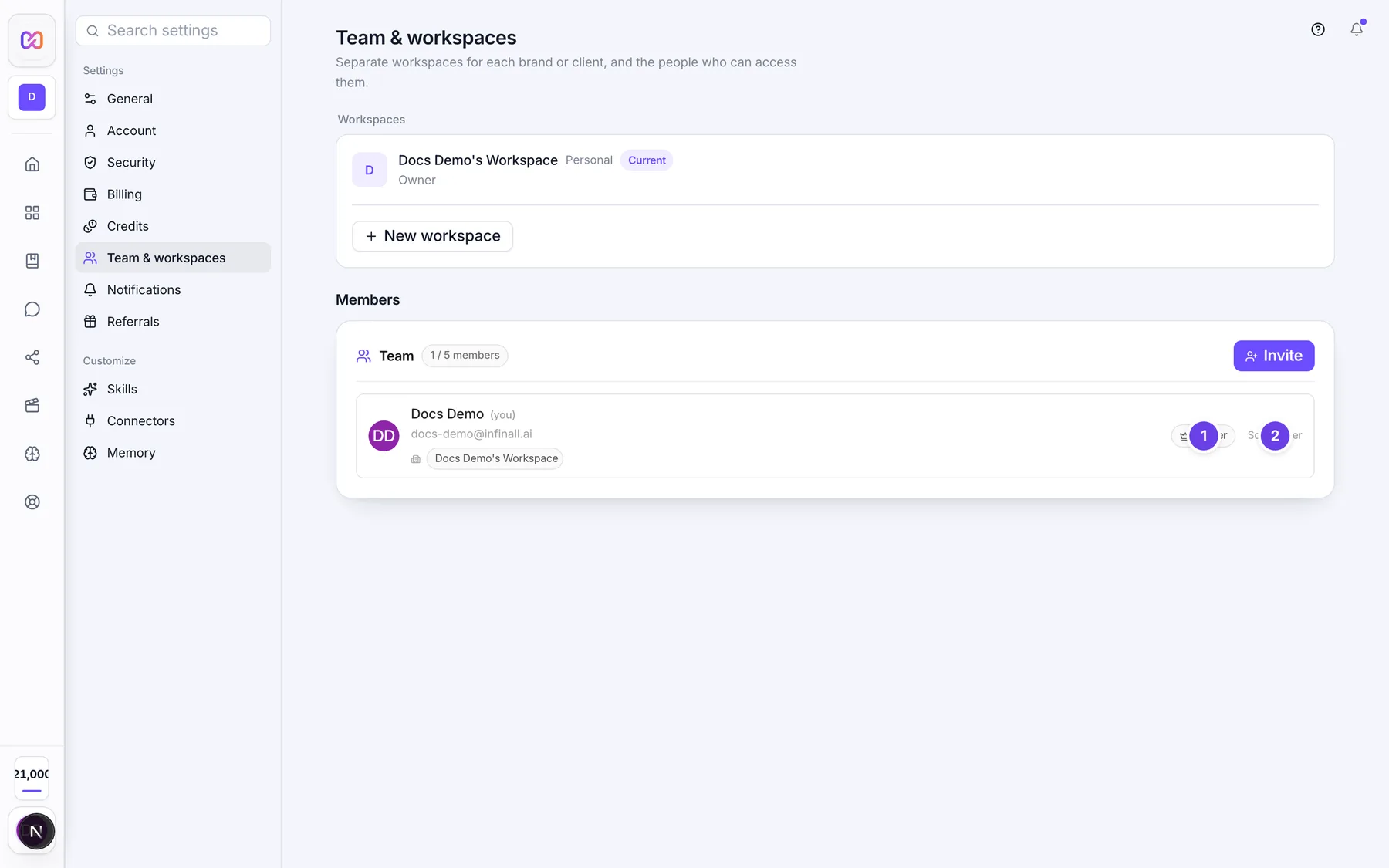
The numbers follow the first member row, which is how an Owner sees a teammate.
| # | Name in the app | What it does | Plan |
|---|---|---|---|
| 1 | Member name and email | The person. "(you)" marks your own row. | Both |
| 2 | Workspace chips | The workspaces this person can reach. A person with none shows "No shared workspace". | Both |
| 3 | Remove (name) from (workspace) | The small X on a chip. It takes that workspace away from the person. Owners only. | Both |
| 4 | + Add workspace | A menu of workspaces the person does not have yet. Picking one gives access at once. Owners only. | Both |
| This is their only workspace. Remove the member instead if they should lose access. | A hint under a member who has just one workspace. | Both | |
| 5 | Owner | A tag on the Owner. | Both |
| 6 | Role | A menu with Editor, Commenter and Viewer. Owners only. Other people see the role as a tag. | Both |
| Sole owner | Shows next to you when you are the only person on the team. | Both | |
| 7 | Remove (name) | The trash icon. It asks you to confirm. Owners only. It does not show on your own row. | Both |
| Remove access? | The question window. It names the person and the workspaces they lose. | Both | |
| Cancel | Closes the question window. | Both | |
| Remove access | Confirms the removal. It shows "Removing..." while it works. | Both | |
| 8 | Transfer ownership | A box for passing ownership on. It shows only when the team has an active member who is not the Owner. | Both |
| 9 | New owner | The menu of members to choose from. It starts on "Select a member...". | Both |
| 10 | Transfer | Passes ownership to the chosen member after a confirmation. | Both |
#How to change someone's role
- Open Settings, then Team & workspaces.
- In the member's row, open Role.
- Pick Editor, Commenter or Viewer.
Hovering the menu says: "Changing the role also changes their access level in this team's workspaces." The change applies at once to every workspace of this team.
#How to give or take back a workspace
- In the member's row, choose + Add workspace and pick a workspace to give access.
- To take one back, choose the X on its chip.
#How to remove a member
- Choose the trash icon on the member's row.
- Read the question: it names the person and the workspaces they lose.
- Choose Remove access. This can't be undone.
#How to transfer ownership
- In Transfer ownership, open New owner and pick a member.
- Choose Transfer.
- Confirm "Transfer ownership to this member? You'll become an Editor."
#Options explained
| Role | What they can do |
|---|---|
| Owner | Everything. Invite people, change roles, remove members, transfer ownership, add or take away workspaces for members, delete workspaces, and see Billing, Referrals and the Top up link. Work started by anyone on the team uses the Owner's credits. |
| Editor | See, comment, create, edit and delete work, and spend credits, in the workspaces they can reach. They cannot manage the team. |
| Commenter | See work and comment. They cannot create, edit or spend. |
| Viewer | The same as Commenter. Both roles give the same access. |
A Commenter or Viewer cannot start or change work. The server refuses it and the app shows the message in the table below.
Teammates who are not Owners do not see Billing and Referrals in Settings. The credits card in the sidebar reads "Team credits" and says: "Shared account balance. Campaigns you run are billed to the account Owner."
#Limits
- A team has at most 5 seats.
- Every team needs one Owner. You cannot demote or remove the only Owner.
- You cannot invite someone as Owner. Ownership is only passed on with Transfer.
- An Owner's workspace access cannot be taken away.
- A member must keep at least one workspace. Remove the member instead.
#When something goes wrong
| Message in the app | What it means | What to do |
|---|---|---|
| You're the only Owner. Transfer ownership before changing this role or removing this member. | You tried to demote or remove the only Owner. | Transfer ownership first. |
| That member already owns this team. | You picked the current Owner. | Pick a different member. |
| That member is no longer on this team. | They were already removed. | Refresh the page. |
| That's their only workspace on this team. Use "Remove member" instead if they should lose access entirely. | You tried to take back the last workspace. | Remove the member instead. |
| An Owner's workspace access can't be revoked. Transfer ownership first if they should no longer administer this team. | You tried to change the Owner's access. | Transfer ownership first. |
| That workspace isn't part of this team anymore. Refresh and try again. | The workspace was deleted. | Refresh the page. |
| Could not change the role. | The change failed. | Try again. |
| Could not remove the member. | The removal failed. | Try again. |
| Could not add that workspace. | Adding failed. | Try again. |
| Could not remove that workspace. | Removing failed. | Try again. |
| Could not transfer ownership. | The transfer failed. | Try again. |
| Your workspace role does not permit this action (write). | Your role is Commenter or Viewer and the action creates or changes work. The word in brackets can also be "spend". | Ask the Owner for Editor access. |
| You do not have access to this workspace. | You are not a member of that workspace. | Ask the Owner to add you. |
#Questions
#What is the difference between Commenter and Viewer?
None in practice. Both can see work and comment, and neither can create, edit or spend. The Role menu still lists both.
#Can an Editor invite people?
No. Only the Owner can invite, change roles, remove members or transfer ownership.
#What happens to my role when I transfer ownership?
You become an Editor and the person you chose becomes the Owner.
#Who pays for the work my teammates do?
The account Owner. All spending is taken from the Owner's balance.
#Does changing a role take effect immediately?
Yes. The new role applies to the person's access in every workspace of this team straight away.
#Can I have two Owners?
The app gives you no way to add a second one. Transfer moves ownership from you to one other person.
Last checked against the app on . View as Markdown