
Emotions, pauses and speed
Make a voiceover sound happy, calm or urgent, add pauses, and change speed mid script with the emotion picker and typed tags.
#What it is
You can tell a voice how to feel, and you can direct a script line by line. Pick an emotion for the whole voiceover, or type short tags such as [excited] and [pause 1s] inside the script to change delivery as it goes.
#Who can use it
Everyone, on Free and Pro. Emotions only work on voices tagged EMOTIONS. Nine voices have the tag: six English and three Hindi. Pro's premium voices do not use emotions.
#Cost
Uses credits, the same as any voiceover. Tags are not spoken, so only the words that are actually spoken are charged. See Price before you confirm.
#Where to find it
In the Audio composer on Home or on the Studio canvas, in Voice over mode, open the emotion chip. It reads Neutral until you pick an emotion. It sits in the row of chips under the script box, next to Voice and Settings.
On the Studio canvas the emotion panel also has small buttons that type tags into your script for you. Home does not have those buttons, but you can type the same tags yourself.
#Buttons and controls
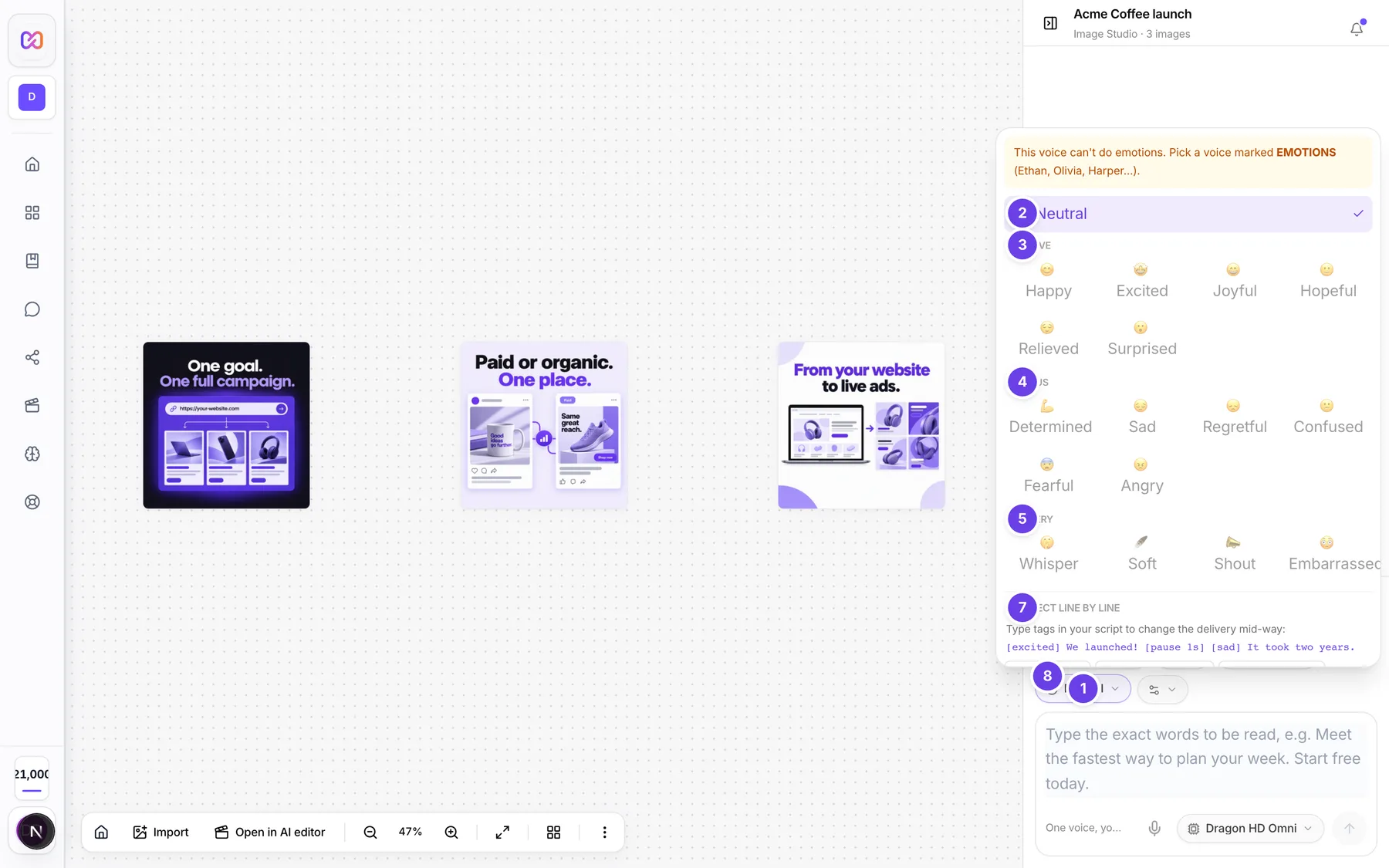
| # | Name in the app | What it does | Plan |
|---|---|---|---|
| 1 | Neutral | The emotion chip. Opens the emotion panel. After you pick one, the chip shows its name, for example Happy. | Both |
| 2 | Neutral (inside the panel) | Clears the emotion so the voice reads plainly. | Both |
| 3 | Positive | Group heading: Happy, Excited, Joyful, Hopeful, Relieved, Surprised. | Both |
| 4 | Serious | Group heading: Determined, Sad, Regretful, Confused, Fearful, Angry. | Both |
| 5 | Delivery | Group heading: a whispering option (the first one), Soft, Shout, Embarrassed. | Both |
| 6 | Intensity | Shows after you pick an emotion. Choose Subtle, Natural or Strong. | Both |
| 7 | Direct line by line | A short guide with an example script that uses tags. | Both |
| 8 | [pause 1s], [slow]...[/slow], [fast]...[/fast], a whispered-line pair, [excited] | Buttons that type a tag into your script at the cursor. Hover for the hint: Silence, Slow down, Speed up, a hint for the whispered line, Switch emotion. Studio canvas only. | Both |
| Only voices that can do emotions | In the voice list. Tick it to show just the voices that can use emotions. | Both | |
| This voice can't do emotions. Pick a voice marked EMOTIONS (Ethan, Olivia, Harper...). | An amber note at the top of the panel. It shows when the picked voice cannot use emotions. The emotion buttons are greyed out until you change voice. | Both |
#How to give the whole voiceover an emotion
- In the Audio composer, open the voice list (Voice) and tick Only voices that can do emotions.
- Pick a voice that shows EMOTIONS.
- Open the emotion chip and choose one, for example Excited or Shout.
- Choose how strong it should be under Intensity.
- Type your script and send it.
If you later switch to a voice that cannot do emotions, the emotion is cleared for you.
#How to change emotion inside the script
Type tags in the script. A bare tag applies to everything after it until you change it:
[excited] We launched! [pause 1s] [sad] It took two years.
To affect just one stretch, close the tag. The voice goes back to how it was afterwards:
[soft]Keep this between us.[/soft] Now back to normal.
On the Studio canvas you can click a tag button in the emotion panel instead of typing. If you select words in your script first, a pair button such as [slow]...[/slow] wraps your selection.
#How to add a pause
Type [pause] where you want silence. A bare [pause] is half a second. To set the length, add it after the word pause, in seconds or milliseconds: [pause 1s] or [pause 500ms].
#How to speed up or slow down part of a script
Wrap the words in [slow] or [fast]:
[slow]Every word matters.[/slow] [fast]Limited time only.[/fast]
[normal] puts the speed back to normal. For the speed of the whole voiceover, use Settings > Speed. See Make a voiceover from a script.
#Options explained
Emotions in the picker. The picker shows sixteen emotions in three groups. Two more, disgusted and jealous, work only when typed as tags, so 18 emotions in total exist.
Friendly words as tags. You can also type these, and they map to the matching emotion: the whispering tag, [soft], [shout], [yell], [cheerful], [glad], [scared], [afraid], [mad], [upset], [hope] and [excite]. [neutral] switches the emotion off.
Intensity. Subtle is a light touch, Natural is the default and Strong pushes the emotion further. Intensity only matters once an emotion is picked.
Speed tags. [slow] reads at 0.7 times normal speed and [fast] at 1.3 times. [normal] resets to 1 times.
Pause tags. A pause can be from 50 up to 5,000 milliseconds. A bare [pause] is 500 milliseconds. A pause at the very start or end of the script is removed, so the take has no dead air.
Typos. A tag that is not recognised, such as [hapy], is dropped instead of being read aloud. Check your spelling if a change did not happen.
Say a brand word your way. Brand words can be said the way your brand wants. Open the brand, edit Visual Identity, and add a line under Pronunciation overrides, for example "Infinall = in-fin-all". Then pick that brand in the brand chip before you generate. Only the spoken words change. Your typed script stays as typed. See Use your brand.
#Limits
- A script with tags can have at most 20 sections. A section is a change of emotion or speed, or a pause.
- A script can be up to 5,000 characters.
- Emotions work on 9 voices (six English and three Hindi).
#When something goes wrong
| Message in the app | What it means | What to do |
|---|---|---|
| This voice can't do emotions. Pick a voice marked EMOTIONS (Ethan, Olivia, Harper...). | The voice you picked has no emotions. | Pick a voice that shows EMOTIONS, or leave the emotion on Neutral. |
Emotions only work with <voice type> voices. Pick a voice marked "Emotions", or remove the emotion. | An emotion was asked for on a voice that cannot do it. | Pick a voice marked EMOTIONS, or remove the emotion and the emotion tags. |
That script has <n> sections. Keep it to 20 or fewer. | You changed emotion, speed or added pauses too many times. | Remove some tags and try again. |
| There are no words to speak once the tags are removed. | The script is only tags. | Add words between the tags. |
That script is too long for <length>. Shorten it to about <n> words, or pick a longer ad length. | A script with tags runs over the chosen Ad length. A script with tags is never trimmed. | Shorten it, or set Ad length to Any or a longer one. |
#Questions
#Why is the emotion chip greyed out or giving a warning?
The voice you picked does not support emotions. Open the voice list, tick Only voices that can do emotions and pick one of those.
#Can I use more than one emotion in one voiceover?
Yes. Type tags in the script, for example [happy] Welcome. [sad] We miss you. Each change counts as a section, up to 20.
#Are the tags read aloud?
No. Tags are not spoken, and you are not charged for them.
#Why did a typo tag disappear?
Unknown tags are dropped on purpose, so a mistake like [hapy] is not read out loud. Fix the spelling and try again.
#Can I set how a single word is pronounced?
Not in the voiceover composer. For brand words, use Pronunciation overrides in your brand, described above.
Last checked against the app on . View as Markdown