
Deactivate or delete your account
What deactivating does, how to come back within the reactivation window, and what happens after it ends.
#What it is
Deactivate is how you close your account in the app. Your account is hidden, you are signed out, and permanent deletion is scheduled. You have 30 days to change your mind.
The app has no separate "Delete account" button. Deactivating is the one step you take. Deletion follows after the window.
#Who can use it
Everyone. Free and Pro accounts have the same Deactivate button.
#Cost
Free, no credits.
#Where to find it
Open Settings, then Account. The Danger zone group is at the bottom. To come back, go to /reactivate.
#Buttons and controls
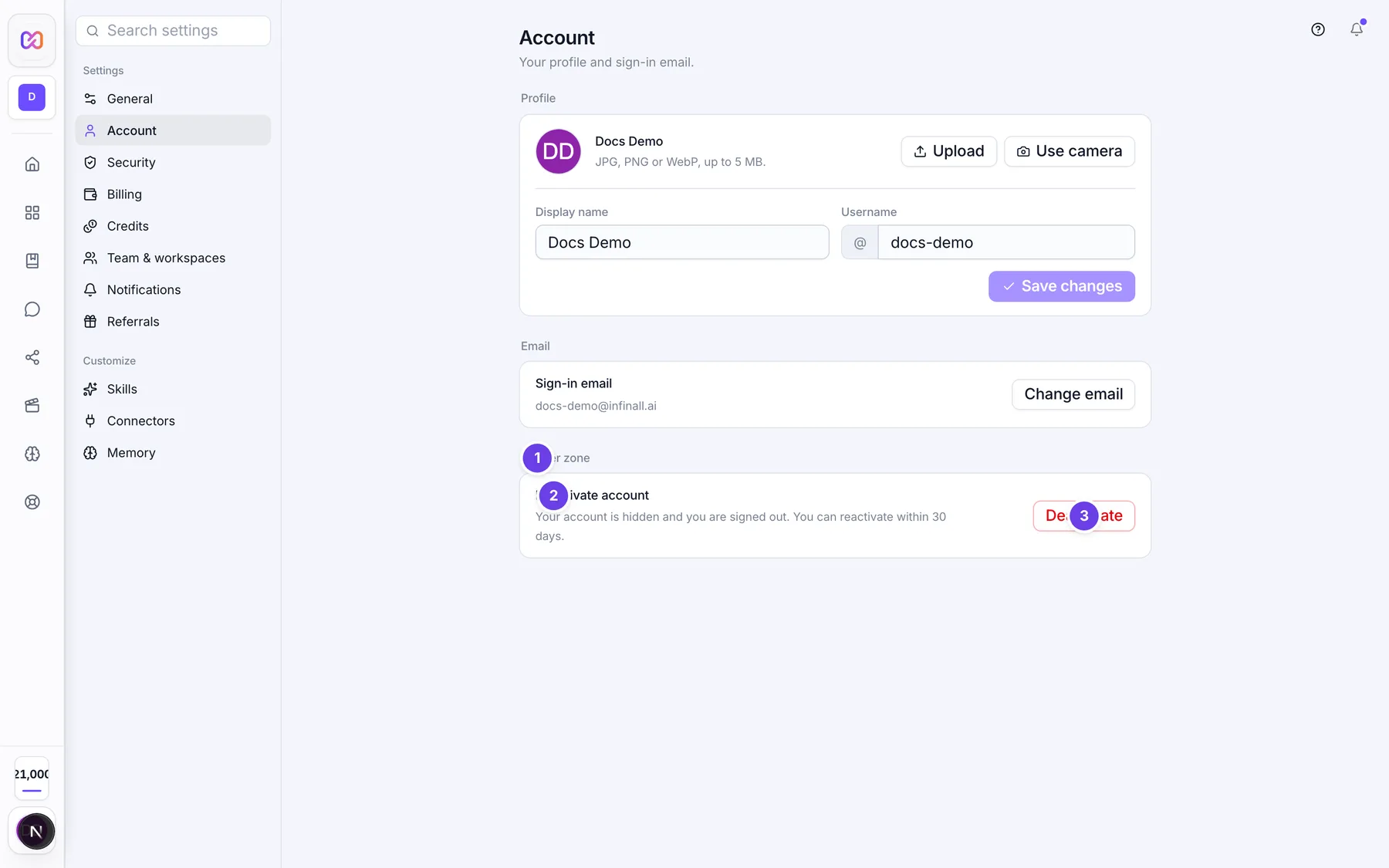
| # | Name in the app | What it does | Plan |
|---|---|---|---|
| 1 | Danger zone | The title of the group. | Both |
| 2 | Deactivate account | The row title. Its text reads: Your account is hidden and you are signed out. You can reactivate within 30 days. | Both |
| 3 | Deactivate | Opens the confirmation. Nothing happens yet. | Both |
| Cancel | Closes the confirmation. | Both | |
| Yes, deactivate | Deactivates the account and takes you to the sign in screen. | Both |
The reactivate screen is a separate page named Reactivate account:
| # | Name in the app | What it does | Plan |
|---|---|---|---|
| 1 | Sign in (top left) | Goes back to the sign in screen. | Both |
| 2 | The email of the deactivated account. The box shows "you@company.com" as a hint. | Both | |
| 3 | Password | Your account password. | Both |
| 4 | Reactivate | Restores the account. It stays off until both boxes are filled. | Both |
#How to deactivate your account
- Open Settings, then Account.
- In Danger zone, choose Deactivate.
- Choose Yes, deactivate.
- You are signed out and taken to the sign in screen.
Before you do this, cancel Pro in Settings > Billing if you have it, and download anything you want to keep.
#How to reactivate your account
- Go to /reactivate.
- Type your Email and Password.
- Choose Reactivate. You see "Account reactivated!" and go to the sign in screen after two seconds.
- Sign in as usual.
#What happens when you deactivate
- Your account is hidden and you are signed out on every device.
- Your plan is set to Free. Any Pro credits you had move into your free credits. See Credits.
- Your sign-in email on the account is replaced, so nobody can use it to reach the account. The app keeps the original email so that reactivating can put it back.
- You get an email saying deletion is scheduled, with a link to /reactivate.
- A deletion job is scheduled for 30 days after you deactivate.
#What happens when you reactivate
- Your account is active again and your email is restored.
- The deletion job is cancelled.
- You get a confirmation email.
- Your plan stays Free. Deactivating moved it to Free, and reactivating does not bring Pro back. Pro credits that were moved into free credits stay as free credits.
#What is deleted, and when
The reactivation window is 30 days from the moment you deactivate. After that the account is treated as permanently deleted, and reactivating is refused.
The app schedules the deletion when you deactivate. It does not show a list of what is erased at that point. If you need exact details about your data, contact support from Support in the account menu.
#Options explained
Deactivate moves your account to the Free plan. The Account screen does not offer a way to manage a payment, so cancel Pro in Settings > Billing first if you have it.
Sign in with Google: the reactivate page needs a password. Google-only accounts see "This account uses Google sign-in. Please contact support." Set a password in Settings > Security before you deactivate if you plan to come back without help.
#Limits
- Reactivation window: 30 days.
- The deletion job is scheduled 30 days after you deactivate.
#When something goes wrong
| Message in the app | What it means | What to do |
|---|---|---|
| Could not deactivate. | The deactivate request failed. | Try again. |
| Account is already deactivated | You tried to deactivate twice. | Go to /reactivate if you want it back. |
| Email or password is incorrect. | The reactivate page did not accept your details. | Check both and try again. |
| No deactivated account found with this email. | No deactivated account matched. | Check the email, or contact support. |
| Account has been permanently deleted | The window has passed. | Make a new account, or contact support. |
| This account uses Google sign-in. Please contact support. | The account has no password. | Contact support. |
| Account is already active | The account is not deactivated. | Sign in normally. |
| Could not reactivate account. | A reason was not given. | Try again. |
#Questions
#How long do I have to change my mind?
30 days from the day you deactivate.
#Can I delete my account right now?
Not from the app. Deactivate starts a countdown. The app has no button that deletes everything on the spot.
#Will my Pro plan come back when I reactivate?
No. Deactivating moves you to Free and reactivating does not restore Pro. Upgrade again in Settings > Billing.
#Will I lose my credits?
Pro credits move into your free credits when you deactivate. They are still there if you reactivate. Free credits are set back to the monthly amount on the 1st as usual.
#I am the Owner of a team. What happens to my teammates?
The Account screen does not say. Transfer ownership first in Settings > Team & workspaces if you want the team to keep working. See Roles and permissions.
#What if I never get the email?
Deactivating still works. You can go to /reactivate and sign in with your email and password at any time inside the window.
Last checked against the app on . View as Markdown