
Paid ads from the Social Hub
Build an ad in three steps, save it as a draft or paused, and run it on Meta, Google, LinkedIn or TikTok once your ad account is connected.
#What it is
The New ad composer builds one paid ad in three steps: the ad itself, who sees it, and the money. You can save it as a draft, save it paused, or run it. Ads live on Meta, Google, LinkedIn or TikTok, and the ad platform charges your ad account for the spend.
#Who can use it
Free and Pro accounts can both open the composer and save ad drafts. Drafts need no connected ad account.
To publish an ad you need a connected ad account. Connecting accounts is Pro only. Free accounts see this message: "Connecting accounts is a Pro feature. Upgrade to Pro to connect your social and ad accounts."
Workspace members with a view-only role cannot start or save a live ad. The app answers "Your workspace role does not permit this action (spend)."
#Cost
Mixed. Saving drafts and saving an ad paused is free, no credits. A live ad uses 2 credits a month. The spend box on step 3 shows this before you confirm. The ad budget itself is charged by the ad platform to your ad account, not by infinall.ai.
#Where to find it
There are three ways in, and they all open the same composer:
- Distribution, then Ads, then New ad (top right).
- The Create button in the Distribution left menu, then Ad campaign.
- Distribution, then Calendar, then New post, then the Ad side of the Post | Ad switch at the top of the composer. The switch only shows when you start a new post, not when you edit an existing one.
#Buttons and controls
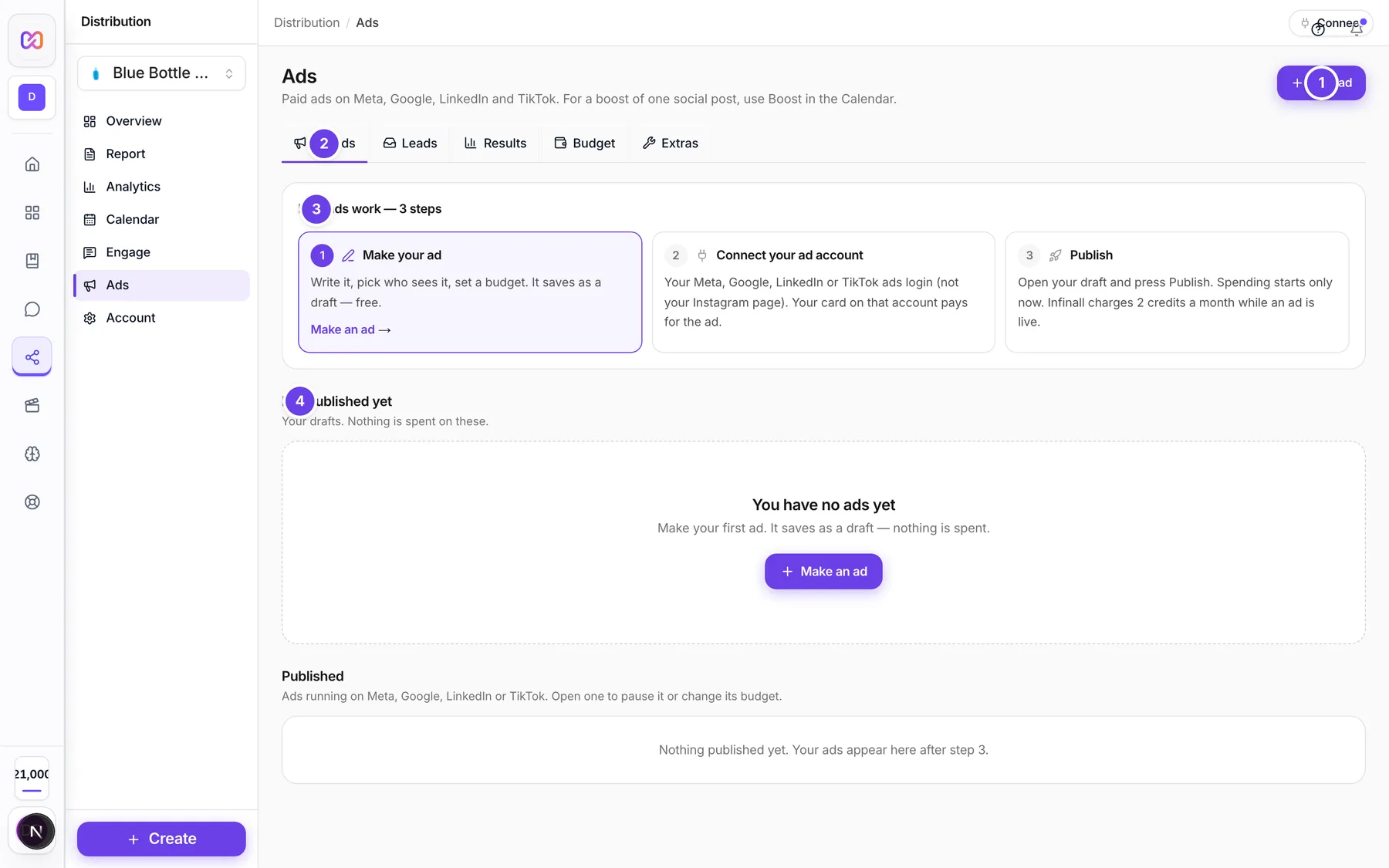
| # | Name in the app | What it does | Plan |
|---|---|---|---|
| 1 | New ad | Opens the three step composer. | Both |
| 2 | My ads | The tab with your drafts and published ads. The other tabs are Leads, Results, Budget and Extras. | Both |
| 3 | How ads work | A short guide with three steps: make your ad, connect your ad account, publish. The step you are on is highlighted. It hides once you have a live ad. | Both |
| 4 | Not published yet | The list of your drafts. Nothing is spent on these. | Both |
| Make an ad | Shows in the guide and in the empty drafts list. Opens the composer. | Both | |
| Connect | Shows in the guide once you have a draft and no connected ad account. Opens Account settings so you can connect your ad account. | Pro | |
| Published | The list of ads that already exist on your ad account. It shows only after you connect one. | Pro | |
| All, Live, Paused, Ended | Filters the published list. | Pro | |
| Pause campaign | Stops an ad from spending. | Pro | |
| Turn on campaign | Starts a paused ad. | Pro | |
| Delete campaign | Deletes the ad on the ad platform. A confirmation asks first. Pause it instead if you only want it to stop spending. | Pro | |
| Publish | On a draft that is ready and has a matching connected ad account. Opens the composer so you can publish it. | Pro | |
| Open | On any other draft. Opens it for editing. | Both | |
| Copy | Makes a copy of a draft. | Both | |
| Delete | Deletes a draft after you confirm. | Both | |
| Where will this ad run? | In the composer, when no matching ad account is connected. Choose Meta, Google, LinkedIn or TikTok. | Both | |
| Ad account | In the composer, when you have a connected account. Choose which one runs the ad. | Pro | |
| Next and Back | Move between the three steps. | Both | |
| Save draft | Saves the ad as a draft and closes the composer. | Both | |
| Save paused | On step 3. Creates the ad on your ad account switched off. | Pro | |
| Run campaign | On step 3. Starts the ad live. It stays off until you tick the spend box. | Pro | |
| Publish | On step 3 when no ad account is connected. Saves a draft and takes you to connect. | Both |
#How to make and save an ad
- Open Distribution, then Ads, then choose New ad.
- On step 1, The ad, pick what the ad should do, write a Headline, add the Link and add an image or video with Add image or video.
- Choose Next. On step 2, Who sees it, pick at least one country. Set the age range and gender.
- Choose Next. On step 3, Money & run, set Budget per day and For how many days. Choose Right away or On a date for the start.
- Read the summary card. It shows the picture, headline, goal, countries, ages and who the ad is for.
- Choose Save draft if you have no connected ad account, or Save paused if you have one.
#How to run an ad live
- Finish steps 1 to 3 as above, with a connected ad account.
- On step 3, tick the box that starts "I understand this campaign will spend up to". It names the total you agreed to and says infinall.ai also uses credits while the ad is live.
- Choose Run campaign.
- A message confirms the result. If you did not tick the box, the ad is not started live. Use Save paused and turn it on later from the published list with Turn on campaign.
#How to publish a draft
- Open Distribution, then Ads, then My ads.
- Find the draft under Not published yet. A badge says Ready to publish when nothing is missing and your ad account is connected.
- Choose Publish. The composer opens with the draft filled in and the title Publish ad.
- Go to step 3 and use Save paused or Run campaign.
If the draft shows Waiting for account, choose Connect now in the draft row. After you connect, you come back to the same draft.
#Options explained
Goal. What the ad should do. Not every platform runs every goal.
| Goal in the app | Meta | TikTok | ||
|---|---|---|---|---|
| Website visits | Yes | Yes | Yes | Yes |
| Get leads | Yes | Yes | No | No |
| Sell a product | Yes | Yes | Yes | Yes |
| Engagement | Yes | Yes | No | Yes |
| Brand awareness | Yes | Yes | Yes | Yes |
| Video views | Yes | Yes | No | Yes |
Get leads needs a lead form. See Lead forms.
Headline, Text, Link, Button. The headline is up to 255 characters. The text is optional and up to 2,000 characters. The link must start with https://. The Button menu offers Learn more, Shop now, Sign up, Contact us, Download, Get offer, Book now, Subscribe, Apply now and Get quote. Google ads have no button menu.
Media. One ad uses one image, or one video with an image as its cover. If you pick more files, the app keeps one and tells you how many were left out. Remove media clears it. Google Search ads use no image: you add Keywords instead, separated by commas, up to 50. TikTok ads need a video. A Video views goal needs a video.
Who sees it. Pick at least one country: United States, India, United Kingdom, Canada, Australia, Germany, France, UAE, Singapore or Netherlands. Set a minimum and maximum age, from 18 up to 65+. Choose Everyone, Women or Men. More options, cities and interests lets you search for cities and interests once an ad account is connected.
Audience size. On Meta and LinkedIn the composer shows "About ... people match this audience." Google and TikTok do not give a size before launch, and the app says the ad still works.
Preview. The composer has no full mock-up of the ad. Step 1 shows a small thumbnail of your image or video. Step 3 shows a summary card with the thumbnail, headline, goal and audience.
Start. Right away starts as soon as you run it. On a date lets you pick a future date and time. When you start an ad from a day on the calendar, that day is filled in.
Save paused and Run campaign. Save paused always creates the ad switched off. Run campaign is the only way an ad starts live, and only after the spend box is ticked and the total matches. Change the budget or days after ticking and the box clears, so you confirm the new total.
Ad drafts. A draft keeps the platform you chose. Its badge shows where it stands:
| Badge | Meaning |
|---|---|
| Not finished | Something is missing. The row says "Next: add" and lists what. |
| Waiting for account | Nothing is missing, but no matching ad account is connected yet. |
| Ready to publish | Complete, with a matching ad account connected. |
| Needs a fix | The last publish failed. The row shows the reason. |
| Published | Sent to your ad account. A published draft cannot be edited. Copy it to change it. |
Publish checklist. A draft is ready when it has: Headline, Link (starting with https://), Image or video, Budget per day and Number of days. Google drafts need Keywords instead of media. TikTok drafts need a video. Get leads drafts need a Lead form.
Ads on the calendar. After an ad exists, it shows on the calendar on its start day with an Ad tag, its status and budget. Click it to open it in Ads.
Ad billing.
- A live ad, which means running or in review, uses 2 credits a month.
- Paused, ended, rejected and deleted ads are free.
- Pausing and resuming inside a month you already paid for costs 0 credits extra.
- If you run short of credits, your live ads keep running for 15 days. You get a notice that starts with "You are out of credits for your ads", and warnings before the pause. Add credits to end it. If you still have no credits when the days end, the ads are paused and you resume them in Distribution after adding credits.
- An ad account is a connection like a social account. You get 2 free connections in total across social and ad accounts. After that each one uses 300 credits a month.
#Limits
- Budget per day: at least 1 in your ad account currency.
- Run time: 1 to 90 days.
- Headline: 255 characters. Text: 2,000 characters.
- Google keywords: up to 50 per ad.
- Ad drafts: up to 500 drafts.
- Starting ads: 10 per minute.
#When something goes wrong
| Message in the app | What it means | What to do |
|---|---|---|
| Write a headline. | Step 1 is missing a headline. | Fill in Headline, then choose Next. |
| Add a link that starts with https:// | The link is empty or not valid. | Paste a full link that starts with https://. |
| Add an image or a video. | A Meta or LinkedIn ad has no media. | Choose Add image or video. |
| Add at least one keyword. | A Google Search ad has no keywords. | Type keywords in Keywords, separated by commas. |
| Pick at least one country. | Step 2 has no country. | Tap a country, then choose Next. |
| Budget per day must be at least 1. | The daily budget is too low. | Raise Budget per day. |
| Run it for 1 to 90 days. | The number of days is outside the range. | Enter a number of days inside the range. |
| Pick a future start date. | On a date has no date, or the date has passed. | Choose a date and time that is still ahead. |
| Tick the spend confirmation first | Run campaign is blocked until you agree to the total. | Tick the spend box. |
| Pick an ad account on this connection first. | The connected account has no ad account selected on the platform. | Open Account settings and finish connecting. |
| Connecting accounts is a Pro feature. Upgrade to Pro to connect your social and ad accounts. | You are on Free. | Upgrade to Pro, then connect your ad account. |
| The ad platform refused this ad: | The ad platform rejected the ad. The reason follows. | Fix what the reason says and try again. Nothing was started. |
| Could not save the draft. Try again. | The draft did not save. | Choose Save draft again. |
| This ad is already live. Duplicate it to make changes. | You tried to edit a draft that was already published. | Use Copy on the draft and change the copy. |
| That draft could not be found. | The draft you were returned to no longer exists. | Start a new ad. |
#Questions
#Are new ads created paused?
Only if you choose Save paused. Save paused always creates the ad switched off. Run campaign starts the ad live, but only after you tick the spend box and the server agrees with the total. If you do not tick it, the ad cannot go live. The result message tells you which happened: "Saved paused. Start it from Ads when you're ready." or "Your campaign is live. Pause it any time in Ads."
#Do I need a connected ad account to make an ad?
No. You can write the whole ad and save it as a draft. You only need an ad account when you publish. See Ad accounts.
#Does saving a draft cost anything?
No. Drafts cost no credits and spend nothing.
#Who charges for the ad spend?
The ad platform. Your card on your ad account pays for the spend. infinall.ai only uses credits for live ads, as described under Ad billing above.
#Can I make a Pinterest, X or Reddit ad?
The composer offers Meta, Google, LinkedIn and TikTok. Those are the platforms you can pick under Where will this ad run?.
#How do I boost a post I already published?
Use Boost post on the post in the calendar. See Boost a post.
#Where do my leads go?
To the Leads tab in Ads. See Lead forms.
Last checked against the app on . View as Markdown