
Upgrade to Pro and pay
Upgrade to Pro monthly or yearly, manage saved payment methods, and use coupon codes and redemption codes.
#What it is
Billing is where you upgrade to Pro, pick monthly or yearly, manage your saved payment methods, and use coupon codes and redemption codes. Free accounts upgrade here. Pro accounts renew and cancel here.
#Who can use it
Everyone can open Billing. Free accounts see the upgrade buttons. Pro accounts see their plan, renewal and cancel controls. Billing is for the account owner. Teammates do not see Billing in their settings menu.
#Cost
Free, no credits. Upgrading is a payment in money. Checkout shows the final charge before you pay.
#Where to find it
Open Settings, then Billing. You can also search the settings menu for "plan", "upgrade", "payment" or "card".
#Buttons and controls
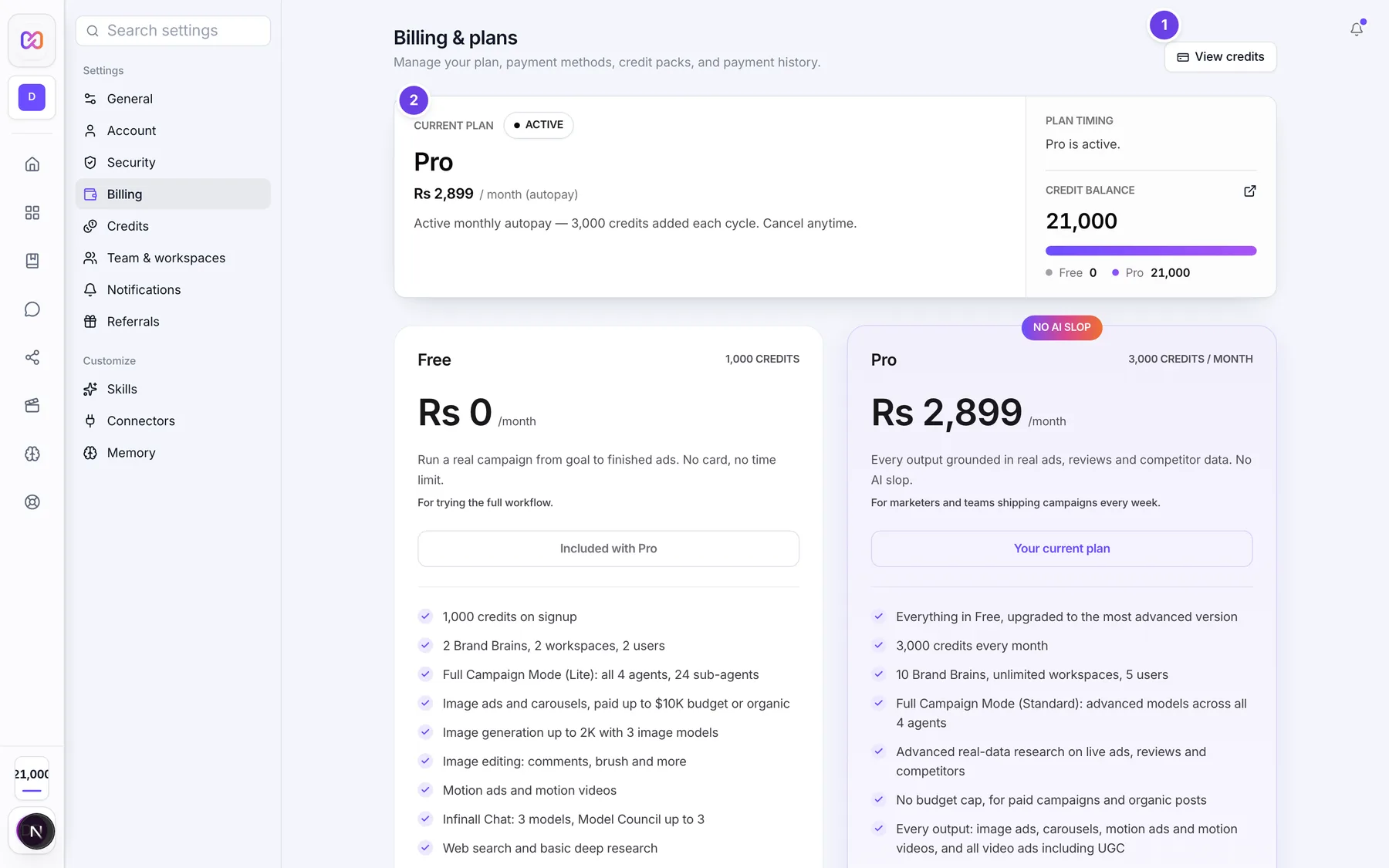
| # | Name in the app | What it does | Plan |
|---|---|---|---|
| 1 | View credits | Opens Settings > Credits. | Both |
| Upgrade to Pro | In the page header. Starts checkout for the plan you picked. Shows only on Free. | Free | |
| 2 | Current plan | Shows your plan with a badge: Free, Active, Cancelled or Lifelong Pro. | Both |
| Monthly | Picks the monthly Pro price. Shows only when you can upgrade. | Free | |
| Annual | Picks the yearly Pro price. Shows only when you can upgrade. | Free | |
| Upgrade Now | Starts checkout for monthly Pro. When you pick Annual it reads Buy Annual. Shows only on Free. | Free | |
| Coupon code | A box for a discount code. Press Apply to check it. Shows only when you can upgrade. | Free | |
| Redeem a code | A card with a box labelled Redemption code and a Redeem button. Hidden while you are on Pro. | Free | |
| Renew Pro / Extend Pro | Shows when your plan is close to ending, or autopay is off. | Pro | |
| Cancel subscription | Stops monthly autopay. Shows only when autopay is on. | Pro | |
| 3 | Credit packs | The four credit packs. Shows on Pro. | Pro |
| 4 | Payment history | Your payments with Description, Date, Status and Amount. | Both |
| 5 | Payment methods | Your saved payment methods. | Both |
| Payment method options | A menu on each saved method with Set as default and Remove. | Both | |
| Continue with your original order | Reopens an order you already started. Shows only when one is open. | Free | |
| Go to Billing | On the Payment status screen after checkout, once your payment is confirmed and Pro is active. | Free | |
| Back to Billing | On the Payment status screen while your payment is still being confirmed. Takes you back without waiting. | Free |
#How to upgrade to Pro
- Open Settings, then Billing.
- Pick Monthly or Annual.
- If you have a discount code, type it in Coupon code and choose Apply. The price line shows the old price and the new one.
- Choose Upgrade Now (or Buy Annual).
- Pay in the payment window. It offers the methods available in your region, such as card or UPI.
- When the payment is confirmed, your plan shows Active and your Pro credits are added.
#How to redeem a code
- Open Settings, then Billing.
- In Redeem a code, type the code in Redemption code.
- Choose Redeem.
- The line under it starts with "Redeemed" and lists the days of Pro and credits you got.
Redemption codes give Pro days or credits with no payment. Discount codes go in Coupon code in the plan card instead.
#How to manage payment methods
- Open Settings, then Billing, and scroll to Payment methods.
- Choose Payment method options on a method.
- Choose Set as default to make it the default. You see "Default payment method updated."
- Choose Remove to delete it. You see "Payment method removed."
Methods appear here after your first checkout. A method with autopay on shows an Autopay badge. The default one shows Default.
#Options explained
Monthly. $10 for your first month (once per account), then $30 a month. It renews automatically until you cancel. Each cycle adds 3,000 credits.
Annual. $299 one time for 365 days. No autopay, no recurring charges. You still get 3,000 credits every 30 days.
Rupee prices. Where the app shows rupees, monthly is Rs 999 for the first month then Rs 2,899, and annual is Rs 33,999.
One-time purchases. Some payment methods, such as UPI, do not support autopay. Then Pro is a one-time purchase with no recurring charges. The plan card says it expires on a date, and you renew it yourself.
Coupon code versus redemption code. A coupon code lowers the price of an upgrade. A redemption code gives Pro days or credits directly with no payment. They use different boxes.
Order already open. If you started an order with different terms, the app shows "You already have a Pro order open." Choose Continue with your original order to reopen it with its original coupon and price, or Dismiss. An open order is reused for 30 minutes.
Switching to annual. If you have a monthly subscription, cancel it first.
Teams. The account owner pays. Teammates use the owner's balance.
#Limits
- Coupon checks: 10 each hour for each account, and 3 each minute for each network address.
- A pending order is reused for 30 minutes.
- You cannot remove your last saved payment method.
#When something goes wrong
| Message in the app | What it means | What to do |
|---|---|---|
| We couldn't find that coupon code. | The code does not exist. | Check the spelling. |
| We couldn't find that code. Check it and try again. | The redemption code does not exist. | Check the spelling. |
| This coupon is no longer active. | The code was switched off. | Use another code. |
| This coupon has expired. | The code is past its end date. | Use another code. |
| This coupon isn't available for your account. | The code is not meant for your account. | Use a code made for you. |
| This coupon has reached its usage limit. | Too many people used it. | Use another code. |
| You've already redeemed this coupon. | You used this redemption code before. | Each code works once per account. |
| Too many attempts. Please wait a moment and try again. | You tried codes too many times. | Wait, then try again. |
| You already have an active Pro plan. This coupon can be redeemed after it lapses. | Redemption codes only start Pro. | Redeem after your Pro ends. |
| This coupon can't be redeemed. | The code cannot be redeemed. | Contact support if you think it is valid. |
| Payment gateway not loaded. | The payment window did not load. | Refresh and try again. |
| Cancel your active monthly subscription before purchasing the annual plan. | You have a monthly plan running. | Cancel monthly first, then buy annual. |
| Payment already received. Your Pro plan is active. | Your payment already went through. | Refresh. Nothing else to do. |
| Your payment is being processed. Please wait a moment before retrying. | The payment is still settling. | Wait, then check Payment history. |
| Cannot remove last payment method | It is your only saved method. | Add another method first. |
| Could not start the Pro upgrade. | Checkout did not start. | Try again. |
#Questions
#What payment methods can I use?
The payment window shows what is available in your region, such as card, UPI, net banking and wallets. Saved methods appear under Payment methods after checkout.
#Is the first month really cheaper?
Yes. Monthly Pro is $10 for your first month, once per account, then $30 a month.
#What is the difference between Coupon code and Redeem a code?
A coupon code lowers the price. A redemption code gives Pro days or credits for free. Use the box that matches your code.
#Can I change from monthly to annual?
Yes. Cancel the monthly subscription first, then choose Annual.
#What happens to my free credits when I upgrade?
They move into your Pro balance, so nothing is lost.
#Where do I see my payments?
In Payment history on the same screen.
Last checked against the app on . View as Markdown