
Invoices, renewal and cancelling
Find your invoices, understand renewal and the grace period, cancel Pro, and see what happens to your Pro credits.
#What it is
This page covers what happens after you are on Pro: how you get an invoice, how renewal works, what the grace period is, how to cancel, and what happens to your credits when Pro ends.
#Who can use it
Pro accounts. Free accounts have no plan to renew or cancel, but they can still read this page. Only the account owner sees Billing.
#Cost
Free, no credits. Renewing is a payment in money. Cancelling and downloading an invoice cost nothing.
#Where to find it
Open Settings, then Billing. Your plan, the renewal and cancel buttons, and Payment history are all there. Invoices arrive by email.
#Buttons and controls
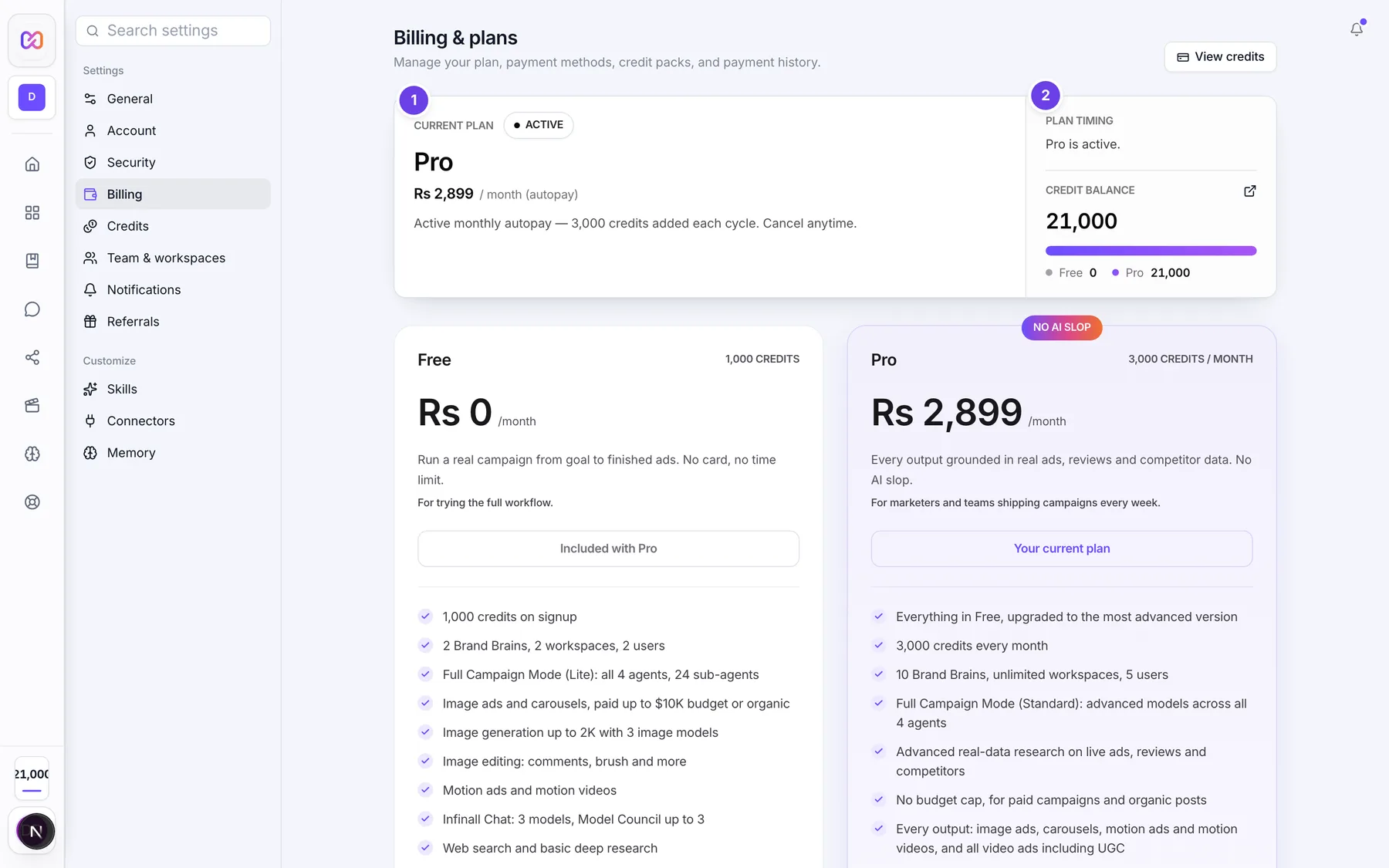
| # | Name in the app | What it does | Plan |
|---|---|---|---|
| 1 | Current plan | Shows Active, Cancelled or Lifelong Pro, and the plan price. | Pro |
| 2 | Plan timing | Says when your plan ends, for example "Ends October 26, 2026." | Pro |
| 3 | Payment history | Lists each payment with Description, Date, Status and Amount. | Both |
| Renew Pro | Starts a new paid period. Shows when autopay is off, or when your plan has ended and is in the grace period. | Pro | |
| Extend Pro | Adds a paid period. Shows only in the last days before your plan ends. | Pro | |
| Cancel subscription | Opens a confirmation. Shows only when autopay is on. | Pro | |
| Keep plan | In the confirmation, closes it and changes nothing. | Pro | |
| Cancel subscription (confirm) | In the confirmation, turns autopay off. | Pro |
#How to get an invoice
- Pay for Pro, a renewal or a credit pack.
- Check your email. You get a payment receipt with a Download Invoice button, and a separate Invoice email.
- Choose Download Invoice to open the PDF. It shows the invoice number, date, amount and a PAID badge.
- For a list of all your payments, open Settings > Billing and read Payment history.
#How to cancel Pro
- Open Settings, then Billing.
- Choose Cancel subscription.
- Read the box titled "Cancel subscription?"
- Choose Cancel subscription to confirm, or Keep plan to stay as you are.
- The app tells you that you keep Pro until the paid-through date.
#How to renew Pro
- Open Settings, then Billing.
- When it is open, choose Renew Pro or Extend Pro.
- Pay in the payment window. Your new period starts from payment if your plan had ended, or from your current end date if you renew early.
#Options explained
Autopay. Monthly Pro on a saved card renews by itself each month. Payment methods that do not support autopay, and the yearly plan, are one-time purchases. You renew those yourself.
When renewal opens. You can renew in the last 4 days before your plan ends. Before that the app says "Renewal opens on {date}. Your Pro plan is active until {date}."
Reminder emails. You get a reminder 2 days before your plan ends, and another 1 day before. During the grace period you get daily reminders.
Grace period. If your plan ends without being renewed, you get a grace period of 3 days. You still see Pro and can use Renew Pro in that time. After it, your account moves to the Free plan.
Cancelling. Cancelling turns autopay off. You keep Pro until the paid-through date and are not charged again. The plan badge changes to Cancelled, and Renew Pro appears if you change your mind. There is no grace period after a cancelled plan ends. It moves to Free when the paid period ends.
What happens to your credits. When Pro ends, your remaining Pro credits become free credits, and your account moves to the Free plan with full access to everything Free includes. Credits from packs count as Pro credits, so they convert too. Free credits are then set back to 1,000 on the 1st of a month under the normal Free rules.
What stays. Your projects, brands and saved work stay. Accounts you already connected stay connected.
Lifelong Pro. An account marked Lifelong Pro does not expire and cannot be cancelled.
Yearly plan. The yearly plan is a one-time payment for 365 days with no autopay. Cancelling a monthly plan is a separate step from buying yearly.
#Limits
- Renewal opens 4 days before your plan ends.
- Grace period: 3 days after a plan ends without renewal.
- The invoice link in the receipt email says it expires in 7 days.
#When something goes wrong
| Message in the app | What it means | What to do |
|---|---|---|
| Renewal opens on YYYY-MM-DD. Your Pro plan is active until YYYY-MM-DD. | It is too early to renew. | Come back on the date shown. |
| No active Pro subscription to cancel | You have no plan that can be cancelled. | Nothing to do. |
| Autopay is already cancelled. Your Pro access continues until it expires. | You already cancelled. | Nothing to do. |
| Power users have complimentary Pro and cannot cancel. | Your Pro is complimentary. | Nothing to do. |
| Your Pro plan autopay is cancelled. You keep full access until DATE and won't be charged again. | The cancel worked. | Nothing to do. |
| Cancellation is being processed. You keep Pro access until the paid-through date. | The cancel is still being confirmed. | Wait. Your Pro continues. |
| Cancel your active monthly subscription before purchasing the annual plan. | You have a monthly plan. | Cancel it first, then buy annual. |
| Your Pro plan is active but its expiry date is unavailable. Please contact support before renewing. | The app cannot see your end date. | Contact support. |
| Invalid or expired invoice link | The invoice link is not valid. | Open Settings > Billing, or contact support. |
| Invoice not available | There is no captured payment for that invoice. | Contact support. |
#Questions
#Where do I download my invoice?
In the emails you get after each payment. Choose Download Invoice in the receipt email. Payment history in Settings > Billing lists your payments but has no download button.
#Do I lose Pro right away if I cancel?
No. You keep Pro until the paid-through date and are not charged again.
#What happens to my Pro credits when Pro ends?
They become free credits. You keep them, and they follow the Free rules from then on.
#What is the grace period?
3 days after a plan ends without renewal. You can still renew in that time. If you cancelled first, there is no grace period.
#Can I renew early?
Yes, from 4 days before your plan ends. Early renewal adds to your current end date.
#Can I come back to Pro after cancelling?
Yes. Choose Renew Pro while your plan is still running, or upgrade again after it ends.
Last checked against the app on . View as Markdown