
Sizes and aspect ratios
Pick Auto or one of nine aspect ratios, see the pixel size each one makes, and learn which platform it fits.
#What it is
The aspect ratio is the shape of the picture: square, tall or wide. You choose it before you make an image, and every image from that send comes out in that shape.
#Who can use it
Everyone. Free and Pro accounts have the same nine shapes and the same sizes.
#Cost
Free, no credits. The shape does not change the price. Only the quality and the engine do, and making the image uses credits as described in create an image.
#Where to find it
Open Image settings. It is the small sliders button in the composer, on Home (Image tab) and in the Studio chat panel. The Aspect ratio tiles are in the middle of the panel.
#Buttons and controls
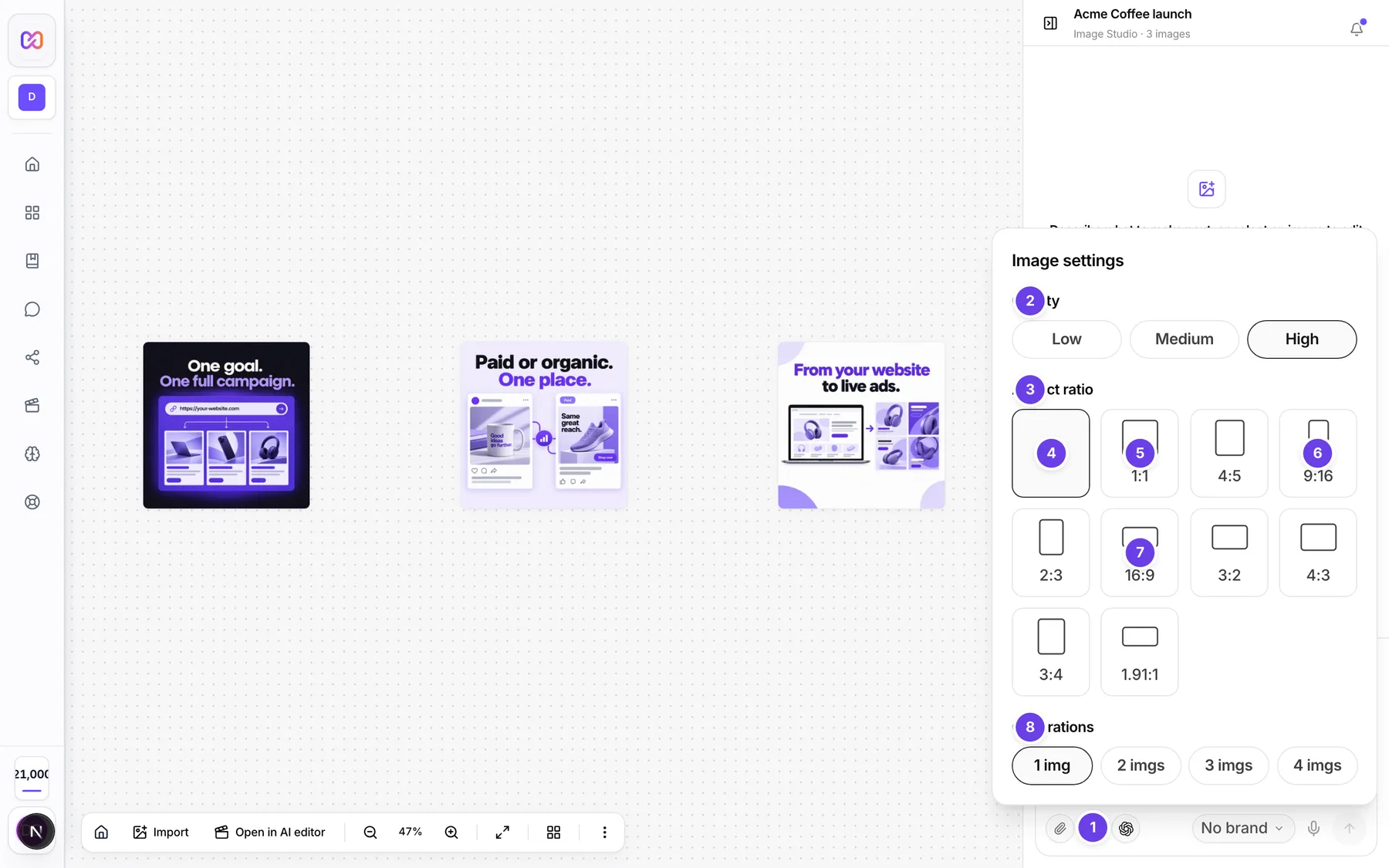
| # | Name in the app | What it does | Plan |
|---|---|---|---|
| 1 | Image settings | Opens the settings panel. The button also reads out your choices, for example Auto, 1 variant, High. | Both |
| 2 | Quality | Low, Medium or High. See quality levels. | Both |
| 3 | Aspect ratio | The row of shape tiles. Click one to choose it. | Both |
| 4 | Auto | Lets Infinall AI pick the shape from the words in your prompt. | Both |
| 5 | 1:1 | Square tile. | Both |
| 6 | 9:16 | Tall story tile. | Both |
| 7 | 16:9 | Wide tile. | Both |
| 8 | Generations | How many images one send makes. See number of images. | Both |
The other tiles are 4:5, 2:3, 3:2, 4:3, 3:4 and 1.91:1. They sit in the same row.
#How to choose a shape
- Open Image settings.
- Under Aspect ratio, click the shape you want.
- Close the panel and send your prompt.
#How to let Auto choose
- Leave Aspect ratio on Auto.
- Say where the picture is going in your prompt, for example "Instagram story" or "YouTube thumbnail".
- Infinall AI reads those words and picks a shape. If it finds none, it makes a square.
#Options explained
Each shape makes a fixed pixel size. Images are cropped to the shape you choose, never stretched. No shape goes above 1,536 pixels on its long side.
| Aspect ratio | Pixel size (width x height) | Good for |
|---|---|---|
| Auto | Picked from your prompt | When you name the platform or format in the prompt. Falls back to 1:1. |
| 1:1 | 1,024 x 1,024 | Square posts, profile pictures, logos, album covers. |
| 4:5 | 1,024 x 1,280 | Feed posts on Instagram and Meta. |
| 9:16 | 864 x 1,536 | Stories, reels, shorts, TikTok, phone wallpapers. |
| 2:3 | 1,024 x 1,536 | Posters, book and magazine covers. |
| 16:9 | 1,536 x 864 | YouTube thumbnails, hero images, banners, desktop wallpapers. |
| 3:2 | 1,536 x 1,024 | Photo prints and landscape photos. |
| 4:3 | 1,365 x 1,024 | Classic landscape. |
| 3:4 | 1,024 x 1,365 | Classic portrait. |
| 1.91:1 | 1,200 x 628 | LinkedIn and Facebook ads, link previews. |
Words that make Auto choose a shape, by shape:
- 9:16: story, reel, TikTok, shorts, vertical video, phone screen, mobile wallpaper.
- 16:9: YouTube thumbnail, hero image, banner, widescreen, desktop wallpaper.
- 1.91:1: LinkedIn ad, Facebook ad, link preview, og image.
- 4:5: Instagram feed, Facebook feed, feed post.
- 2:3: poster, book cover, magazine cover, album art.
- 3:2: photo print, landscape photo.
- 1:1: Instagram post, square, profile picture, logo.
If a prompt has words for more than one shape, the first match in that order wins, starting with 9:16.
#Limits
- There is no custom size. You cannot type your own width and height for a new image.
- There is no 2K or 4K option for a new image. To make an existing image bigger, see upscale.
- The ratio you pick does not change the price.
#When something goes wrong
| Message in the app | What it means | What to do |
|---|---|---|
Request must include size or aspect. | The app sent no shape at all. This is rare. | Pick an aspect ratio in Image settings and send again. |
| Couldn't generate images. | The request failed. | Choose Retry. |
#Questions
#Can I type my own size?
No. New images use one of the nine shapes. You can resize or extend an image after it is made, see upscale and edit a selected area.
#Why is my 16:9 image shorter than I expected?
Images are cropped to the shape you chose and never stretched larger. A 16:9 image is wide and not very tall, so its pixel size comes from the table above.
#Which shape is best for an Instagram story?
Choose 9:16. For an Instagram feed post, choose 4:5.
#Does Auto always get it right?
It only reads your words. If you do not name a platform or format, you get a square. Choose a shape yourself when you are sure.
#Does a different shape cost more?
No. The price follows the quality and the engine, not the shape.
Last checked against the app on . View as Markdown