
Distribution settings and questions
Find accounts, automations, broadcasts and webhooks under Account, set up webhooks for your other tools, and get answers to common Social Hub questions.
#What it is
Account is the settings area of the Social Hub. It has four tabs: Accounts, Automations, Broadcasts and Webhooks. This page also answers the questions people ask most about the whole hub.
#Who can use it
Free and Pro accounts can open every tab. Adding a new social or ad account in Accounts is Pro only. Automations, Broadcasts and Webhooks are not locked to a plan in the app code.
On a team, a view-only role cannot change settings or spend.
#Cost
Free, no credits. Webhooks, settings and these tabs never use credits. Costs only apply to connecting more than your free connections and to ads that are live, see Connect social accounts.
#Where to find it
Open Distribution, then Account in the hub menu. Tabs are at the top. The link in the address bar keeps your tab, so you can bookmark it.
#Buttons and controls
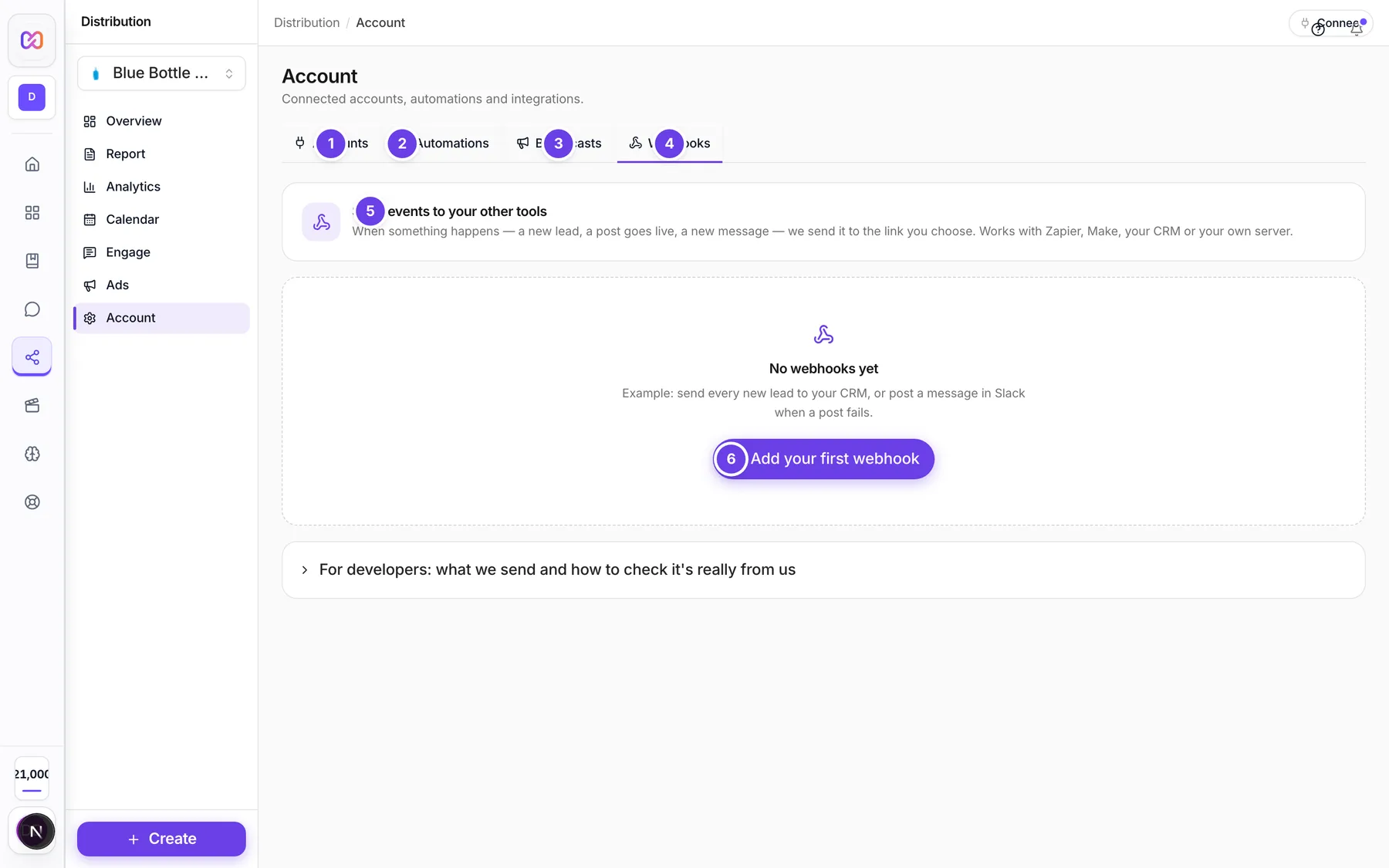
| # | Name in the app | What it does | Plan |
|---|---|---|---|
| 1 | Accounts | Social profiles and ad accounts. See Connect social accounts and Ad accounts. | Both |
| 2 | Automations | Automatic replies, tags and assignments. See Workflows. | Both |
| 3 | Broadcasts | Send a direct message to many people, or a sequence of messages. See Campaigns and broadcasts. | Both |
| 4 | Webhooks | Send events to your other tools. Described below. | Both |
| 5 | Send events to your other tools | The heading of the Webhooks tab. | Both |
| 6 | Add your first webhook | The button in the empty state under No webhooks yet. It opens the form. | Both |
| Add webhook | Opens the form to add a webhook. Shows once you have at least one. | Both | |
| Add a webhook | The form. It has Name, Link to send to, a list of events and optional headers. | Both | |
| Webhook name | A name for you, such as "Leads to HubSpot". | Both | |
| Webhook URL (Link to send to) | The address that receives the events. | Both | |
| All (group) | A checkbox that ticks every event in a group: Posts, Messages, Comments, Reviews, Leads, Ads and Accounts. | Both | |
| Header name, Header value | Optional extra headers, for example an API key your tool needs. + Add header adds a row and Remove header deletes it. | Both | |
| Add webhook / Save changes | Saves the form. | Both | |
| Cancel | Closes the form. | Both | |
| Turn (name) off / on | A switch on each webhook. The badge shows On, Off, Working or Failing. | Both | |
| Test event | Picks which event to send as a test. | Both | |
| Send test | Sends a test event to your link now. | Both | |
| Delivery log | Opens the list of what was sent, with What we sent and What your tool answered. Re-send tries a failed one again. | Both | |
| Edit | Opens the form for this webhook. | Both | |
| Show secret | Shows the signing secret again. | Both | |
| New secret | Makes a new signing secret. The old one stops working at once. It asks you to confirm. | Both | |
| Delete (name) | Asks "Delete this webhook and its log?". Delete confirms and Keep cancels. | Both |
#How to add a webhook
- Open Distribution > Account > Webhooks.
- Click Add your first webhook (or Add webhook).
- Type a Name.
- Paste your tool's address in Link to send to. It must start with https://.
- Tick the events you want, or tick a whole group.
- Add headers if your tool needs them.
- Click Add webhook.
- Copy the signing secret from the yellow box right away. It says "Save it in your tool now. You can show it again later from the webhook."
- Click Send test to check that your tool answers.
#How to check your tool is receiving events
- Pick an event in Test event.
- Click Send test. You see "Test sent" with the answer your tool gave, or "Test failed" with the reason.
- Click Delivery log to see every send.
#Options explained
Events you can send:
| Group | Event | Fires when |
|---|---|---|
| Posts | Post published | A scheduled post went live on a platform. |
| Posts | Post failed | A post could not be published. |
| Messages | New message | Someone sent you a direct message. |
| Comments | New comment | Someone commented on one of your posts. |
| Reviews | New review | A customer left a review. |
| Leads | New lead | Someone filled in one of your lead forms. |
| Ads | Ad status changed | An ad was approved, rejected, paused or ended. |
| Ads | Ad account sync failed | We could not read data from an ad account. |
| Accounts | Account connected | A social or ad account was connected. |
| Accounts | Account disconnected | An account was disconnected or needs reconnecting. |
What each send looks like. Each event is a POST with a JSON body. Your tool should answer with any 2xx code within 10 seconds. Three headers come with it: X-Infinall-Event, X-Infinall-Delivery and X-Infinall-Signature.
Checking the signature. Compute an HMAC-SHA256 of the time, a dot, and the raw body, using your signing secret. Compare it with the v1 value in the signature header. Ignore it if the time is older than 5 minutes.
Retries. If your tool does not answer with a 2xx, Infinall tries again four more times, after about 1, 5, 30 and 120 minutes. Use the id in the body to ignore duplicates.
Webhook badges. On means turned on and not tried yet. Working means the last send worked. Failing means the last sends failed. Off means turned off.
#Limits
- Up to 20 webhooks.
- Up to 10 extra headers per webhook.
- A webhook name is up to 120 characters. The address is up to 2,048 characters.
- Brand calendar settings: the missed grace period is 15 to 1,440 minutes.
#When something goes wrong
| Message in the app | What it means | What to do |
|---|---|---|
| Give it a name. | The name is empty. | Type a name. |
| Paste the full link, starting with https:// | The address is not complete. | Paste the full link. |
| Pick at least one event. | No event is ticked. | Tick at least one event. |
| The address must start with https:// | The address uses http or something else. | Use an https address. |
| That address points to a private network. Use a public address. | Addresses inside a private network are blocked. | Use a public address. |
| We could not find that address. Check the spelling. | The address does not exist. | Check the spelling. |
| Remove the username/password from the address. Use a custom header instead. | The address has a login in it. | Move it to an extra header. |
| You can have up to 20 webhooks. | You reached the limit. | Delete one you do not use. |
| Up to 10 custom headers. | Too many extra headers. | Remove some. |
| Test failed | Your tool did not answer with a 2xx. | Read the reason, fix your tool and test again. |
| Couldn't load your webhooks. | The list did not load. | Click Try again. |
#Questions
#What do I need to use the Social Hub?
Just a brand. You can plan posts and save drafts without connecting anything. To publish by themselves, answer messages and read results, you need connected accounts.
#What is free and what is Pro?
The hub screens are open to Free and Pro. Connecting a new social or ad account is Pro. See Free vs Pro.
#What do the connection prices mean?
You get 2 free connections in total, shared by social profiles and ad accounts. After that, each account costs 300 credits a month. Each live ad costs 2 credits a month. Paused ads are free. The exact price shows before you confirm.
#Why do some platforms only send me a reminder?
Only platforms with a connected, active account post by themselves. Others get a reminder. X is always a reminder. See Calendar and posts.
#How big can an upload be?
The upload window in the post composer accepts files up to 25 MB each, and says so. Use a smaller file if you see "over 25 MB, skipped".
#Which time zone does the calendar use?
The brand's time zone for scheduling. You can show times in another time zone, and choose a 12 or 24 hour clock, from More in the calendar. Charts in Analytics use UTC.
#Why is my account paused?
An account is paused when your credits ran out at renewal. Add credits and click Resume on the account.
#Where do I get help with one screen?
Each Social Hub screen has its own page in this section, starting with the Social Hub overview.
Last checked against the app on . View as Markdown