
Add a brand from your website
Paste your website address, watch Infinall AI read it, answer a few questions about gaps, then confirm your Brand Brain.
#What it is
You paste your website address and Infinall AI reads it in the background. It then asks only about the things it could not find, and you confirm the result to save your Brand Brain.
#Who can use it
Everyone, on Free and Pro. You need an Editor role or higher in the workspace. The new brand is saved in the workspace you are working in.
#Cost
Free, no credits.
#Where to find it
- On Home, open the brand chip in the Image, Audio, Motion or Video composer and choose Add brand.
- On a new account, Home shows Build your first Brand Brain with a website box. You can also choose Skip, I don't have a website and add a brand later.
- On the Brand Brain screen, the Add brand button (a plus) takes you to Home.
#Buttons and controls
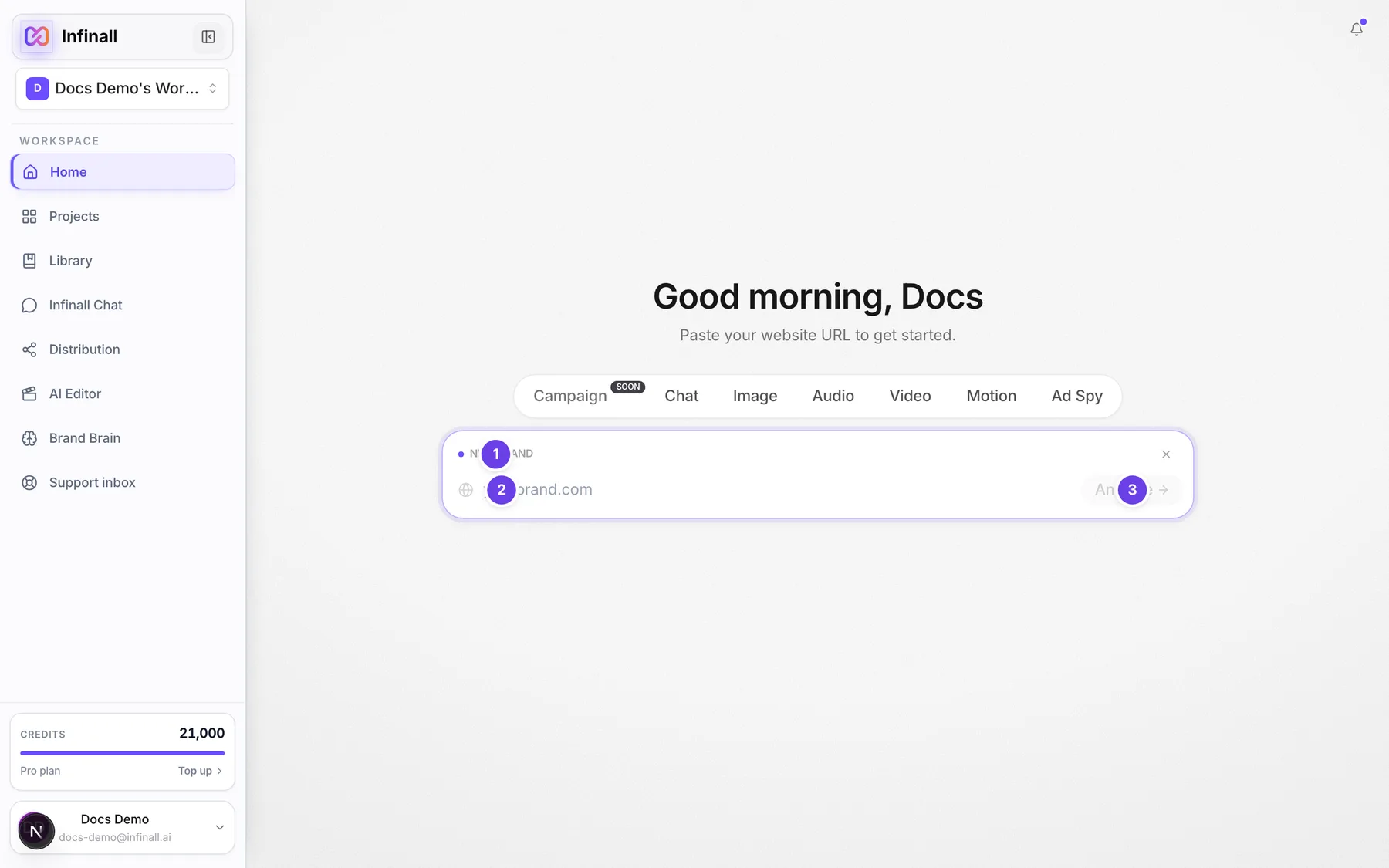
| # | Name in the app | What it does | Plan |
|---|---|---|---|
| 1 | New brand | The label on the add card. | Both |
| Cancel | Closes the add card and returns to the normal composer. Shows only when you already have a brand selected. | Both | |
| 2 | Product URL | The box where you type your website, for example yourbrand.com. Press Enter to start. | Both |
| 3 | Analyze | Starts the analysis (its screen-reader name is Analyze website). It stays grey until you type something. | Both |
| Try again | Shows on the analysis screen only if it fails. Takes you back to the website box. | Both | |
| Save answer | Shows on a question. Saves what you typed. Needs some text. | Both | |
| Use suggestion | Shows on a question only when Infinall AI has a suggested answer. Saves that suggestion. | Both | |
| Mark as TBD (pre-launch) | Shows only on the pricing question. Marks pricing as not decided yet. | Both | |
| Skip | Shows on a question. Saves nothing and moves on. | Both | |
| Continue | On the product stage step. Saves the stage you picked. | Both | |
| Use this palette | On the palette step, which shows only when no brand colours were found. | Both | |
| Confirm Brand Brain | On the review screen. Saves your brand. | Both | |
| Back | On the review screen. Goes back a step. | Both | |
| Refetch | On the review screen. Reads your website again for fresh data. | Both |
#How to add a brand
- Open the brand chip in a composer on Home and choose Add brand.
- Type your website address in Product URL. You can leave out
https://. - Press Enter or choose Analyze.
- Watch the analysis screen. Wait until it moves on by itself. See "What you see while it runs" below.
- Answer or Skip each question. See "The questions" below.
- Pick your product stage and choose Continue.
- If asked, pick a palette and choose Use this palette.
- On the review screen, check each card. Choose Edit on any card to fix it.
- Choose Confirm Brand Brain. You land back on Home with the brand selected.
#What you see while it runs
The screen says Analyzing and shows the site you are scanning. Three step chips fill in as real steps finish:
- URL verified
- Site capture: a live preview of your site. If the preview cannot load, the chip says the preview was skipped and the analysis carries on.
- Brand intelligence: moves from pages downloaded, to product data, pricing, audience, then voice and competitors, and ends with Brand Brain saved.
A preview card shows what has been found so far. Your logo, colours and fonts appear first, then your product name and a ready tag for each section as it finishes (Product, Pricing, Audience, Positioning, Competitors, Voice, Social proof).
The app waits up to 6 minutes for an analysis. If an analysis stops making progress for 10 minutes it is marked as interrupted and you can start it again.
#The fill score
On the review screen a green pill reads Brand Brain coverage with a percentage. It shows how much of your Brand Brain the website filled in on its own. A low score is not an error. It only means more of the brand will come from your answers and edits. The pill is hidden when there is no score.
#The questions
Infinall AI only asks about things it could not find. It asks at most 5 questions, and the product stage question does not count toward that limit. Each screen says Question with your position, for example 1 of 2.
- Product: if it could not tell what you sell, it asks "What does your product do?". If some details are missing it names them and asks you to fill them in.
- Pricing: it starts "I couldn't find your pricing" and asks for your pricing model. You can answer, skip, or choose Mark as TBD (pre-launch).
- Product stage (always asked): "What stage is your product at?" You pick one of Idea/Pre-launch, MVP/Beta, Early Traction, Growth or Mature. The stage is never read from your site. If it can guess your team size it may offer that as a suggestion.
- Palette (only if no colours were found): "Pick a brand palette". Choose Trust, Energy, Clean or Custom.
- Competitor pricing: this is not a question. After the analysis Infinall AI looks up competitor pricing from their own sites in the background and fills it in. You can type your own price instead.
Skipping a question saves nothing. Social proof can be marked "none yet" on the review screen when you have no testimonials or customers to show.
#Options explained
Palette presets (shown only when no colours were found):
| Preset | Look | Use it when |
|---|---|---|
| Trust | Navy and blue | You want a calm, reliable look. |
| Energy | Dark with orange | You want a bold, active look. |
| Clean | White with teal | You want a light, simple look. |
| Custom | Pick your own | You know your exact brand colours. Opens Custom colours: choose a primary colour, a secondary colour and a font (type it in Custom font name), then Save colours. Colours are hex values like #RRGGBB. |
Below the palettes, Upload a logo instead lets you upload your logo so the colours can be read from it.
Product stage: Idea/Pre-launch, MVP/Beta, Early Traction, Growth, Mature.
Provenance tags on each card: Scraped, Inferred, Suggested, Preset and You edited. A card can also show Confirmed, TBD, None yet or Missing.
#Limits
- A website address can be up to 2,048 characters.
- Use a public address that starts with http or https. Addresses with a username or password, a custom port, localhost or a private network address are refused.
- Infinall AI reads up to 20 pages, up to 2 levels deep.
- Only one analysis can run per brand at a time.
- If you analyze an address a workspace already has, that brand is reused instead of making a second one.
#When something goes wrong
| Message in the app | What it means | What to do |
|---|---|---|
| Please enter a valid website URL (e.g. infinall.ai or https://infinall.ai) | The address is not a valid website. | Fix the address and try again. |
| That URL cannot be analyzed. Use a public http(s) website address without credentials or a custom port. | The address is private, has login details or a custom port. | Use your public website address. |
| We couldn't reach that site. Please check the URL and try again. | The site did not answer. | Check the spelling, then try again. |
| This site blocks automated crawling. You can enter your brand details manually. | The site's robots rules keep crawlers out, so Infinall AI stopped. | Try again with a different site address. The failure screen only offers Try again. |
| This site blocked our automated reader. You can enter your brand details manually. | The site uses a bot wall. | Same as above. |
| We couldn't read enough from this site. You can enter your brand details manually. | Too little readable content was found. | Try a page with more about your product. |
| We read the website, but our AI service didn't respond, so nothing was extracted. Please try again in a few minutes. | The AI service did not respond. | Wait a few minutes and try again. |
| Something went wrong on our side while analyzing this site. Please try again. | An unexpected error. | Try again. |
| The analysis was interrupted. Please try again. | The analysis stopped making progress. | Start it again. |
| Could not start the scrape right now. Please try again. | The analysis could not be queued. | Try again. |
| This is taking longer than expected. Please try again. | The app waited its full time. | Try again. |
| A scrape is already running for this brand. Please wait for it to finish. | An analysis is already going for this brand. | Wait for it to finish. The app picks it up and keeps showing progress. |
| Too many requests. Please wait a moment and try again. | You started too many requests in a short time. | Wait a moment. |
| We lost connection while checking the scrape status. Please try again. | Your connection dropped while the app was checking. | Check your connection and try again. |
| You've answered the maximum number of questions. Review and confirm what you have so far. | You hit the question limit. | Go to review and confirm. |
| That field is already filled in. Edit it from the review screen instead. | You answered a field that already has a value. | Use Edit on the review screen. |
| That answer is missing some required product details. Please add more and try again. | Your product answer was too short. | Add more detail. |
| That answer wasn't valid for this field. | The answer did not fit the field. | Rewrite it. |
| We couldn't find that saved brand. Try analyzing the URL again. | The brand no longer exists in this workspace. | Analyze the website again. |
#Questions
#Do I have to answer the questions?
No. You can Skip any question. Skipping saves nothing, and missing fields never stop you from confirming.
#Why was I asked about pricing?
Infinall AI could not find pricing on your site. Answer it, skip it, or mark it as TBD if it is not decided yet.
#What if I leave before confirming?
Your work is saved as a draft and will still be there when you come back. Confirming locks it in as a version that tools can use. Until you confirm, Image, Audio, Motion and Video cannot use the brand.
#Can I add the same website twice?
No. Analyzing an address that a workspace already has reuses that brand. Another workspace gets its own separate brand.
#What does the coverage percentage mean?
It is how much of the Brand Brain the website filled in by itself. It does not rate your brand.
#Does it need my website to be live?
Yes. It reads the public pages of the address you give it.
Last checked against the app on . View as Markdown