
What is Motion
Motion makes short animated videos from a text prompt: moving text, logos and scenes, ready to export as an MP4.
#What it is
Motion turns a few lines of text into a short animated video. You describe the scenes, the words on screen and the timing. Infinall AI designs each scene, checks the frames and gives you a video you can export as an MP4.
#Who can use it
Everyone. Motion is open on Free and Pro. Quality levels Standard, Pro and Max are open to every account too. The quality level called Pro is not the Pro plan.
#Cost
Uses credits. Motion is charged on what the video uses, so the quality menu shows an estimate, not a fixed price. Your balance and every charge are in Settings > Credits. Looking at your work, exporting the MP4 and downloading are free.
#Where to find it
On Home, choose the Motion tab. Inside any Studio project, use the What to make switch above the prompt box and choose Motion.
#Buttons and controls
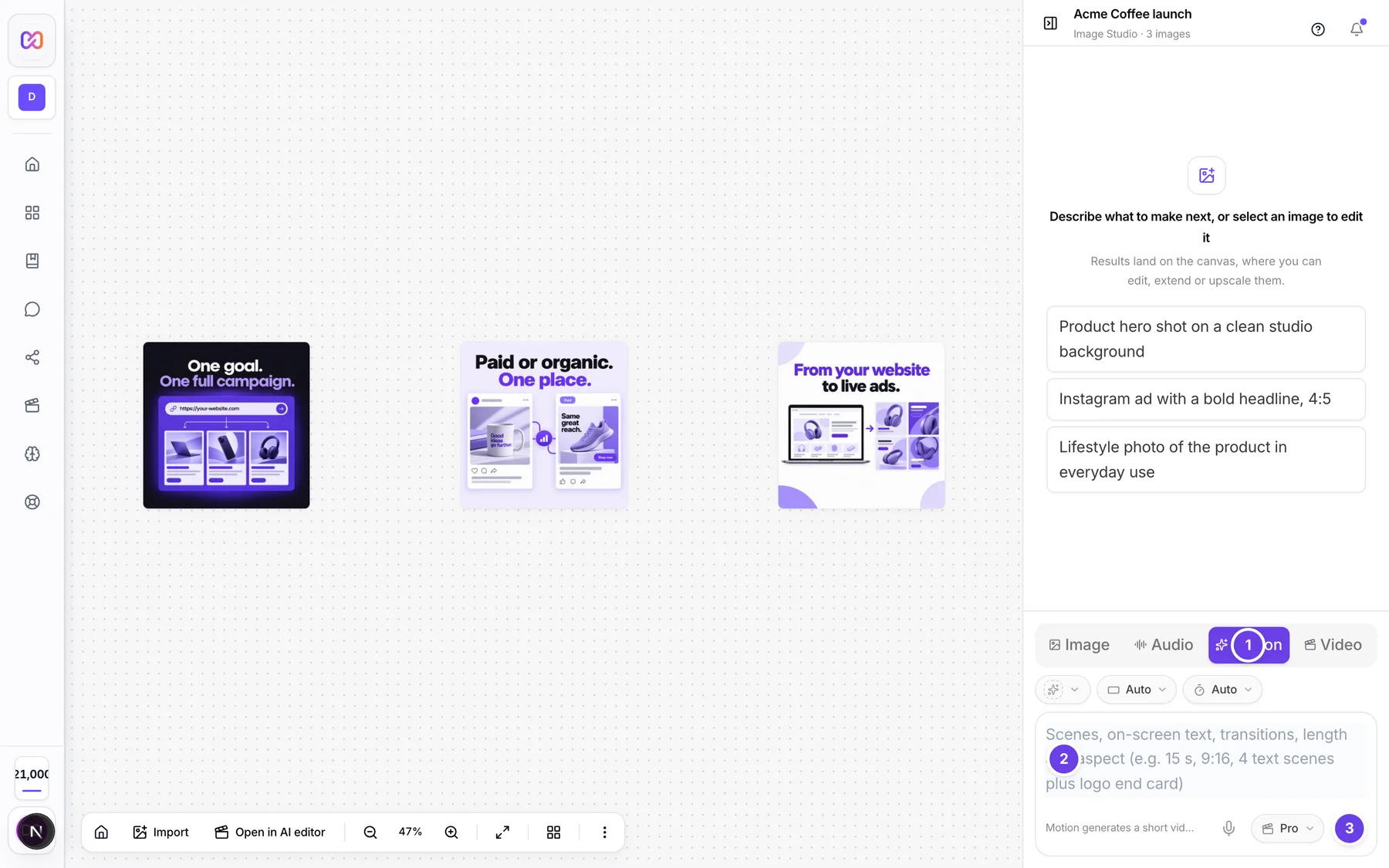
| # | Name in the app | What it does | Plan |
|---|---|---|---|
| 1 | Motion | The tab in What to make. It sets the box below to make motion videos. | Both |
| 2 | Scenes, on-screen text, transitions, length and aspect (e.g. 15 s, 9:16, 4 text scenes plus logo end card) | The prompt box. Describe the video you want. | Both |
| 3 | Generate motion video | Sends your prompt and starts the video. | Both |
#How to make a first motion video
- Open a Studio project, or go to Home and choose Motion.
- Describe the video in the prompt box. Say what each scene shows, the words on screen and how long it should be.
- Click Generate motion video.
- Watch the card on the canvas fill in. See Watch it being made.
- When the card says Video ready, click Export MP4. See Export MP4.
#Options explained
What Motion makes. Short videos built from animated text, shapes, logos and simple scenes. Think product reveals, promos, logo stings and ad bumpers. It is not a tool for filming people or generating live footage.
Sound. A plain prompt makes a silent video. Ask for a voiceover or music in your prompt to add them. See Music and voice.
Your brand. Pick a brand with the brand chip and the video can use its name, colours, logo, tagline and approved claims. See Use your brand.
#Limits
- Videos run from 10 to 60 seconds when you pick a length yourself.
- The prompt box is locked while a video is being built. Send the next prompt when the card says it is ready.
#When something goes wrong
| Message in the app | What it means | What to do |
|---|---|---|
| Couldn't make that motion video. | The video could not be started or finished. | Open the activity card in the chat to see the last step. Check your balance, then send the prompt again. |
#Questions
#Is Motion free?
Motion is open to every account, Free and Pro. Making a video uses credits, like other AI work. Exporting and downloading are free.
#What kind of videos does Motion make?
Animated videos: moving text, logos, shapes and scenes. Examples are a product reveal, a short promo, a logo sting and an ad bumper.
#How long can a motion video be?
When you choose a length, from 10 to 60 seconds. On Auto, the length comes from your prompt.
#Does Motion add sound?
Only when you ask. A plain prompt gives a silent video. Say "with a voiceover" or "add music" in the prompt.
#Is Motion different from Video?
Yes. Video makes footage with avatars and generated shots and is a separate mode. Motion builds animated graphics from your words.
Last checked against the app on . View as Markdown