
Use your brand in images
Pin a brand to a Studio project so images use your logo, colours and voice without you describing them every time.
#What it is
You can pin a brand to an image project. Infinall AI then uses that brand's name, colours, voice and logo when it makes and edits images, so you do not describe your brand in every prompt.
#Who can use it
Everyone, on Free and Pro. The brand chip is not gated by plan.
Only brands that have a confirmed version appear in the list. A brand you have not confirmed yet cannot be picked.
#Cost
Free, no credits. Pinning a brand costs nothing. The images you make still use credits as usual, see create an image.
#Where to find it
- In a Studio project: the brand chip in the composer, at the bottom of the chat panel. It reads No brand or the brand name.
- On Home: the brand selector in the Image composer, next to the paperclip.
#Buttons and controls
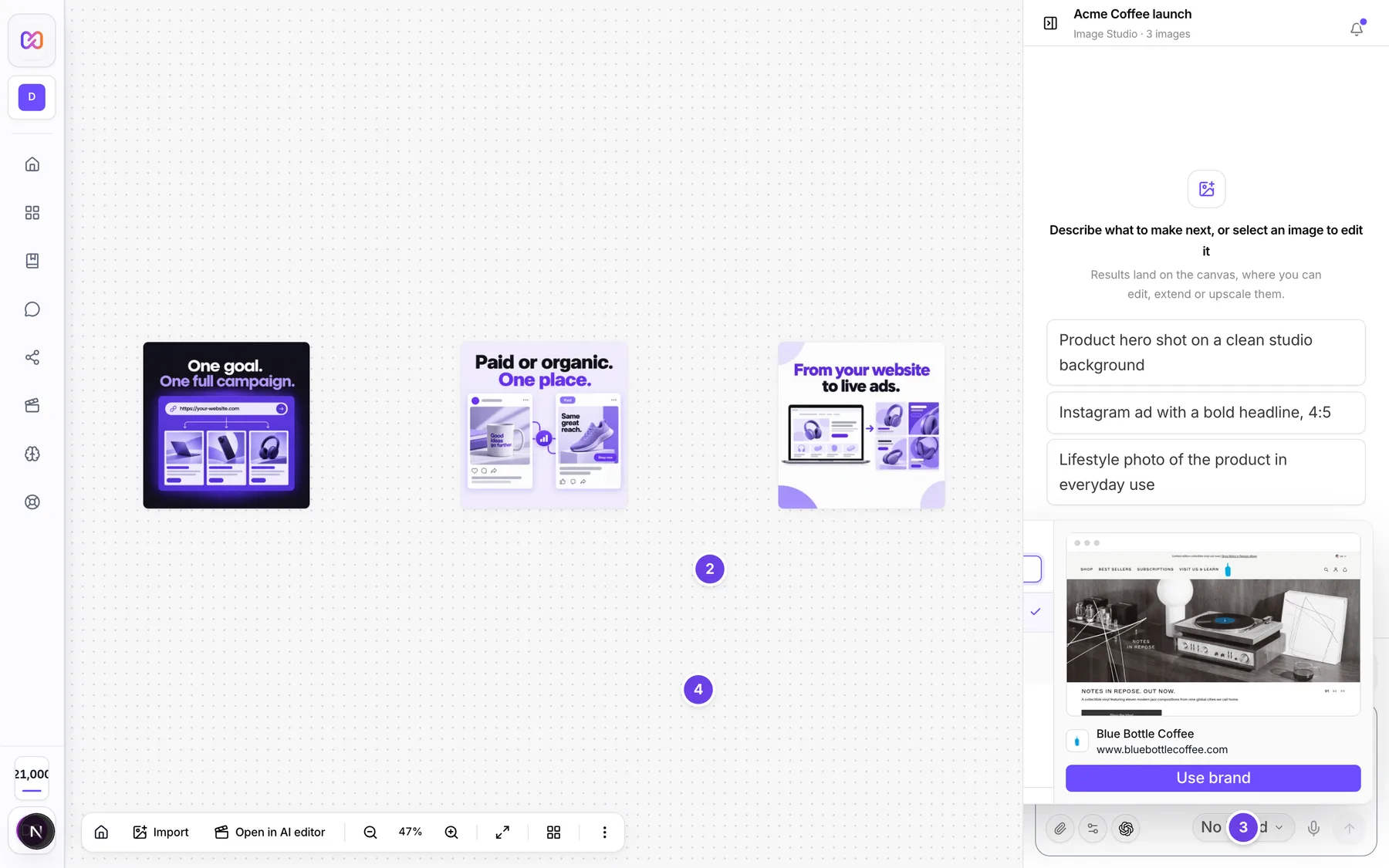
| # | Name in the app | What it does | Plan |
|---|---|---|---|
| 1 | Select brand | The brand chip. Opens the list of brands. Once a brand is pinned, the accessible name is Change brand (currently) with the brand name. | Both |
| 2 | Search brands | The search box at the top of the list. | Both |
| 3 | No brand | A row that clears the brand. It has a tick when no brand is pinned. | Both |
| 4 | Brands | The list of confirmed brands in your workspace. A tick marks the pinned one. | Both |
| 5 | Add brand | Opens the screen to add a new brand. | Both |
| 6 | Manage all | Opens the full Brand Brain screen. | Both |
| Brand: your brand name | On Home. The accessible name of the brand selector once a brand is picked. | Both | |
| Edit brand | A small pencil on a brand row. Opens that brand to edit. | Both |
#How to pin a brand to a project
- Open a Studio project.
- Choose the brand chip at the bottom of the chat panel.
- Pick a brand from the list. Use Search brands if the list is long.
- The chip shows the brand name. New images and edits in this project now use it.
#How to clear the brand
- Choose the brand chip.
- Choose No brand.
#How to ask for your logo
- Pin a brand that has a logo.
- Say "logo" in your prompt, for example "our logo in the bottom right corner".
- Send. Infinall AI is given your real logo file as a picture, so it places the real mark and does not draw one.
#Options explained
What the brand adds. Infinall AI is given a short brief from your brand: the name and what it does, the voice, the colours, the positioning, the tagline and words to avoid, and your first audience profile. Anything that is empty or marked to be decided is left out.
The logo. Your logo is only attached when your prompt asks for a logo. The words that count are logo, wordmark, brandmark, logotype, emblem and insignia. If your prompt does not ask for one, no logo is attached.
Engines that cannot take a logo. Not every image engine can take a picture as input. If yours cannot, or the logo file cannot be loaded, Infinall AI is told not to draw any logo, so it never makes up a fake one.
Edits. When you edit an image in a branded project and do not mention a logo, Infinall AI is told to keep any mark already in the picture as it is and not to add one.
Home and Studio. On Home, the brand you pick goes with the project it creates.
#Limits
- The brand brief is cut to a fixed length so it never crowds out your own prompt.
- A brand must have a confirmed version to be pinned.
#When something goes wrong
| Message in the app | What it means | What to do |
|---|---|---|
| Couldn't change brand. | The brand could not be pinned. | Try again. |
| No confirmed brands in this workspace. | You have no brand with a confirmed version. | Add a brand and confirm it, see use your brand. |
| Loading brands... | The list is still loading. | Wait a moment. |
| Image project has changed since your last read | The project changed in another tab, so your change was refused. | Reload the project and pin the brand again. |
#Questions
#Do I have to pin a brand?
No. Pick No brand and image works the same, without your brand details.
#Why did my logo not show up?
Check that you said "logo" in the prompt, that the brand has a logo, and that your engine can take pictures as input. If any of these is missing, no logo is placed.
#Can I use a different brand on each project?
Yes. A brand is pinned per project, and you can change it any time.
#Does a brand make images cost more?
No. Pinning a brand is free and the price is set by the quality and the engine.
#Where do I set up my brand?
See use your brand.
Last checked against the app on . View as Markdown