
Workspaces
Create a workspace for each brand or client, switch between them, and delete one you no longer need.
#What it is
A workspace keeps the work for one brand or client in its own place. You switch between workspaces from the sidebar. Every account starts with one workspace marked Personal.
#Who can use it
Everyone. The code puts no plan limit on creating workspaces, so Free and Pro accounts can both make them. Only the Owner of a workspace can delete it. The Personal workspace can never be deleted.
#Cost
Free, no credits. Creating, switching and deleting workspaces never uses credits.
#Where to find it
Two places:
- The workspace switcher at the top of the sidebar, under the logo.
- Settings, then Team & workspaces. The Workspaces group is at the top of that screen.
#Buttons and controls
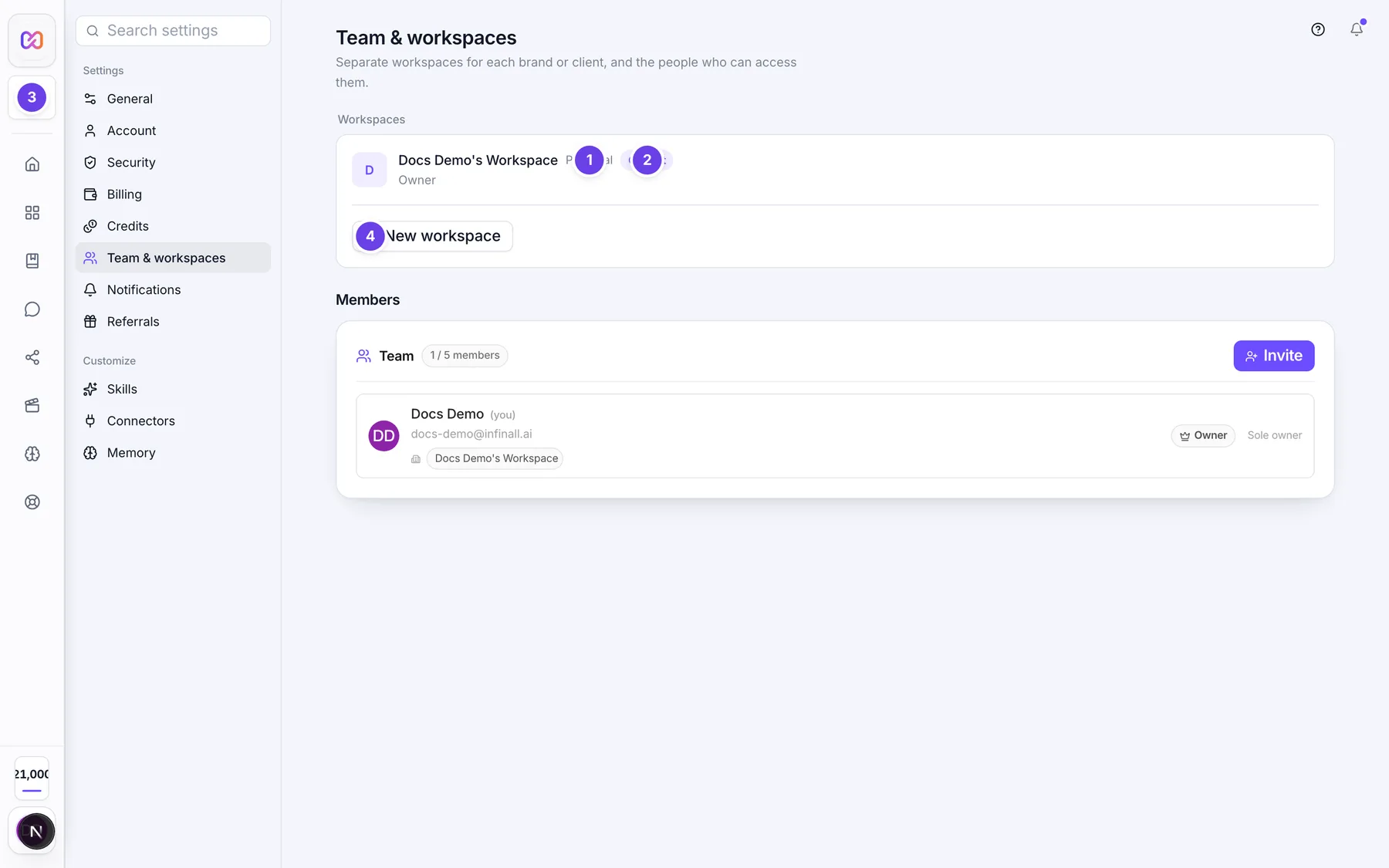
This table follows the Workspaces group in Settings > Team & workspaces. The sidebar switcher has the same actions in a small menu.
| # | Name in the app | What it does | Plan |
|---|---|---|---|
| 1 | Workspace name and role | Each row shows the workspace name and your role in it (for example Owner). | Both |
| Personal | A tag on your default workspace. | Both | |
| 2 | Current | A tag on the workspace you are working in now. | Both |
| 3 | Switch | Makes this workspace the current one. It shows on every row except the current one. | Both |
| 4 | Delete (trash icon, named "Delete" plus the workspace name) | Starts the delete. It is hidden on the Personal workspace. | Both |
| Cancel | Closes the delete question without deleting. Shows after you click the trash icon. | Both | |
| Delete workspace | Confirms the delete. Shows after you click the trash icon. | Both | |
| 5 | New workspace | Opens a name box. | Both |
| Workspace name, e.g. Client: Acme | The name box. | Both | |
| Create | Makes the workspace. It stays off until the box has a name. | Both |
The switcher in the sidebar (named Switch workspace) lists every workspace under Workspaces, puts a check mark on the current one, shows Personal on your default one, and has its own trash icon, New workspace, Create and Cancel. Deleting there opens a small panel titled Delete workspace? with Cancel and Delete workspace.
#How to create a workspace
- Open Settings, then Team & workspaces.
- Under Workspaces, choose New workspace.
- Type a name, for example "Client: Acme".
- Choose Create. A note tells you the workspace was created.
In the sidebar switcher the same steps work, and the new workspace becomes the current one at once. On the Settings screen it does not switch for you. Choose Switch on its row.
#How to switch workspaces
- Open the workspace switcher in the sidebar, or go to Settings > Team & workspaces.
- Pick the workspace in the list, or choose Switch on its row.
- The app reloads what you see for that workspace. Your balance also refreshes.
#How to delete a workspace
- Choose the trash icon on the workspace row.
- The question reads: Delete "name"? This action cannot be undone.
- Choose Delete workspace.
- If the deleted workspace was the current one, the app moves you to your Personal workspace.
#Options explained
Personal is your default workspace. It is created with your account. You cannot delete it.
Role under a workspace name is your role in that workspace: Owner, Editor, Commenter or Viewer. See Roles and permissions for what each can do.
#Limits
- A workspace name can be up to 60 characters in the box.
- The server needs at least 2 characters, so a one letter name is refused.
- Two workspaces cannot share a name. The server turns the name into a short web address, and that address must be unique across all accounts.
#When something goes wrong
| Message in the app | What it means | What to do |
|---|---|---|
| Your personal workspace can't be deleted. | You tried to delete the Personal workspace. | Keep it. Delete a different workspace. |
| This workspace has active campaigns. Finish, pause, or delete them first. | The workspace still has running work. | Stop or remove that work, then delete the workspace. |
| A workspace with this name already exists | The name, or one that turns into the same web address, is taken. | Choose a different name. |
| Only workspace owners can perform this action | You are not the Owner of this workspace. | Ask the Owner. |
| Could not create the workspace. | Something failed and the server gave no reason. | Try again. |
| Could not delete the workspace. | Something failed and the server gave no reason. | Try again. |
#Questions
#How many workspaces can I have?
The app does not set a number. Neither the screen nor the server counts your workspaces, so Free and Pro accounts are treated the same.
#Can I get a deleted workspace back?
Not from the app. There is no restore button, and the question you confirm says the action cannot be undone.
#Do teammates spend my credits?
Yes. Work a teammate starts is billed to the account Owner's balance. Teammates see "Team credits" in the sidebar with a note that says so.
#Can I give a teammate one workspace only?
Yes. When you invite someone you pick the workspace they can reach. See Invite your team.
#Why can I not see a Delete icon on one workspace?
It is your Personal workspace. Every other workspace shows the icon, but the server only lets a workspace Owner delete it. Anyone else sees "Only workspace owners can perform this action".
Last checked against the app on . View as Markdown