
Memory and skills
Control what Infinall remembers about you, and add, write, import or switch off the reusable skills it applies to your work.
#What it is
Memory holds the details Infinall remembers about you and your business across chats, such as your brand voice or your audience. Skills are reusable sets of instructions Infinall applies to your work. Each one has its own screen in Settings.
#Who can use it
Everyone. The code puts no plan limit on memory or skills. Free and Pro accounts see the same two screens.
#Cost
Free, no credits. Adding, editing and removing memories and skills never uses credits. The chat replies that use them follow the normal chat cost.
#Where to find it
Open Settings. Under Customize, click Memory or Skills. You can also search the Settings menu for "remember", "memories", "auto skills", "skill", "github", "library" or "instructions". The same lists are in the chat under Customize.
#Buttons and controls
#Memory screen
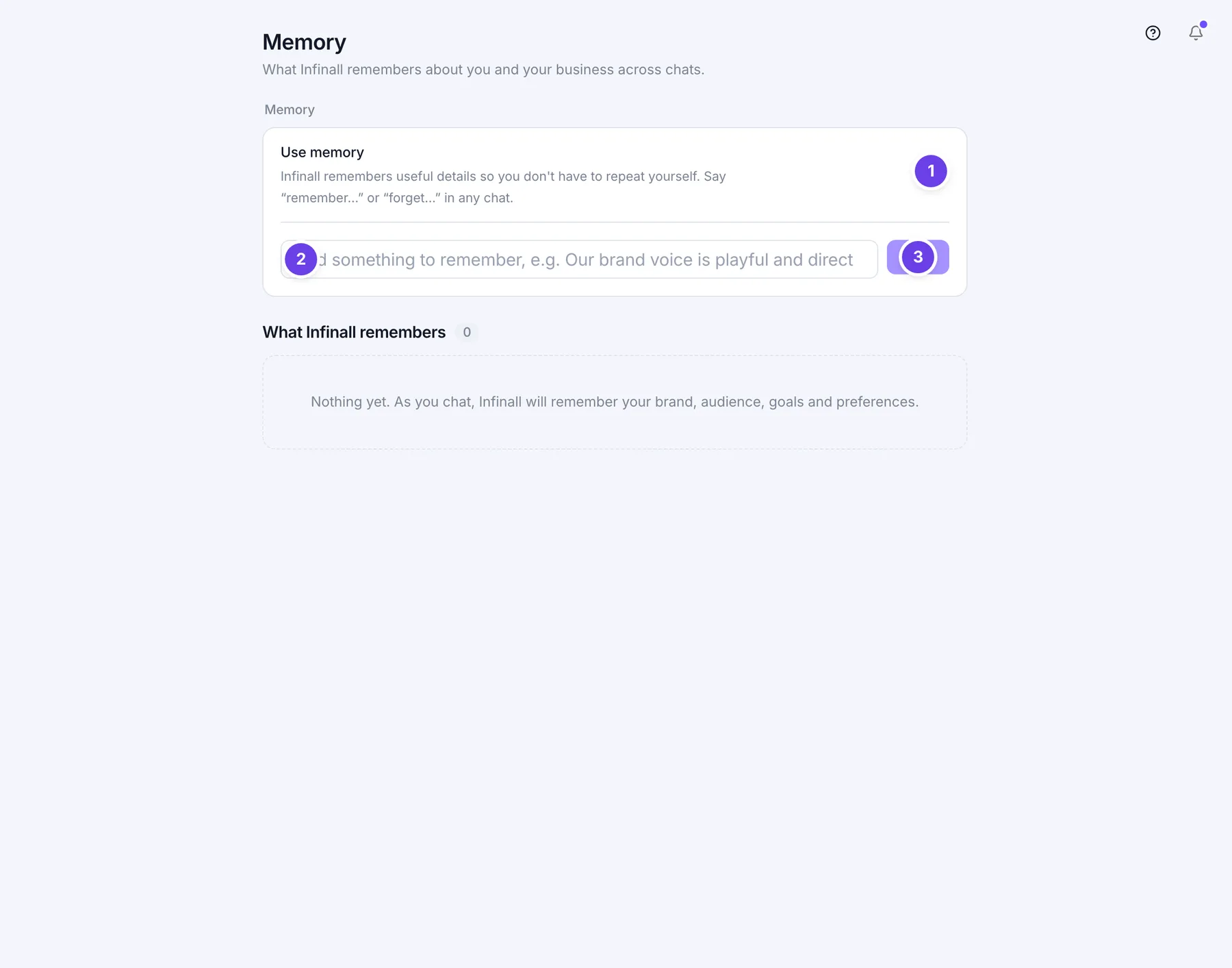
| # | Name in the app | What it does | Plan |
|---|---|---|---|
| 1 | Use memory | A switch. On means Infinall remembers useful details so you do not repeat yourself. It starts on. Off means it does not learn from your chats. | Both |
| 2 | Add something to remember, e.g. Our brand voice is playful and direct | A box where you type a memory. Press Enter to save it. | Both |
| 3 | Add | Saves what you typed in the box. It stays grey until you type something. | Both |
| 4 | Clear all | Starts the clear-everything check. Shows only when you have at least one memory. | Both |
| 5 | Edit memory | A pencil on a memory row. On a computer it shows when you hover over the row. | Both |
| 6 | Delete memory | A bin on a memory row. Deletes that one memory at once. | Both |
| Save | Shows while you edit a memory. Saves your change. Enter does the same. | Both | |
| Cancel (while editing) | Drops your change. Escape does the same. | Both | |
| Cancel (after Clear all) | Backs out of clearing everything. Shows after you click Clear all. | Both | |
| Delete all (number) | Confirms clearing everything. The number is how many memories you have. Shows after you click Clear all. | Both |
Memories are grouped under these headings: About you, Business & brand, Audience, Goals, Preferences, Instructions, Tools and Other. A number next to What Infinall remembers shows how many you have. Each row also shows the date it last changed.
#Skills screen
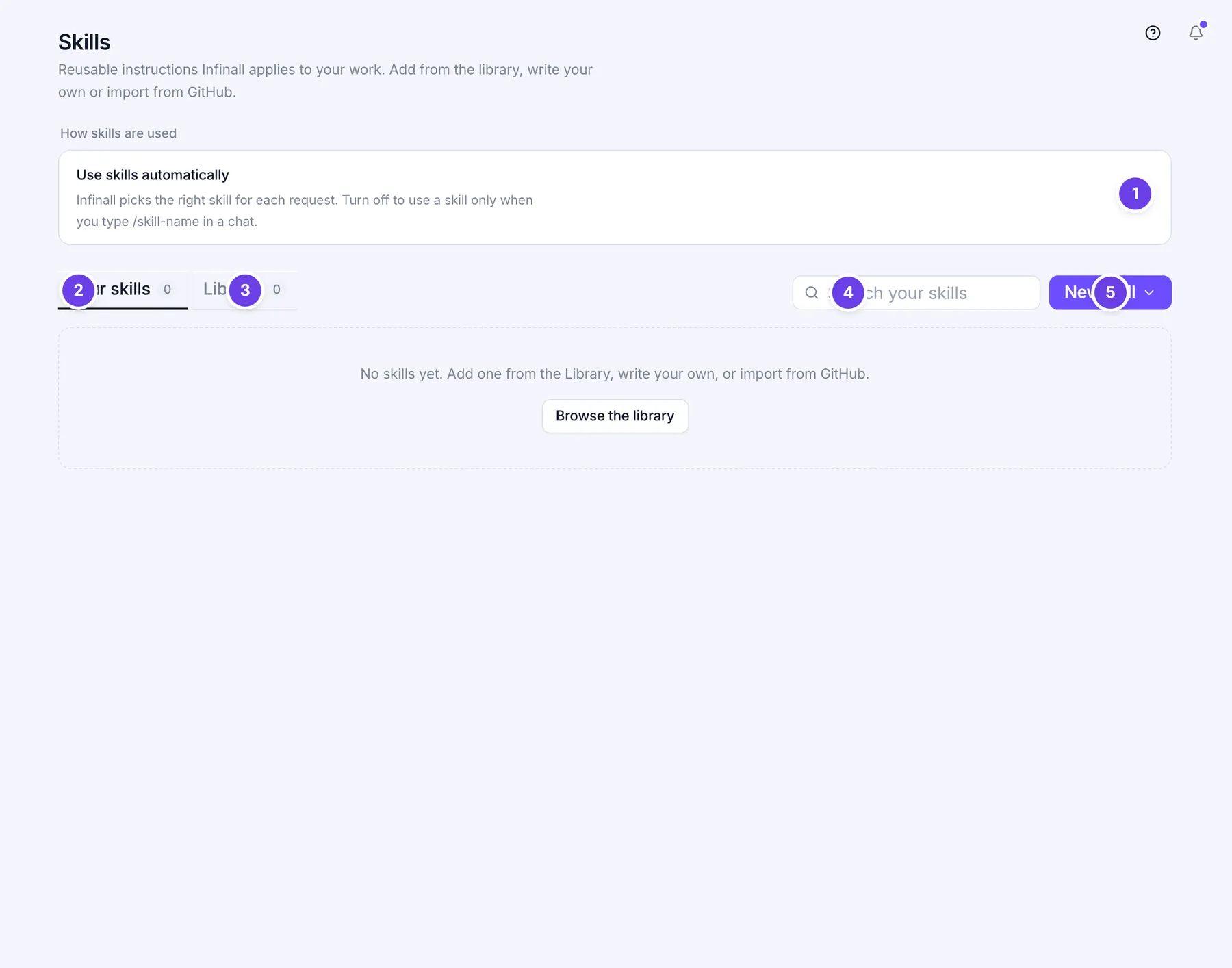
| # | Name in the app | What it does | Plan |
|---|---|---|---|
| 1 | Use skills automatically | A switch. On means Infinall picks the right skill for each request. Off means a skill runs only when you type /skill-name in a chat. It starts on. | Both |
| 2 | Your skills | Tab. The skills you added, wrote or imported. A number shows how many. | Both |
| 3 | Library | Tab. Ready-made skills you can add. A number shows how many. | Both |
| 4 | Search your skills | A search box. On the Library tab it reads "Search the library". It matches names and descriptions. | Both |
| 5 | New skill | A purple button that opens a menu with Write a skill and Import from GitHub. | Both |
| 6 | Use (skill name) | A switch on each skill in Your skills. Off stops Infinall using that skill. | Both |
| 7 | Remove (skill name) | A bin on each skill in Your skills. Removes it at once. | Both |
| 8 | All | A chip on the Library tab. Shows every skill. The chips next to it each show one category, with a count. | Both |
| 9 | Add (skill name) | On a Library skill. The button reads "+ Add". Adds the skill to Your skills. | Both |
| 10 | Show more | At the bottom of the Library tab. Shows the next skills. It shows how many are left. | Both |
| Write a skill | In the New skill menu. Opens Create a skill. | Both | |
| Import from GitHub | In the New skill menu. Opens Import skills from GitHub. | Both | |
| Added (with a tick) | Replaces + Add on a library skill you already have. | Both | |
| Browse the library | On Your skills when you have none. Takes you to the Library tab. | Both |
Click a skill card, not its switch, to open it. The window shows its instructions and has these buttons:
| Name in the app | What it does |
|---|---|
| Use in chat | Opens a new chat with /skill-name filled in. |
| Add skill | Adds the skill. Shows on a library skill you have not added. |
| Done | Closes the window. Shows when there is nothing to add. |
| Close | The cross at the top right. |
#How to turn memory on or off
- Open Settings, then Memory.
- Switch Use memory on or off.
When memory is off, the list shows "Memory is off. Turn it on to let Infinall remember you." Your saved memories stay until you delete them.
#How to add, edit and delete a memory
- Open Settings, then Memory.
- To add one, type it in "Add something to remember, e.g. Our brand voice is playful and direct" and click Add. A note says "Saved to memory."
- To change one, hover over it and click Edit memory. Change the text, then click Save.
- To delete one, hover over it and click Delete memory.
You can also say "remember..." or "forget..." in any chat.
#How to clear all memories
- Open Settings, then Memory.
- Click Clear all.
- Click Delete all (number) to confirm, or Cancel to back out.
- A note says how many were cleared, for example "Cleared 12 memories." Your chats are not deleted.
#How to add a skill from the library
- Open Settings, then Skills, then the Library tab.
- Pick a category chip or type in Search the library.
- Click + Add on the skill. To read it first, click the card.
- A note says "Skill added. Infinall will use it automatically." It now shows under Your skills.
#How to write your own skill
- Open Settings, then Skills.
- Click New skill, then Write a skill.
- In Create a skill, fill in the name (for example "Name, e.g. Product launch email"), then "When to use it (one sentence)", then the instructions in markdown. Under the name box you see the command it will get, such as /product-launch-email.
- Click Save skill.
- A note says "Saved. Use it with /" and the command.
The Save skill button stays grey until you fill in the name and the instructions.
#How to import skills from GitHub
- Open Settings, then Skills.
- Click New skill, then Import from GitHub.
- Paste a public repository address, for example https://github.com/owner/repo. To import one folder, point to it, for example github.com/owner/repo/tree/main/marketing.
- Click Import skills. It reads "Importing..." while it works.
- A note says how many were imported, for example "Imported 8 of 9 skills from owner/repo". Some may fail and are left out.
#How to switch a skill off or remove it
- Open Settings, then Skills, then Your skills.
- To stop using it for now, switch off Use (skill name).
- To delete it, click Remove (skill name). A note says "Skill removed."
#How to use a skill in chat
Type / in a chat followed by the skill name, for example /product-launch-email. Or leave Use skills automatically on and Infinall picks one when it fits. Tip: type /skill in any chat to have Infinall write one for you.
#Options explained
Memory headings. Each memory belongs to one heading.
| Heading | What goes in it |
|---|---|
| About you | Facts about you. |
| Business & brand | Your business and brand. |
| Audience | Who you sell to. |
| Goals | What you are aiming for. |
| Preferences | How you like things done. |
| Instructions | Standing rules you set. |
| Tools | The tools you use. |
| Other | Anything that fits nowhere else. Memories you add by hand land here. |
Where skills come from. Each skill card says where it came from.
| Shown on the card | What it means |
|---|---|
| Created by you | You wrote it. |
| From library | You added it from the Library tab. |
| From GitHub | You imported it from a repository. |
Memory and skills together. Memory is facts about you. A skill is a method for doing a task. Use memory for "we sell coffee to students" and a skill for "how to write our launch email".
#Limits
- You can keep up to 500 memories. When you go over, the least important and least used ones are dropped first.
- One memory holds up to 500 characters. Longer text is cut.
- A skill's instructions hold up to 40,000 characters. Longer text is cut.
- A skill name holds up to 120 characters. The "When to use it" line holds up to 500.
- One GitHub import reads up to 300 skills.
- The Library tab shows 40 skills at a time. Show more adds the next batch.
- Memory does not accept secrets. See the table below.
#When something goes wrong
| Message in the app | What it means | What to do |
|---|---|---|
| That looks like a secret (API key, password, or card number). Memory is not a safe place for it. | What you typed looks like a key, a password or a card number, so it was refused. | Leave the secret out and add the rest. |
| Memory is empty. | The text had nothing in it after spaces were removed. | Type something and add it again. |
| Memory not found | The memory was already deleted, perhaps in another tab. | Refresh the page. |
| Name and instructions are required. | You tried to save a skill with no name or no instructions. | Fill in both, then click Save skill. |
| Skill not found | The skill was already removed. | Refresh the page. |
| Skill not found in the catalog | The library skill is no longer there. | Pick another one from the Library tab. |
| Enter a GitHub repository URL, e.g. https://github.com/owner/repo | The address is not a GitHub repository address. | Paste the address of a repository on github.com. |
| Repository not found or not public. | GitHub has no public repository at that address. | Check the address. Only public repositories work. |
| No SKILL.md files were found in that repository. | The repository has no SKILL.md files. | Point to a repository or folder that has them. |
| Could not import from GitHub: (reason) | GitHub did not answer as expected. | Try again in a moment. |
If a switch or a delete does not save, a red message with the reason shows at the top of the screen and the switch goes back.
#Questions
#Does Infinall remember things I did not tell it?
Yes, when Use memory is on. It picks up lasting facts about you from your chats, such as your brand, audience, goals and preferences. It does not keep one-off task details. It never saves what looks like a key, password or card number. Switch Use memory off to stop it.
#Will turning memory off delete what it remembers?
No. It stops Infinall using and adding memories. Your saved list stays until you delete it.
#Can I make Infinall forget one thing?
Yes. Click Delete memory on that row, or say "forget..." in a chat.
#What happens if I make a skill with the same name as one I have?
It replaces the old one. A skill is saved under a command made from its name, and the same command means the same skill.
#What is the difference between Use skills automatically and the switch on each skill?
Use skills automatically decides if Infinall picks skills by itself. Use (skill name) switches one skill on or off. With the first switch off, a skill that is still on runs only when you type its command.
#Does importing from GitHub take my repository?
No. It only reads the SKILL.md files in a public repository and saves a copy as skills in your list.
#Do memory and skills use credits?
No. Setting them up is free. Chat replies that use them follow the normal chat cost.
Last checked against the app on . View as Markdown