
Add music and voiceover
Motion makes silent videos by default. Ask for a voiceover or music in your prompt to add sound.
#What it is
A plain Motion prompt makes a silent video. If your prompt asks for a voiceover or for music, Motion adds it. The music is a track from a built-in library, chosen to fit the style and cut to the length of your video.
#Who can use it
Everyone. Free and Pro both get voiceover and music through the prompt.
#Cost
Uses credits. A voiceover is extra AI work on top of the video, so the video uses more. Motion is charged on what the video uses. Music from the built-in library adds no generation cost of its own. See Price before you confirm.
#Where to find it
There is no separate sound control. Write it in the prompt box in a Studio project with Motion chosen in What to make.
#Buttons and controls
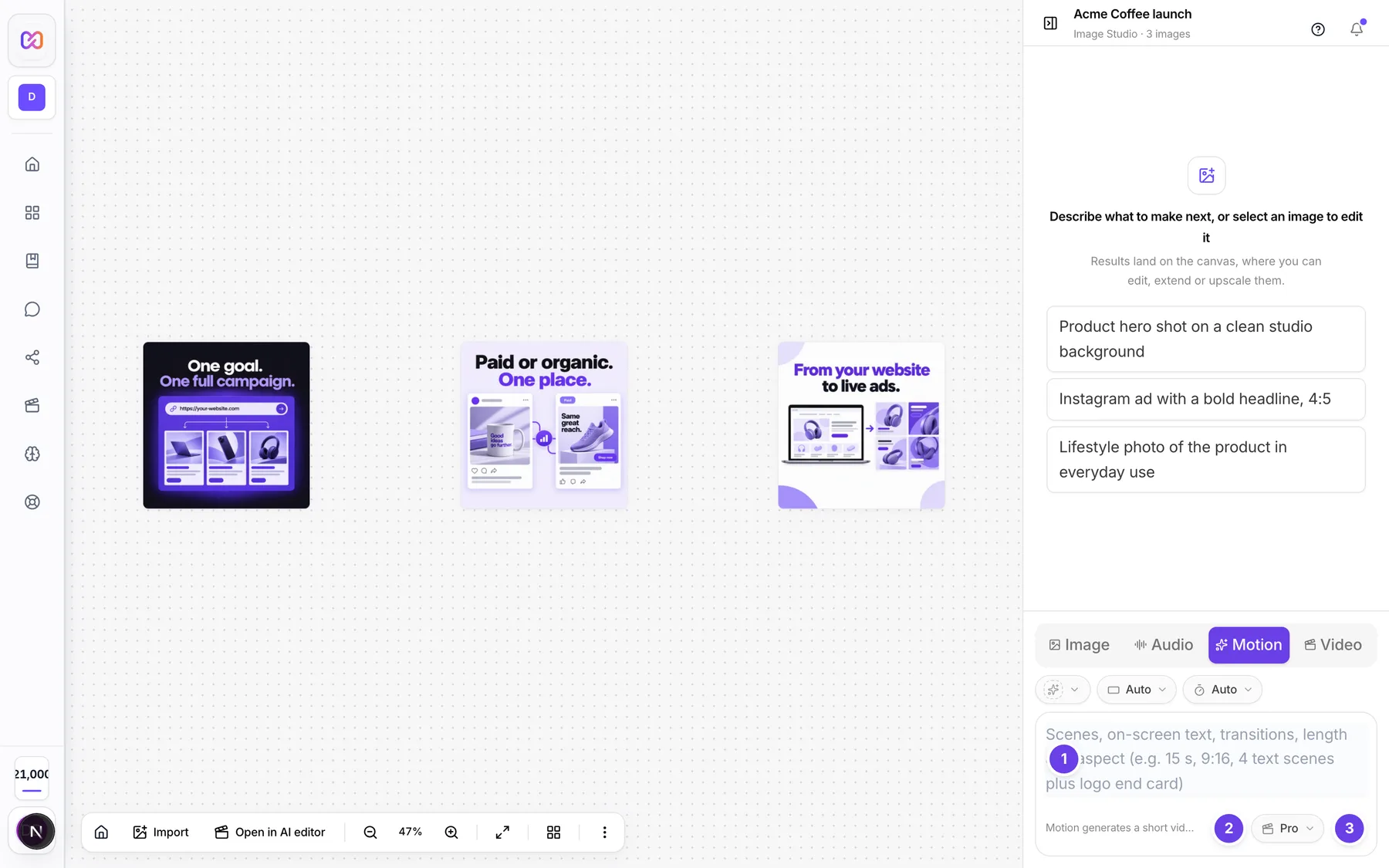
| # | Name in the app | What it does | Plan |
|---|---|---|---|
| 1 | Scenes, on-screen text, transitions, length and aspect (e.g. 15 s, 9:16, 4 text scenes plus logo end card) | The prompt box. Ask for sound here. | Both |
| 2 | Voice typing | Speak your prompt instead of typing it. | Both |
| 3 | Generate motion video | Starts the video with the sound you asked for. | Both |
#How to add a voiceover
- Open the Motion box.
- Write your prompt and add that it needs a voiceover. For example: "20 s, 16:9 product reveal with a voiceover."
- Optional: write the exact lines for each scene in the prompt. They are used as the voiceover.
- Click Generate motion video.
- In the activity card, look for the Recording the voiceover row. Open it to read the lines.
#How to add music
- Write your prompt and add that it needs music. For example: "15 s promo with upbeat music."
- Click Generate motion video.
- Look for Composing music in the activity card. Open it to see the direction used.
- When the soundtrack is ready, Mixing voice, music and effects finishes.
#How to keep it silent
Say "no music", "no voiceover" or "silent" in the prompt. A prompt that does not mention sound is silent.
#Options explained
Words that ask for a voiceover. Voiceover, voice over, narration, narrator, spoken, voice.
Words that ask for music. Music, soundtrack, background music, beat, tune, track, score.
What the music is. A free track from the built-in library. Its mood is matched to your prompt, for example calm, upbeat, cinematic or playful. It is faded and fitted to the length of the video.
What the voiceover is. Spoken lines placed on your scenes. Their length can change how long each scene runs.
#Limits
- One music track runs under the whole video.
- Voiceover and music are only added when your prompt asks for them.
- There is no voice or track picker in the Motion box.
#When something goes wrong
| Message in the app | What it means | What to do |
|---|---|---|
| Music could not be generated | A row in the activity feed. The music step failed. The video still finishes. | Try again, or leave music out. |
| Couldn't make that motion video. | The video failed. If you asked for a voiceover and the voice service was down, the video does not start. | Try again in a moment. If it keeps failing, leave the voiceover out. |
| Picked music. | Your message was only a music request, so no video was made. | Describe the whole video and ask for music inside that prompt. |
#Questions
#Can I choose the voice?
Not in the Motion box. Use the Audio mode when you need a chosen voice.
#Can I choose the music track?
Not in the Motion box. The track is picked to fit your prompt.
#Can I use my own music?
There is no attach button in the Motion box today, so you cannot add your own track.
#Why is my video silent?
A prompt with no words about sound makes a silent video. Add "with a voiceover" or "add music".
#Do I pay extra for sound?
A voiceover is more AI work, so the video uses more credits. The built-in music has no generation cost of its own.
Last checked against the app on . View as Markdown