
Hide and restore a brand
Hide a brand from your Brand Brain list and bring it back later. Hiding is per device and does not delete anything.
#What it is
You can hide a brand you no longer want to see in your Brand Brain list, and restore it any time. Hiding does not delete the brand or its saved versions.
#Who can use it
Everyone, on Free and Pro. Hiding is a personal choice on the device you are using, so it needs no special workspace role.
#Cost
Free, no credits.
#Where to find it
On Home, open the brand chip in the Image, Audio, Motion or Video composer and choose Manage all. A window called Brand Brain opens with your saved websites.
#Buttons and controls
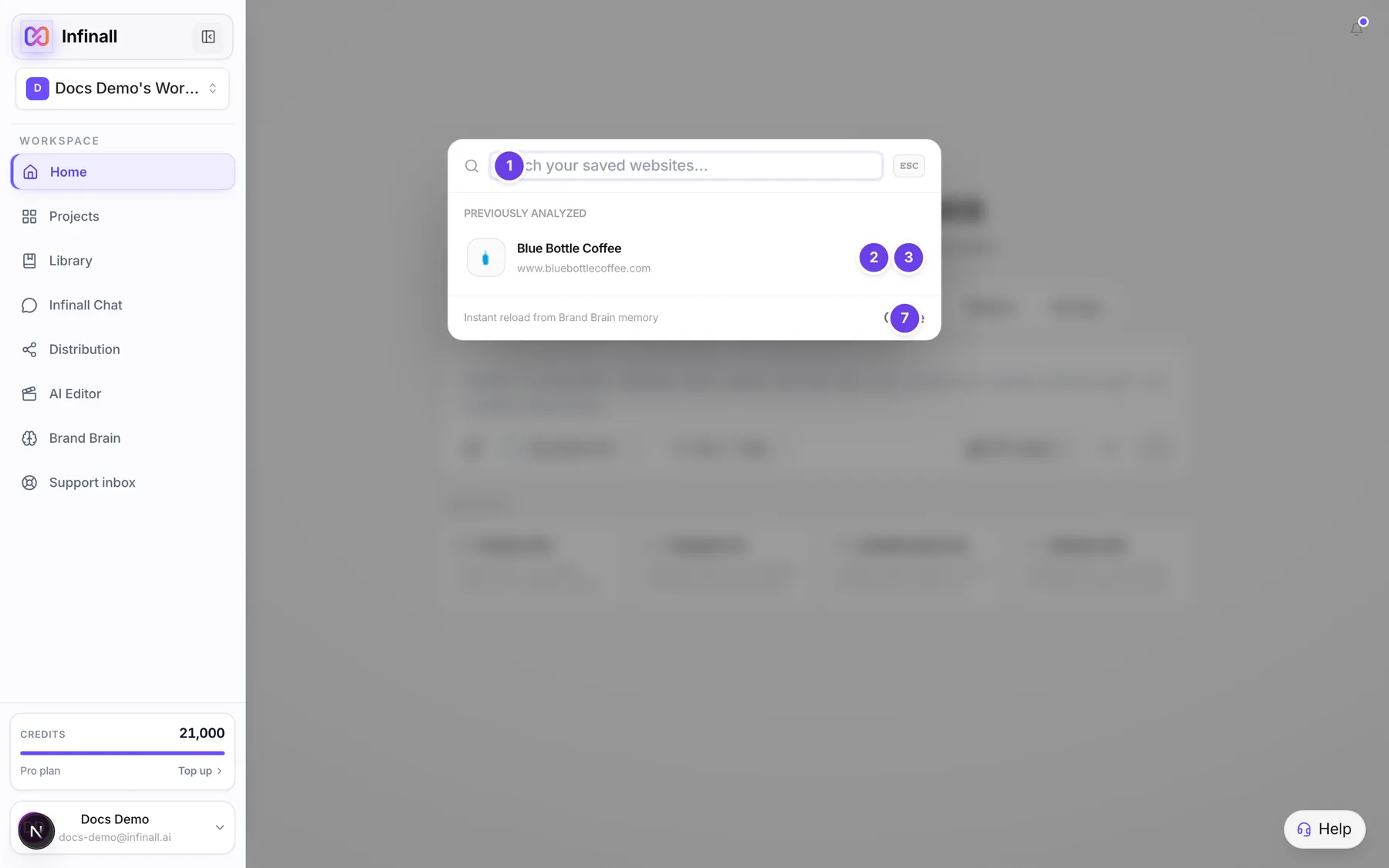
| # | Name in the app | What it does | Plan |
|---|---|---|---|
| 1 | Search your saved websites... | Filters the list by name or website. | Both |
| 2 | Edit (name) | A pencil on each row. Opens that brand on the Brand Brain screen. It shows when you hover the row on a computer, and always on a phone. | Both |
| 3 | Hide (name) from this list | An eye-off button on each row. Moves the brand to the hidden list. Same hover rule as the pencil. | Both |
| 4 | Hidden on this device | A second list under your brands. It shows only when you have hidden at least one brand. | Both |
| 5 | Restore all | Brings every hidden brand back. | Both |
| 6 | Restore | One per hidden brand. Brings that brand back to the list. | Both |
| 7 | Close | Closes the window. You can also press Esc. | Both |
#How to hide a brand
- On Home, open the brand chip and choose Manage all.
- Find the brand. Hover its row if you are on a computer.
- Choose the eye-off button, Hide (name) from this list.
- The brand moves under Hidden on this device.
#How to restore a hidden brand
- Open Manage all on Home.
- Under Hidden on this device, choose Restore next to the brand. To bring back every hidden brand, choose Restore all.
Confirming a brand also brings it back to the list. If you confirm a brand you had hidden, it shows again right away.
#What hiding does
- A hidden brand leaves the Brand Brain list on Home. The brand still exists, with all its saved versions.
- A hidden brand still shows in every brand chip, so you can still pick it for Image, Video, Motion, Audio and Chat.
- Hiding is saved in your browser, for your user and the workspace you are in. It does not hide the brand for teammates, and it does not follow you to another device or browser.
- If a brand is removed from the workspace, its hidden mark is cleaned up for you.
#About deleting a brand
The Brand Brain screens in the app have no Delete button today. There is nothing in the app that removes a brand for good, so this page only covers Hide and Restore. Do not expect a hidden brand to free up anything. It stays in your workspace.
#Limits
- Hiding is per device, per user and per workspace.
- The Brand Brain screen (the left menu) has no Hide or Restore controls. They live in the Manage all window on Home.
#When something goes wrong
| Message in the app | What it means | What to do |
|---|---|---|
| No saved websites yet | You have no brands to show. | Choose Add brand from the brand chip. |
| No matches for (your search) | Nothing matches what you typed. | Try a different name or domain. |
| Could not load saved brand data. Try analyzing the URL again. | Opening a brand from this window failed. | Analyze the website again. |
#Questions
#Is hiding the same as deleting?
No. Hiding only removes the brand from one list on this device. The brand and its versions are not touched.
#Can I permanently delete a brand?
Not from the app today. There is no Delete button.
#Will my teammates still see a brand I hid?
Yes. Hiding is saved in your own browser, so only you, on that device, see the change.
#I hid a brand and now I can't find it in Manage all.
Look under Hidden on this device, below your list. It shows only when something is hidden. Choose Restore.
#Does a hidden brand still work in Image or Chat?
Yes. Hidden brands still appear in every brand chip and can still be picked.
#I hid a brand on my laptop. Why is it back on my phone?
Hiding is saved per device. Hide it again on the other device.
Last checked against the app on . View as Markdown