
Connect an ad account
Connect Meta, Google, LinkedIn or other ad accounts so you can run ads and boost posts. Ad accounts share your free connections with social profiles.
#What it is
An ad account is the account where a platform keeps your ads and bills your ad spend, for example Meta Ads or Google Ads. Connect one and you can run campaigns and boost posts from Infinall. It is different from a social profile, which is where you publish posts.
#Who can use it
Adding a new ad account is Pro only. A Free account sees "Connecting accounts is a Pro feature" and cannot start the connection. Ad accounts you already connected keep working.
Ad accounts use the same free connections as social profiles. You get 2 in total, not 2 of each. After that each account costs 300 credits a month.
#Cost
Mixed. Connecting follows the same rule as social profiles: free for the first 2 connections, then 300 credits a month per account. You see the exact price before you confirm.
Your ad spend is separate. You set the budget for each campaign, and the platform charges it to your ad account. Infinall also charges 2 credits a month for each ad while it is live. Paused ads are free. See Paid ads.
#Where to find it
Open Distribution, then Account, then the Accounts tab. Scroll to the Ad accounts section below the social profiles.
#Buttons and controls
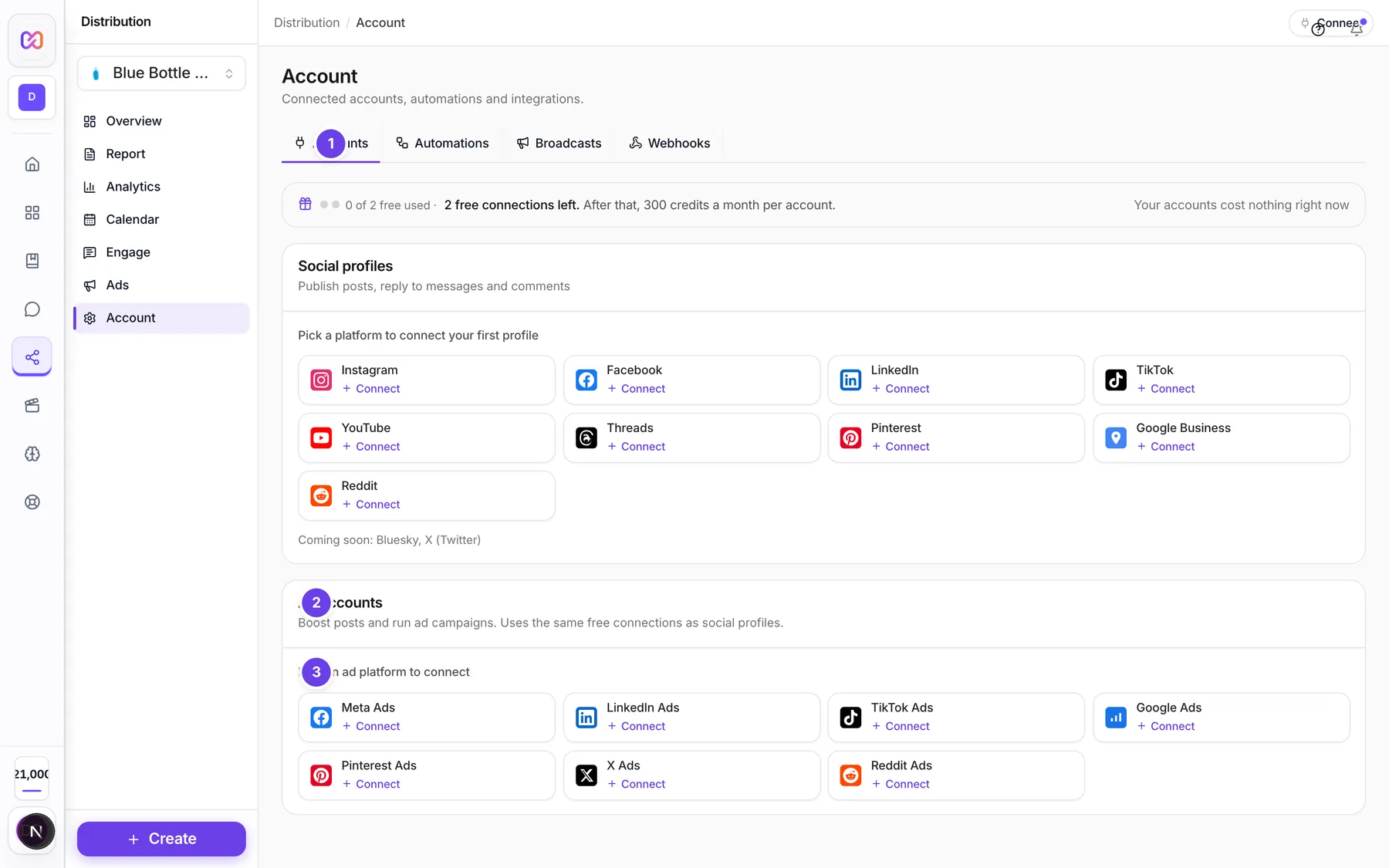
| # | Name in the app | What it does | Plan |
|---|---|---|---|
| 1 | Accounts | The tab that holds social profiles and ad accounts together. | Both |
| 2 | Ad accounts | The section for ad accounts. The line under it says "Boost posts and run ad campaigns. Uses the same free connections as social profiles." A green pill shows how many are connected. | Both |
| 3 | Pick an ad platform to connect | The row of ad platform buttons. After your first account the title says Connect an ad account. Each button shows Connect, or how many you connected. | Pro |
| Ad account row | Shows the account name, the platform, the currency, and a status badge. It says "no ad account picked" when the platform did not give an ad account yet. | Both | |
| Reconnect | Shown on any ad account that is not Active. Opens the platform to sign in again. | Both | |
| Actions for (platform) | The three dots on a row. It has Reconnect and Disconnect. | Both | |
| Connect an ad account | The window that opens when you pick a platform. It shows the price box first. | Pro |
#How to connect an ad account
- Open Distribution > Account > Accounts.
- Pick the right brand at the top of the hub menu. Ad accounts are connected to one brand.
- Under Ad accounts, click a platform.
- In Connect an ad account, read the price box. It says Free. or the credits it will cost.
- Click the platform. A new tab opens on the platform's sign in page.
- Sign in and pick the ad account you want to use.
- Come back to Infinall. You see "Finishing your ad account connection..." and then "Ad account connected."
If you were in the middle of an ad draft when you left, Infinall takes you back to that draft after the connection finishes.
#How to disconnect an ad account
- Click the three dots (Actions for the platform) on the row.
- Click Disconnect.
You see "(Platform) disconnected."
#Options explained
Which platforms. The connect window lists the ad platforms the app offers: Meta (Facebook and Instagram), LinkedIn, TikTok, Google Ads, Pinterest, X and Reddit. The New ad form builds ads for Meta, Google, LinkedIn and TikTok, see Paid ads.
Ad account vs social profile. A social profile publishes posts. An ad account runs paid campaigns and receives your ad spend bills. They are listed and counted separately.
Status. Active means it works. Anything else, such as a login that expired, shows a Reconnect button.
#Limits
- Free connections: 2, shared by social profiles and ad accounts.
- Each connection after that: 300 credits a month.
- A connection attempt works for 15 minutes. After that, start again.
- Each live ad: 2 credits a month.
#When something goes wrong
| Message in the app | What it means | What to do |
|---|---|---|
| Connecting accounts is a Pro feature. Upgrade to Pro to connect your social and ad accounts. | Your plan is Free. | Upgrade in Billing. |
| You need credits to connect another ad account. Add credits and try again. | Your free connections are used and your balance is too low. | Add credits, then connect again. |
| Choose a brand first. Ad accounts are connected per brand. | No brand is picked. | Pick a brand in the hub menu. |
| This connection attempt expired. Please try again. | You waited too long on the platform's page. | Click the platform again. |
| We could not find a connected ad account for this platform. Please try connecting again. | The platform did not return an ad account. | Try again and pick an ad account when asked. |
| Could not start reconnecting. | The reconnect could not start. | Try again in a minute. |
| Could not disconnect this ad account. | The disconnect failed. | Try again. |
#Questions
#Is an ad account the same as a social account?
No. A social profile publishes posts. An ad account runs ads. They share your free connections.
#Do I pay Infinall for my ad spend?
No. Ad spend is billed by the ad platform. Infinall only charges credits for connecting past your free connections and for each live ad.
#Can I use Free to build ads?
You can open the ad form and save drafts. To run an ad you need a connected ad account, and connecting is Pro.
#Should I pause my ads before I disconnect?
Yes, that is the safe order. Pause or end the ads in Ads first, then disconnect the account.
Last checked against the app on . View as Markdown