
Write the script for me
Describe your ad in a few words and let Infinall AI write the voiceover script. Pick a length and a tone, then edit the result.
#What it is
The script writer turns a short brief into ad copy you can read out loud. It puts the script in your box, so you can edit it and then turn it into a voiceover.
#Who can use it
Everyone, on Free and Pro. The code does not lock the script writer behind a plan.
#Cost
Uses credits. You see what a take costs after it is made. The script is only text, so nothing is spoken until you send it as a voiceover. See Price before you confirm.
#Where to find it
There are two ways in, and they do slightly different things.
- Inside Voice over: in the Audio composer, open Settings (the icon next to the voice and emotion chips) and choose Write the script for me. A small panel called Write the script opens. The result replaces the words in your script box.
- As its own mode: open the mode chip and choose Write a script (in the Words group, "AI writes your ad copy"). Describe the ad in the Brief box and send it. The script lands on your canvas as a Script card.
#Buttons and controls
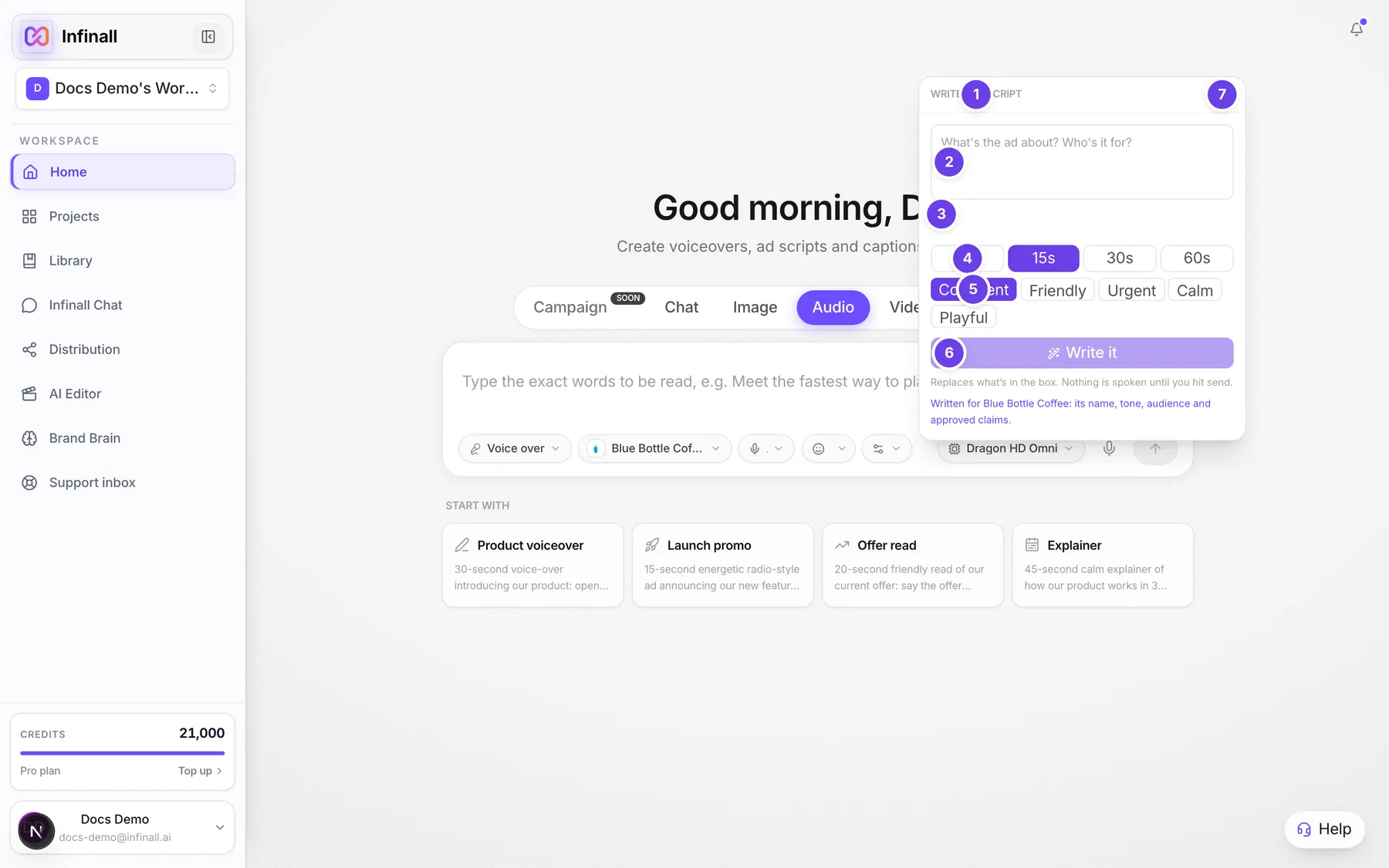
| # | Name in the app | What it does | Plan |
|---|---|---|---|
| 1 | Write the script | The panel heading, shown after you choose Write the script for me in Settings. | Both |
| 2 | Brief | The box where you say what the ad is about and who it is for. The hint reads "What's the ad about? Who's it for?" | Both |
| 3 | Voice typing | Inside the Brief box. Click and speak instead of typing. Voice typing uses credits. | Both |
| 4 | 6s, 15s, 30s, 60s | Four buttons for how long the ad should run. 15s is picked at first. | Both |
| 5 | confident, friendly, urgent, calm, playful | Five buttons for the tone. Confident is picked at first. | Both |
| 6 | Write it | Writes the script. While it works the button says Writing.... | Both |
| 7 | Close | The X at the top right of the panel. Closes it without writing anything. | Both |
| Written for (your brand) | A line under the button. It shows when a brand is picked in the brand chip, and says the script uses its name, tone, audience and approved claims. | Both | |
| Copy | On the Script card on the canvas, in the Write a script mode. Copies the words. | Both |
#How to write a script inside a voiceover
- In the Audio composer, keep the mode on Voice over.
- Open Settings and choose Write the script for me.
- In Brief, say what the ad is about and who it is for.
- Choose a length: 6s, 15s, 30s or 60s.
- Choose a tone.
- Choose Write it.
- Read the script that appears in your box and edit any words you want.
- Pick a voice and send it to make the voiceover. See Make a voiceover from a script.
The panel warns you: "Replaces what's in the box. Nothing is spoken until you hit send." If you already typed something you like, copy it somewhere safe first.
#How to write a script as its own result
- Open the mode chip and choose Write a script.
- In the box, describe the product, the audience, the length, the tone and what you want people to do.
- Send it.
- A Script card appears on the canvas with a Copy button.
#Options explained
Length sets how many words the writer aims for. The targets are about 15 words for 6 seconds, 38 for 15 seconds, 75 for 30 seconds and 150 for 60 seconds.
Tone steers the voice of the writing: confident, friendly, urgent, calm or playful.
Brand. With a brand picked in the brand chip, the script uses that brand's name, tone, audience and approved claims. A brand that has no confirmed version yet cannot be used. Pick No brand or confirm the brand first. See Use your brand. Only a written script uses the brand. A voiceover you typed yourself is spoken exactly as you typed it.
#Limits
- The brief can be up to 2,000 characters.
- The panel only appears in modes that speak with one voice. Use Write a script from the mode chip anywhere else.
#When something goes wrong
| Message in the app | What it means | What to do |
|---|---|---|
| The script came back empty. Try a more specific brief. | Nothing useful came back from the brief. | Add the product, the audience and the goal, then try again. |
| Couldn't write the script. | The request failed. | Try again. |
| This Brand Brain has no confirmed version yet. Confirm it first or choose No brand. | The brand you picked is not confirmed. | Confirm the brand, or pick No brand. |
| Insufficient credits. Purchase more to continue. | Your balance is too low. | See Your credit balance. |
#Questions
#Does the script writer speak anything?
No. It only writes text. Nothing is spoken until you send the script as a voiceover.
#Can I edit the script after it is written?
Yes. The script lands in your box as normal text. Change any words, add tags, then send it.
#Will it use my brand?
Yes, when a brand is picked in the brand chip. It then uses the brand's name, tone, audience and approved claims. With No brand, it writes from your brief alone.
#What if I do not like the result?
Change the brief or the tone and choose Write it again. Each try replaces the words in your box.
#Can the writer make the script exactly 30 seconds long?
It aims for about 75 words for 30 seconds. In the voiceover itself, Ad length trims a script that runs long.
Last checked against the app on . View as Markdown