
Search a brand or keyword in Ad Spy
Type a competitor or a topic, pick Meta, Google or LinkedIn, and see the ads they are running right now.
#What it is
Ad Spy shows the ads a competitor is running on Meta, Google and LinkedIn. You search by brand (a website) or by keyword, and the ads appear as a grid of tiles.
TikTok and X are coming soon. You cannot search them yet.
#Who can use it
Everyone, on Free and Pro. The code does not lock searching to Pro, and there is no daily count limit on either plan. You can run up to 3 searches at the same time.
You need a role that is allowed to spend in the workspace (not Viewer or Commenter) to start a search.
#Cost
Free, no credits. Today every live platform searches for 0 credits, and an empty search also costs nothing. The app is built to show you a price before it runs anything, so if a search is ever priced you see the amount and confirm first.
#Where to find it
- Open Library in the sidebar. Spy is the first tab and opens by default.
- Or open Home and choose the Ad Spy tab, type your search there and press Search ads. You land in Library with your search filled in and it starts on its own.
#Buttons and controls
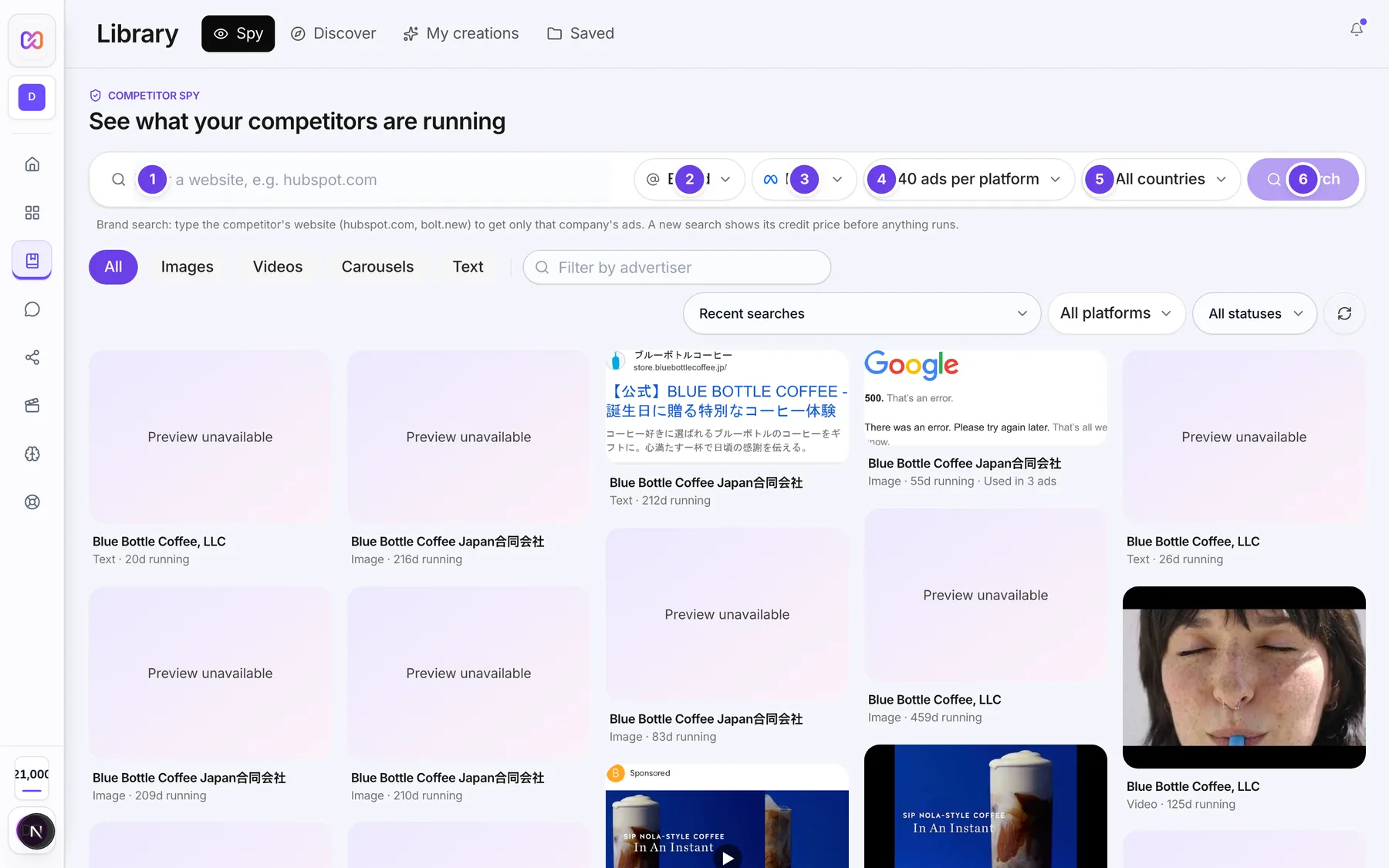
| # | Name in the app | What it does | Plan |
|---|---|---|---|
| 1 | Competitor brand or keyword | The search box. For a brand search it asks for a website, for example hubspot.com. For a keyword search it asks for a topic, for example AI ad generator. | Both |
| 2 | Search by | Choose Brand or Keyword. | Both |
| 3 | Platform | Choose Meta, Google, LinkedIn or All platforms. | Both |
| 4 | Results | How many ads to ask for per platform. | Both |
| 5 | Country | Limit the ads to one country, or leave it on All countries. | Both |
| 6 | Search | Starts the search. While it checks, the button says Checking.... | Both |
| Cancel | In the quote box Search fresh competitor ads?. Closes it without searching. Shows only when your search finds older stored results. | Both | |
| Confirm search | In the same box. Refreshes the stored results with a new search. | Both | |
| Close quote | The X in the corner of the quote box. | Both | |
| Dismiss | The X on a red message above the results. | Both |
#How to search for a brand
- Open Library. Spy is already selected.
- Leave Search by on Brand.
- Type the competitor's website in the search box, for example hubspot.com.
- Choose a Platform. Pick All platforms to search Meta, Google and LinkedIn together.
- Optional: choose a Results size and a Country.
- Choose Search.
- Wait while the screen shows the search running. You can leave the page. The search keeps running and the results open here when it is done.
#How to search for a keyword
- In Search by, choose Keyword.
- Type a topic, for example a product type.
- Choose Meta as the Platform, or All platforms.
- Choose Search.
Keyword search is for Meta. LinkedIn only searches by brand, so it shows Brand only and cannot be picked while Keyword is on. With All platforms and Keyword, only the platforms that support keyword search run.
#How to search from Home
- On Home, choose the Ad Spy tab.
- Type a competitor name or website in the Ad Spy search box.
- Pick Search by, Platform and Country if you want to change them.
- Choose Search ads (the arrow button), or press Enter.
- You land on Library > Spy with the search already running.
#Options explained
Search by
| Value | What it is for |
|---|---|
| Brand | Only that company's ads. Type its website, for example hubspot.com. |
| Keyword | Every advertiser running ads on a topic. Meta only. |
Platform
| Value | What it searches |
|---|---|
| Meta | Meta ads. Brand and keyword. |
| Google ads. Brand search. | |
| LinkedIn ads. Brand search only. | |
| All platforms | Runs each platform that supports your kind of search and combines the ads. |
The Library search bar does not list TikTok or X. Home lists them in its Platform menu, but they are coming soon, so choose Meta, Google or LinkedIn.
Results offers 40, 100 and 200 ads per platform. The first is the default. A larger size takes longer and gives a fuller sweep.
Country lists All countries, India, United States, United Kingdom, Canada, Australia, Germany, France and Singapore.
#Limits
- The search box takes up to 200 characters.
- Results per platform: from 40 to 200.
- Up to 3 searches can run at once.
- A search that is already stored and less than 24 hours old opens at once with no new search.
- A search that does not finish waits up to 5 minutes on screen. It keeps going in the background after that.
#When something goes wrong
| Message in the app | What it means | What to do |
|---|---|---|
| Competitor Spy is coming soon. | Ad Spy is switched off on the server right now. | Try again later. Your Library and saved ads are not affected. |
| Search not found. | The search you were waiting for no longer exists. | Start the search again. |
| No platform could run this search. You were not charged. | None of the platforms could start your all platforms search. | Try again in a few minutes. |
| The search could not finish. You were not charged. | The search failed part way. | Try again. |
| The search is taking longer than expected. It will continue in the background. | The search ran past the time the screen waits. | Open Recent searches later to see the results. |
| You already have the maximum number of searches running. | You have reached the number of searches that can run at once. | Wait for one to finish. |
| This search is already in progress. Please try again in a moment. | The same search is being started by someone else. | Wait a moment and search again. |
| Competitor Spy is at capacity right now. Please try again later. | The service is busy. | Try again later. |
| Your workspace role does not permit this action (spend). | Your role in this workspace cannot start searches. | Ask an owner for a role that can spend. |
| Enter what you want to search for. | An all platforms search had an empty box. | Type a brand or keyword. |
#Questions
#Is Ad Spy only for Pro?
No. Free and Pro both search the same three platforms. The code does not lock search to Pro.
#Does a search cost credits?
Today it does not. Every live platform quotes 0 credits. See the costs page.
#Why can I not pick TikTok or X?
They are coming soon. Only Meta, Google and LinkedIn are live.
#Why is LinkedIn greyed out when I choose Keyword?
LinkedIn can only be searched by brand. Switch Search by back to Brand.
#What does a brand search need?
A website such as hubspot.com. It returns only that company's ads.
#Can I leave the page while it searches?
Yes. The search keeps running. When you come back, a banner shows it is still searching and the results open when it finishes.
Last checked against the app on . View as Markdown