
Set up automatic replies with Automations
Write a rule that says when something happens, and only if some things are true, then reply, tag or hand over to a person.
#What it is
An automation is one rule written as a sentence: When something happens, and only if some things are true, then do some things. The app calls each one a rule. The screen is named Automations in the tab bar, and the code and the guide call the same thing workflows.
There is no canvas and no node editor. You pick from lists and type words.
#Who can use it
Free and Pro accounts both see the Automations tab. The code has no plan check on rules.
A rule needs a connected account that can receive messages. Connecting accounts is a Pro feature, so a Free account with no connected account sees the tab but cannot make a rule.
Rules work on Instagram, Facebook, WhatsApp, Telegram, Reddit and Bluesky. Each rule runs on one account: the first account of those platforms connected to the brand you have selected.
#Cost
Free, no credits. Creating, turning on, pausing and deleting rules never shows a price.
#Where to find it
Open Distribution, then Account, then the Automations tab. The address is /distribution/settings?tab=automations. Rules belong to one brand, so pick the brand in the brand switcher at the top of the left menu first.
#Buttons and controls
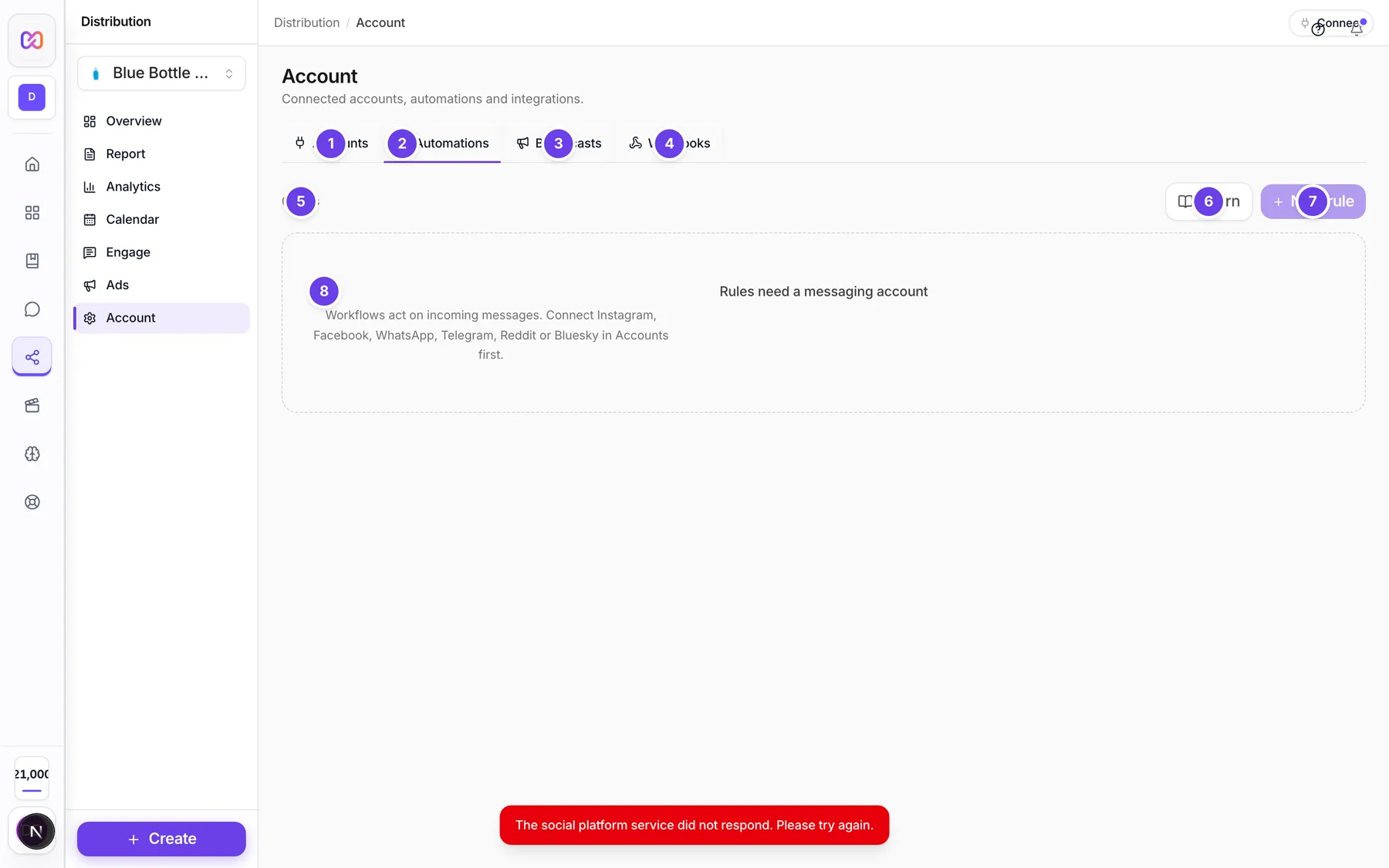
| # | Name in the app | What it does | Plan |
|---|---|---|---|
| 1 | Accounts | Opens the tab for connecting accounts. | Both |
| 2 | Automations | The tab you are on. | Both |
| 3 | Broadcasts | Opens the tab for broadcasts and sequences. See Broadcasts. | Both |
| 4 | Webhooks | Opens the tab that sends events to your other tools. | Both |
| 5 | 0 rules | Counts your rules. It reads 1 rule for one. | Both |
| 6 | Learn | Opens the guide How to use Workflows with real examples. | Both |
| 7 | New rule | Opens the rule builder. It is switched off until a messaging account is connected. | Both |
| 8 | Rules need a messaging account | The message you see when no Instagram, Facebook, WhatsApp, Telegram, Reddit or Bluesky account is connected. | Both |
| No rules yet | The message when you have an account but no rules. | Both | |
| Not on yet | The label on a new rule. It turns to active when on and paused when stopped. | Both | |
| started / finished / handed off | Counts on each rule: how many runs started, finished and were handed to a person. | Both | |
| Runs | Shows the latest runs of that rule. | Both | |
| Turn on | Starts a rule. On a running rule this button says Pause. | Both | |
| Delete workflow | The bin icon. Asks you to confirm, then deletes the rule. | Both |
Inside the New rule window:
| Name in the app | What it does |
|---|---|
| Trigger | The When... list. See Options. |
| Trigger words | Words that fire a keyword or comment trigger. Separate them with commas. |
| Start from a template (optional) | One tap fills in a whole rule. You can still edit it. |
| + Add condition | Adds an And only if... row. |
| Condition type | What to check. |
| Condition value | The words, tag or hours for that check. |
| Remove condition | The X on a condition row. |
| Action type | The Then... list. |
| Action value | The text, tag or minutes for that step. |
| Media file | Attach a picture, video, audio file or PDF for a Send media step. |
| Add a step | Adds another Then... row. |
| Remove action | The X on an action row. |
| Same person can re-fire after | The cooldown in hours. |
| Create rule | Saves the rule as Not on yet. |
#How to make a rule
- Open Distribution, then Account, then Automations.
- Choose New rule.
- Under When..., pick the trigger. For a keyword or comment trigger, type the words in Trigger words.
- Optional: choose + Add condition and set each check.
- Under Then..., pick what happens. Choose Add a step for more.
- Set Same person can re-fire after in hours if you want something other than the default of 24 hours.
- Choose Create rule. The rule is saved as Not on yet.
- In the list, choose Turn on. Nothing messages anyone before this click.
#How to start from a template
- Choose New rule.
- Under Start from a template (optional), choose one: Answer price questions instantly, Welcome first-time messagers, Never auto-reply to angry mail, After-hours acknowledgement, Turn story replies into leads, Thank commenters automatically or Win back people who went quiet.
- Read what it filled in and change the wording to suit you.
- Choose Create rule, then Turn on.
#How to check, pause or delete a rule
- Open the Automations tab.
- Choose Runs on a rule to see its latest runs. A run shows as completed, exited or another status with its start time.
- Choose Pause to stop it. Choose Turn on to start it again.
- Choose the bin icon, then confirm, to delete it. A deleted rule stops straight away.
#Options explained
When... (triggers)
| Trigger | Fires when |
|---|---|
| a message arrives | Any direct message comes in. |
| a message mentions a word | A message contains one of your words. |
| someone writes for the first time | A person messages you for the first time. |
| someone replies to a story | Someone answers one of your stories. |
| someone comments | Someone comments. You can add trigger words to limit it. |
| someone reacts to a post or message | Someone reacts with any emoji. |
And only if... (conditions). Every condition must be true, or the rule does nothing.
| Condition | Checks |
|---|---|
| the message says | The message has one of your words. |
| the message does not say | The message has none of your words. Good for skipping angry mail. |
| they already have the tag | The contact has this tag. |
| they do not have the tag | The contact does not have this tag. |
| their name or handle mentions | The name or handle has one of your words. |
| they follow you | The person follows you. |
| they do not follow you | The person does not follow you. |
| you heard from them within (hours) | You last heard from them inside this many hours. |
| it has been over (hours) since they wrote | You last heard from them more than this many hours ago. |
The follower checks are written for Instagram in the code.
Then... (actions)
| Action | What it does |
|---|---|
| Reply with | Sends your text. |
| Send media | Sends a picture, video, audio file or PDF. |
| Tag them | Adds a tag to the contact. See Contacts. |
| Remove tag | Takes a tag off the contact. |
| Hand to a human | The rule stops and the conversation is flagged for you. |
| Wait minutes | Pauses before the next step. If you leave the number out, it waits 5 minutes. |
Same person can re-fire after keeps two automatic replies from talking to each other forever. The default is 24 hours. You can set it up to 720 hours.
Status. A rule is Not on yet, active or paused.
#Limits
- Trigger words: up to 20 words, each up to 60 characters.
- A reply is up to 1,000 characters.
- The server allows up to 8 actions in a rule. The window lets you add up to 6 steps.
- The window lets you add up to 6 conditions.
- Conditions on hours accept a number from 1 up to 8,760.
- A Wait minutes step is capped at 43,200 minutes.
- Media files: up to 25 MB. The window says JPEG, PNG, GIF, MP4, AAC, WAV or PDF.
- Runs lists up to 10 runs.
- A rule must have at least one reply, media, tag or hand over step.
- There is no "outside business hours" trigger. The code has no clock trigger.
#When something goes wrong
| Message in the app | What it means | What to do |
|---|---|---|
| Connect a messaging account first | You hovered the switched off New rule button. | Connect an Instagram, Facebook, WhatsApp, Telegram, Reddit or Bluesky account first. This needs Pro. |
| Add at least one word for this trigger. | A keyword trigger has no words. | Type words in Trigger words. |
| The rule needs at least one reply, media, tag or handoff. | Every step is empty or only a wait. | Add a reply, media, tag or hand over step. |
| A reply cannot be empty (the message goes on to say to remove it or write it) | A Reply with step has no text. | Write the reply or remove the step. |
| Upload the media file for the Send media step, or remove that step. | A Send media step has no file. | Attach a file or remove the step. |
| Connect a messaging account first (the message goes on to say media needs one to upload through) | You tried to upload with no account connected. | Connect an account first. |
| Could not upload the file. JPEG, PNG, GIF, MP4, AAC, WAV or PDF, max 25 MB. | The upload failed. | Use one of the listed file types under the size limit. |
| Workflows need a connected messaging account. Connect one in Accounts first. | The brand has no account of a supported platform. | Connect one in the Accounts tab. |
| Cooldown must be 1-720 hours. | The cooldown is outside the range. | Use a number from 1 up to the limit. |
| Workflow not found | The rule is gone or belongs to another brand. | Reload the page and pick the right brand. |
| Could not change the workflow | Turning on or pausing failed. | Try again. |
| Could not delete the workflow | The delete failed. | Try again. |
#Questions
#Is it called Automations or Workflows?
The tab and the nav item say Automations. The Learn guide, the Delete button label and the code say workflows. They are the same thing.
#Does a new rule start sending right away?
No. A new rule is Not on yet. It only starts when you choose Turn on.
#Why did the same person not get a second auto reply?
The cooldown holds it back. By default a person can trigger a rule again after 24 hours. Change Same person can re-fire after to shorten or lengthen it.
#Can I reply only to people who follow me?
Yes. Add the condition they follow you. The code describes this check as an Instagram check.
#Can a rule answer only outside office hours?
No. The code has no time of day trigger. The template named After-hours acknowledgement answers every incoming message once per cooldown, not only at night.
#How do I stop a rule answering angry messages?
Add the condition the message does not say with words like refund, scam or angry. Or use the Never auto-reply to angry mail template. A message with those words gets no automatic reply and waits for you in Messages.
#What happens when I choose Hand to a human?
The rule stops and the conversation is flagged for you. Answer it in Engage, then Messages. See Reply to messages in the inbox.
Last checked against the app on . View as Markdown