
Make a voiceover from a script
Turn a script into spoken audio. Pick a voice, speed and ad length, make extra takes, or compare voices and languages.
#What it is
Audio mode reads your script out loud in the voice you pick. Each result is a "take" that lands on your canvas as a player you can play, download and reuse.
#Who can use it
Everyone can make a voiceover on Free and Pro.
- Free accounts can use 54 voices across 29 languages.
- Pro adds 20 premium English voices, and any voices you clone yourself. Premium voices are hidden from the voice list on Free.
- The speech model list has five choices. Four are for everyone. The one marked Pro gives the most natural voices and your own clones.
#Cost
Uses credits. A voiceover is charged on the characters spoken, and every take is charged. If a voiceover fails, no credits are charged. The finished take card shows what it cost. See Price before you confirm.
#Where to find it
On Home, choose the Audio tab above the box. After you send, you land on the project canvas with the take on it. On the canvas you can keep going: use the Audio switch above the box (next to Image, Motion and Video) to make more takes in the same project.
#Buttons and controls
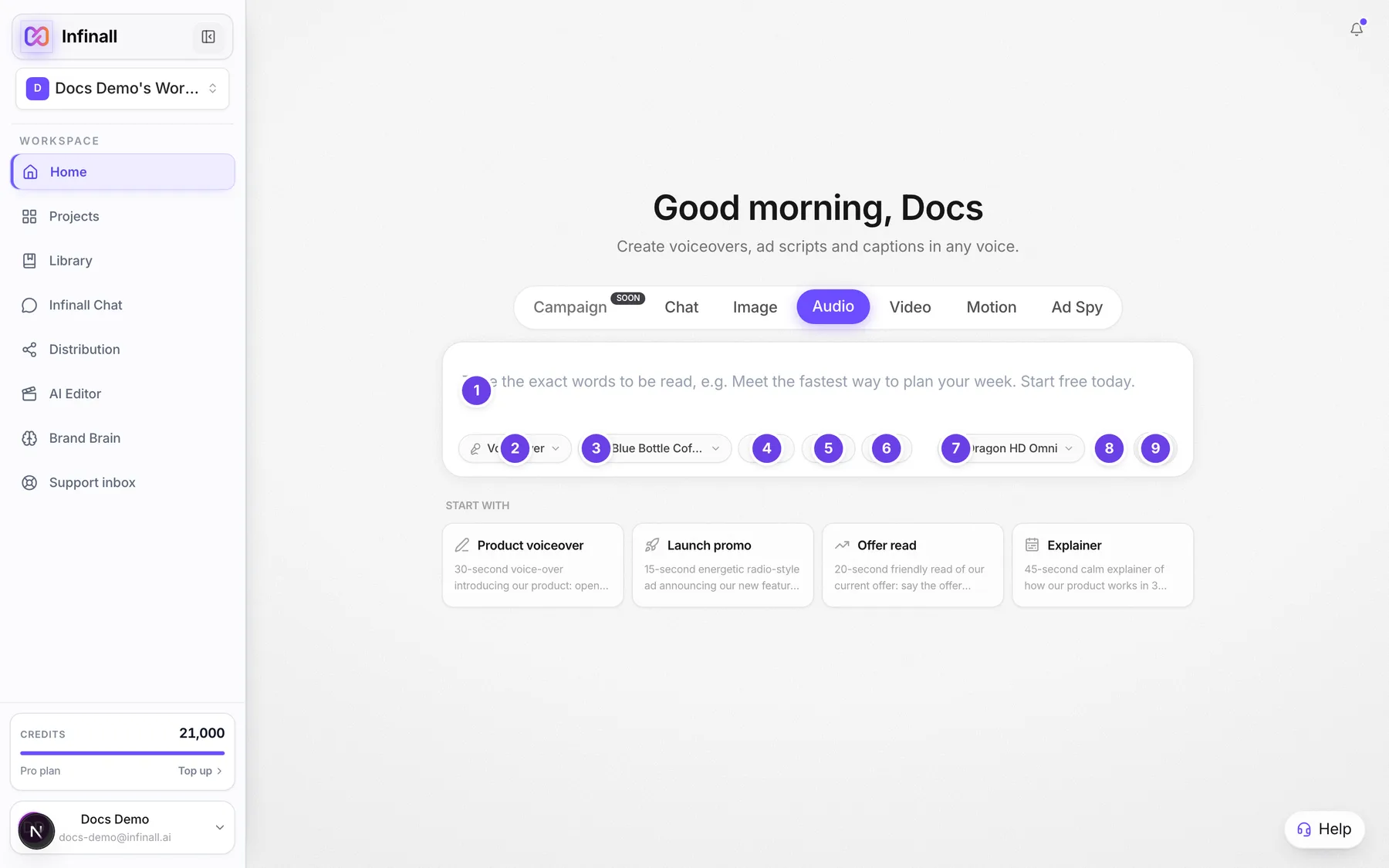
| # | Name in the app | What it does | Plan |
|---|---|---|---|
| 1 | Type the exact words to be read, e.g. Meet the fastest way to plan your week. Start free today. | The script box. Type the words exactly as you want them spoken. The text changes in other modes. | Both |
| 2 | Voice over | The mode chip. Opens the list of audio modes. Voice over is one voice reading your text. | Both |
| 3 | Brand: (your brand name) | The brand chip. Pick a brand so the take uses it, for example to say brand words the way the brand wants. With no brand picked, the chip is named Select brand. | Both |
| 4 | Voice | Opens the voice list. The chip shows the voice name and a short language code. | Both |
| 5 | Neutral | The emotion chip. See Emotions, pauses and speed. | Both |
| 6 | Settings | Icon only. Opens speed, ad length and takes, plus Write the script for me. A number on it counts how many settings you changed. | Both |
| 7 | Speech model | Opens the list of speech models. On the canvas this sits just left of the send button. | Both |
| 8 | Voice typing | Click and speak to type the script with your voice. Voice typing uses credits. | Both |
| 9 | Start campaign | The round arrow that sends your script. On the canvas the same button is named Generate audio. | Both |
| Search voice, language, accent... | Inside the voice list. Type to filter voices. | Both | |
| Only voices that can do emotions | Inside the voice list. Tick it to show only voices that can use emotions. | Both | |
| Slow, Normal, Fast | Inside Settings, under Speed. | Both | |
| Any, 6s, 15s, 30s, 60s | Inside Settings, under Ad length. | Both | |
| 1, 2, 3 | Inside Settings, under Takes. | Both | |
| Write the script for me | Inside Settings. Opens the script writer. See Write the script for me. | Both | |
| Pro (on a speech model) | Shows next to the model that needs Pro. On Free, picking it opens an upgrade prompt. | Pro | |
| Play, Pause | On the finished take. Plays your voiceover. | Both | |
| Download | On the finished take. Saves the audio file. | Both | |
| Export, Mix with music, Re-voice | Buttons under the finished take. Export and Mix are free. Re-voice makes a new take, so it uses credits. | Both |
#How to make a voiceover
- Open Home and choose the Audio tab. On the canvas, switch the composer to Audio.
- Keep the mode on Voice over.
- Type your script in the box.
- Open Voice and pick a voice.
- Optional: open Settings to change Speed, Ad length or Takes.
- Send it with the round arrow.
- Wait for the take to appear on the canvas, then press Play.
#How to compare voices
- Open the mode chip and choose Compare voices.
- Type one script.
- Open Pick voices and tick the voices you want. The list shows how many you picked out of 10.
- Send it. Each voice makes its own take, so you can listen side by side.
#How to say the same script in other languages
- Open the mode chip and choose Translate & speak.
- Type the script once, in any language.
- Open Pick languages and tick each language. Each language uses one voice for that language.
- Send it. You get one take per language, translated and spoken.
#How to make a short conversation
- Open the mode chip and choose Two speakers.
- Write lines that start with Speaker 1: and Speaker 2:, each on its own line. The box shows an example.
- Send it. Each line is spoken as a separate take so they play back as a conversation. The voices are picked for you.
#Options explained
Modes in the Voice group.
| Mode | What it does |
|---|---|
| Voice over | One voice, your text. |
| Two speakers | A conversation between two voices. |
| Compare voices | Same text, several voices. |
| Translate & speak | Same text in several languages. |
| Clone voice | Train your own voice. Pro. See Voice cloning. |
Speed. Slow reads at 0.7 times normal speed, Normal at 1 times and Fast at 1.3 times. To slow down or speed up only part of a script, use tags. See Emotions, pauses and speed.
Ad length. Pick 6s, 15s, 30s or 60s to fit an ad slot. Any turns this off. The target is about 15 words for 6 seconds, 38 for 15 seconds, 75 for 30 seconds and 150 for 60 seconds. If a plain script runs over the chosen length, it is trimmed to fit, and only the trimmed words are read and charged. The Settings panel says "Long scripts are trimmed to fit."
Takes. Pick 1, 2 or 3 versions of the same script. Each take is charged. More takes means more choice, because no two reads sound exactly the same.
Voice list. Voices are grouped by language, with English first. You can search by voice name, language, accent, tone or gender. English voices come in American, British, Australian and Indian accents. Hindi, Tamil, Telugu, Kannada, Malayalam and Bengali are covered too. A voice tagged EMOTIONS can use the emotion chip.
Speech model. The list has two groups. The first has four models for everyone, with strengths shown under each name, for example emotions and Indian languages, fastest, many languages, or high definition narration. The second group has one model marked Pro (the most natural voices and your clones). The panel says "Charged on the characters spoken. Each take is charged." Switching to a model from the other group moves you to a voice that fits it.
Brand. With a brand picked, brand words are said the way the brand wants. The words you typed stay exactly as typed.
#Limits
- One script can be up to 5,000 characters, which is roughly five minutes of speech.
- Settings lets you pick up to 3 takes. Each one is charged.
- Compare voices and Translate & speak take up to 10 voices or languages at once. Each one is a separate charge.
- Two speakers reads two speakers at most. A third speaker is refused.
- Generated audio can be used commercially by the account that made it.
#When something goes wrong
| Message in the app | What it means | What to do |
|---|---|---|
| Write or describe the voiceover you want. | The script box is empty. | Type your script, then send again. |
| Pick a voice first. | No voice is selected, usually because the voice list has not loaded. | Open Voice and pick one. |
| Pick at least one language to translate into. | You are in Translate & speak with no language ticked. | Open Pick languages and tick at least one. |
| No speaker lines found. Use "Speaker 1: ..." and "Speaker 2: ..." on separate lines. | Two speakers needs lines that start with a speaker name. | Start each line with Speaker 1: or Speaker 2:. |
| Two speakers maximum. | The script has a third speaker. | Keep to two speakers. |
| That voice is not available. | The voice you picked is no longer in your list. | Pick another voice. |
| Voice generation failed. No credits were charged. | The voiceover did not finish. | Try again. You were not charged. |
| None of the selected voices could be rendered. | Compare voices produced nothing. | Try again or pick other voices. You were not charged. |
| None of the selected languages could be rendered. | Translate & speak produced nothing. | Try again or pick other languages. You were not charged. |
That script is too long for <length>. Shorten it to about <n> words, or pick a longer ad length. | A script with tags is over the ad length. Plain scripts are trimmed instead. | Shorten it, or set Ad length to Any or a longer value. |
| Insufficient credits. Purchase more to continue. | Your balance is too low. | See Your credit balance. |
| Premium voices, music, sound effects, voice changer, noise removal, voice cloning and dubbing are Pro features. Upgrade to Pro to use them. | You tried a premium voice or Pro mode on Free. | Pick a voice or model without the Pro tag, or upgrade. |
| This take failed. You weren't charged. | A take on the canvas did not finish. | Make the take again. |
#Questions
#Which voices can I use on Free?
54 voices across 29 languages. Pro adds 20 premium English voices and your own clones.
#Why does a second take sound different?
Each take is a fresh read, so pace and tone vary a little. That is why Takes exists: make a few and keep the best.
#Am I charged if it fails?
No. A voiceover that fails produces no audio and charges no credits. Credits are held first, and any unused part is returned.
#Can I use the audio in my ads?
Yes. Generated audio can be used commercially by the account that generated it.
#Where do my takes go?
Every take is saved on the project canvas. Drag it to a new place and the position is remembered. Moving a take is free. See Move around the canvas and Download and export.
Last checked against the app on . View as Markdown