
Contact support
Ask Infinall AI in the Help chat, bring in the team, open a ticket, attach files and send a bug report.
#What it is
You can get help in three ways. The Help chat answers at once and can pass you to a person. The Support page holds your tickets and lets you write a new one. Report a bug sends the team a title, a description and screenshots.
#Who can use it
Everyone. Free and Pro accounts use the same Help chat, tickets and bug reports. The only difference is the reply time we promise from a person: 24 hours on Pro and 72 hours on Free.
#Cost
Free, no credits. Chatting with support, sending files, opening tickets and sending bug reports never use credits.
#Where to find it
- Help chat: the Help button at the bottom right of Home and Projects. It does not show on other screens.
- Support page: open the Account menu (your picture at the top right, or at the bottom of the sidebar) and choose Support. The top right menu also has Get help.
- Report a bug: the Account menu, or the Report a bug button at the top of the Support page.
- By email: support@infinall.ai.
#Buttons and controls
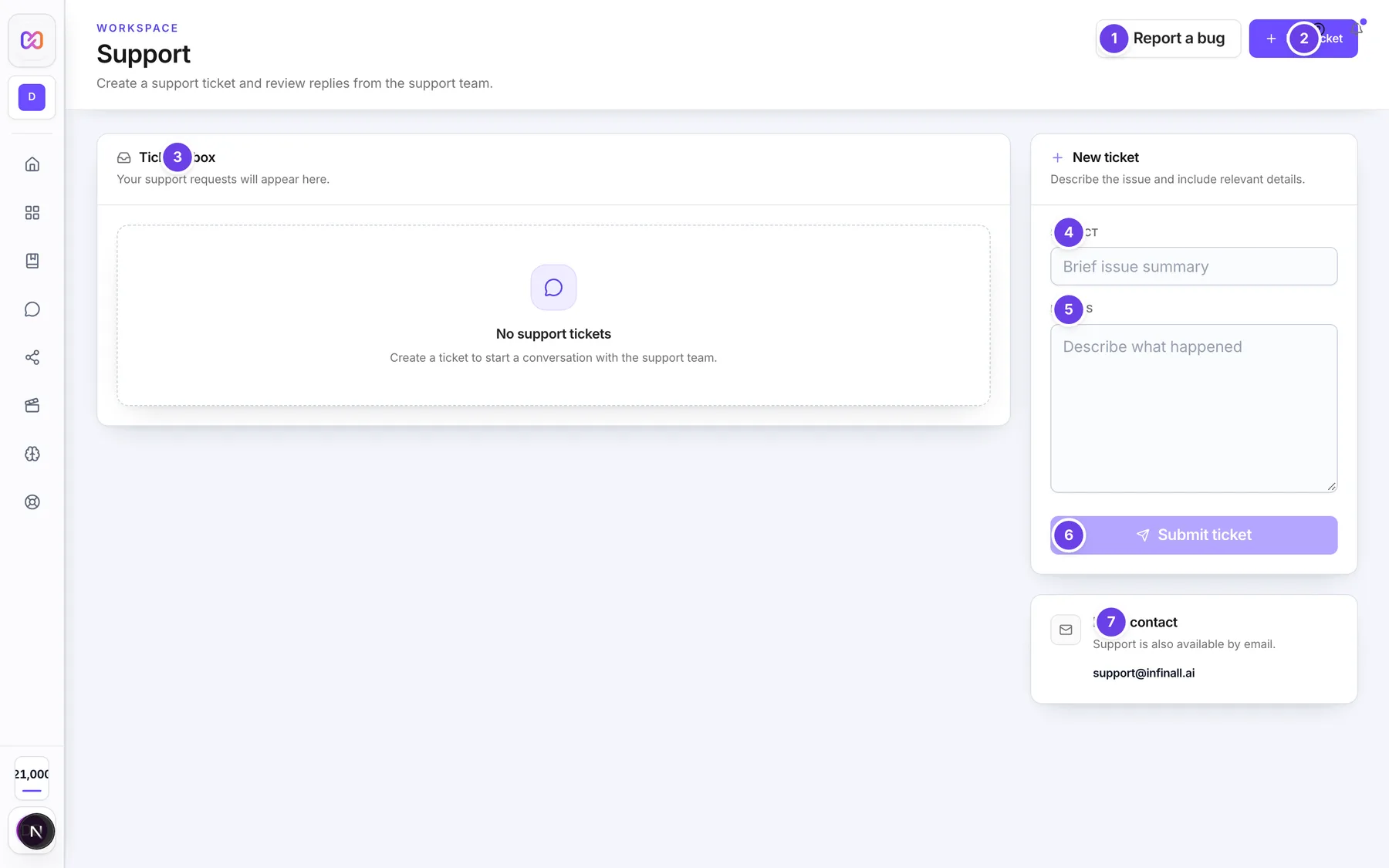
This is the Support page.
| # | Name in the app | What it does | Plan |
|---|---|---|---|
| 1 | Report a bug | Opens the bug report box. See below. | Both |
| 2 | New ticket | Jumps down to the new ticket form. | Both |
| 3 | Ticket inbox | Lists your tickets with their number (for example INF-1042), Subject, Status and Created date. Click a row to read it. It says "No support tickets" until you make one. | Both |
| 4 | Subject | The short title of your ticket. | Both |
| 5 | Details | What happened. | Both |
| 6 | Submit ticket | Sends the ticket. It stays off until both boxes have text. | Both |
| 7 | Email contact | Shows support@infinall.ai. Click it to open your email app. | Both |
| Write a reply | Inside an open ticket. Type your reply. Enter sends it. | Both | |
| Reply | Sends your reply. Shows on a ticket that is not closed. | Both | |
| Close ticket | Closes the ticket. Shows on a ticket that is not closed. | Both |
The ticket Status badge on this page shows the plain status word, for example open or closed. New replies appear by themselves every 10 seconds while a ticket is open on your screen.
#The Help chat window
These controls are in the window that opens from the Help button. Several show only in some states.
| # | Name in the app | What it does | Plan |
|---|---|---|---|
| Help | The launcher button. A number on it counts replies you have not read. | Both | |
| Start conversation | On the Help home screen. Opens the chat. It reads Continue conversation when you already have one. | Both | |
| Get Help | A link on the Help home screen to the public help pages. Opens in a new tab. | Both | |
| Frequently Asked Questions | A short list of common questions. Click one to read the answer. | Both | |
| Back | Returns to the Help home screen. | Both | |
| New | Ends this chat and starts a fresh one. Shows after your first message. | Both | |
| Close support | The x at the top right. Closes the window. Esc does the same. | Both | |
| Write a message | The box where you type. Enter sends. Shift and Enter start a new line. | Both | |
| Send | Sends your message. | Both | |
| Attach a file | Picks a picture, video, PDF, Word, text or CSV file to share. | Both | |
| Record a voice message | Records your voice and sends it. Click again (Stop recording) to finish. | Both | |
| Remove screenshot | The x on the small picture above the box. Drops the screenshot of your page. | Both | |
| Helpful and Not helpful | Thumbs under an answer from Infinall AI. Click again to take your vote back. | Both | |
| Sources | Small tags under an answer. Click one to read the help article the answer used. | Both | |
| Talk to our team | A link under the chat, next to "Prefer a person?". Opens Bring in our team?. | Both | |
| Connect me | In Bring in our team?. Passes the chat and your current page to a person. Not now closes it. | Both |
#How to ask a question in the Help chat
- Go to Home or Projects and click Help.
- Click Start conversation. You can also click a question under Frequently Asked Questions.
- Type in Write a message, or click one of the starters: "How do credits work?", "Why did my campaign fail?" or "Help with billing".
- Press Enter or click Send. Infinall AI answers and shows Sources when it used a help article.
A small picture of your page is taken when you open Help. It is attached to your chat so the team can see what you saw. Click Remove screenshot if you do not want it shared. If you remove it before you send, it is never uploaded. If it was already uploaded, it is deleted.
#How to talk to a person
- In the Help chat, send at least one message.
- Click Talk to our team.
- In Bring in our team?, click Connect me.
- Keep messaging in the same window. The top of the chat changes to "Connecting you with our team", then "A person is here".
If nobody joins within 5 minutes, the chat becomes a ticket and the chat tells you the ticket number and when to expect a reply.
#How to open a ticket
- Open the Account menu and choose Support.
- In New ticket, type a short Subject.
- Write what happened in Details.
- Click Submit ticket. You see "Ticket created successfully." and the ticket appears in Ticket inbox.
To follow a ticket, click its row in Ticket inbox. Replies from the team show as "Support team" and yours as "You". To add something, type in Write a reply and click Reply. To finish, click Close ticket.
#How to share a file
- In the Help chat, click Attach a file.
- Pick a file. Pictures, MP4 video, PDF, Word, plain text and CSV files work.
- Wait for "Uploading..." to finish. The file shows in the chat.
Files you share are private. Only you and the support team can open them, and the link to a file stops working after 5 minutes, so reopen it from the chat.
#How to send a bug report
- Click Report a bug on the Support page, or in the Account menu.
- In What's the problem?, write a short title, for example "Export button does nothing".
- In What happened, and what did you expect?, describe the steps.
- To add pictures, click Add or paste an image into the box. You can add up to 3 screenshots.
- Click Send report. You see "Thanks, your report was sent." Click Close.
The report also includes the page address and your browser details, such as language, screen size and theme. It does not include passwords.
#Options explained
Ticket status. A ticket is open, in progress, waiting on you, resolved or closed. The Support page shows the word as it is. A closed ticket has no reply box. A resolved or closed ticket cannot take new replies.
Chat state. The line under the chat title tells you who is answering: "Infinall AI - replies instantly", "Connecting you with our team" or "A person is here".
When the chat ends. A chat with no activity for 5 minutes ends by itself. A resolved chat closes after 7 days. After it ends, the chat says "This conversation is closed. You can start another anytime." and the box reads Start a new conversation.
#Limits
- A Help chat message can be up to 2,000 characters.
- You can send 8 messages per minute and 150 per day.
- A file you share can be up to 10 MB.
- One chat holds up to 3 page screenshots.
- A ticket subject is 5 to 120 characters. The details are 10 to 5,000 characters. A reply can be up to 5,000 characters.
- A bug report title is 3 to 200 characters and the description is 5 to 5,000 characters. Each screenshot can be up to 10 MB.
- The Help chat you left is kept on your screen for up to 30 minutes. After that it starts fresh.
- Support chats older than 180 days are made anonymous and their files are deleted.
#When something goes wrong
| Message in the app | What it means | What to do |
|---|---|---|
| You are sending messages very fast. Wait a minute and try again. | You went over the per minute limit. | Wait a minute. |
| You have reached today's support chat limit. Email support@infinall.ai and we will help. | You went over the daily limit. | Email support@infinall.ai. |
| Messages can be up to 2000 characters. Shorten it and send again. | Your message is too long. The number can change, so the app shows the current one. | Split it into shorter messages. |
| Something went wrong. Please try again. | A message, file or voice note did not go through and the server gave no reason. | Check your connection and try again. If it keeps happening, email support@infinall.ai. |
| Message cannot be empty | You sent a blank message. | Type something first. |
| That file is over 10 MB. Choose a smaller one. | The file is larger than the limit. | Pick a smaller file or shrink it. |
| Unsupported file type | The file type is not allowed. | Use a picture, MP4, PDF, Word, text or CSV file. |
| This chat already has 3 screenshots. | The chat is full of page screenshots. | Click New to start a fresh chat. |
| Voice messages need microphone access in a secure browser. | Your browser cannot record here. | Use a current browser on a secure (https) page. |
| Microphone access is off. Allow it in your browser and try again. | The microphone is blocked. | Allow the microphone for this site. |
| This conversation is closed. You can start another anytime. | The chat ended. | Type a new message or click New. |
| Nobody is online right now. Ticket INF-1042 is created. We reply within 24 hours (Pro plan). | No person was free, so a ticket was made. The number and time match your ticket and plan. | Follow the ticket on the Support page. |
| Support ticket not found. | The ticket is gone or is not yours. | Check the ticket number. |
| This ticket is closed and cannot be updated. | You replied to a closed ticket. | Open a new ticket. |
| We couldn't load your tickets. | The list did not load. | Reload the page. |
| Screenshots must be PNG, JPG, WEBP or GIF images. | A bug report file is not a picture of that type. | Use a PNG, JPG, WEBP or GIF image. |
| Each screenshot must be 10 MB or smaller. | A bug report picture is too big. | Use a smaller picture. |
| You can attach up to 3 screenshots. | You tried to add a fourth. | Remove one first. |
| We couldn't send your report. Please try again. | The bug report did not send. | Try again in a moment. |
#Questions
#How fast will I get a reply?
Infinall AI replies at once. If you ask for a person, we promise a reply within 24 hours on Pro and 72 hours on Free.
#Why do I not see the Help button?
It shows only on Home and Projects. On other screens, open the Account menu and choose Support.
#Does support cost credits?
No. Chatting, tickets, files and bug reports are free.
#What is the difference between a ticket and a bug report?
A ticket is a conversation with the team, with replies you can follow. A bug report is a one way note about something broken, with screenshots and your browser details. We reply by email if we need more.
#Can I stop the page screenshot from being sent?
Yes. Click Remove screenshot on the small picture above the message box. Before the first message it is never uploaded. After it is uploaded, it is deleted.
#Where do I find my ticket number?
In Ticket inbox on the Support page, in front of the subject, for example INF-1042. The same number is in emails about the ticket.
Last checked against the app on . View as Markdown