
What is Infinall
Infinall is one place to make images, motion videos, audio and chat from your brand, with a Home screen, a sidebar and credits.
#What it is
Infinall is one place to plan, create and launch marketing work. The sign in screen puts it as "Your whole marketing team, in one place".
You start on the Home screen, pick what you want to make, type a short description and send it. Your work opens in a project, and your brand is saved once in Brand Brain so everything you make can stay on brand.
#Who can use it
Everyone. Free and Pro accounts both get the Home screen, the sidebar and credits. A few modes and features are Pro only. The Free vs Pro page lists them.
#Cost
Signing in, opening screens and reading your balance are free. Making things uses credits, and the sidebar shows your balance as you spend. A Free account starts with 1,000 credits. See Your credit balance.
#Where to find it
Open the app and you land on Home. The sidebar on the left takes you everywhere else.
#Buttons and controls
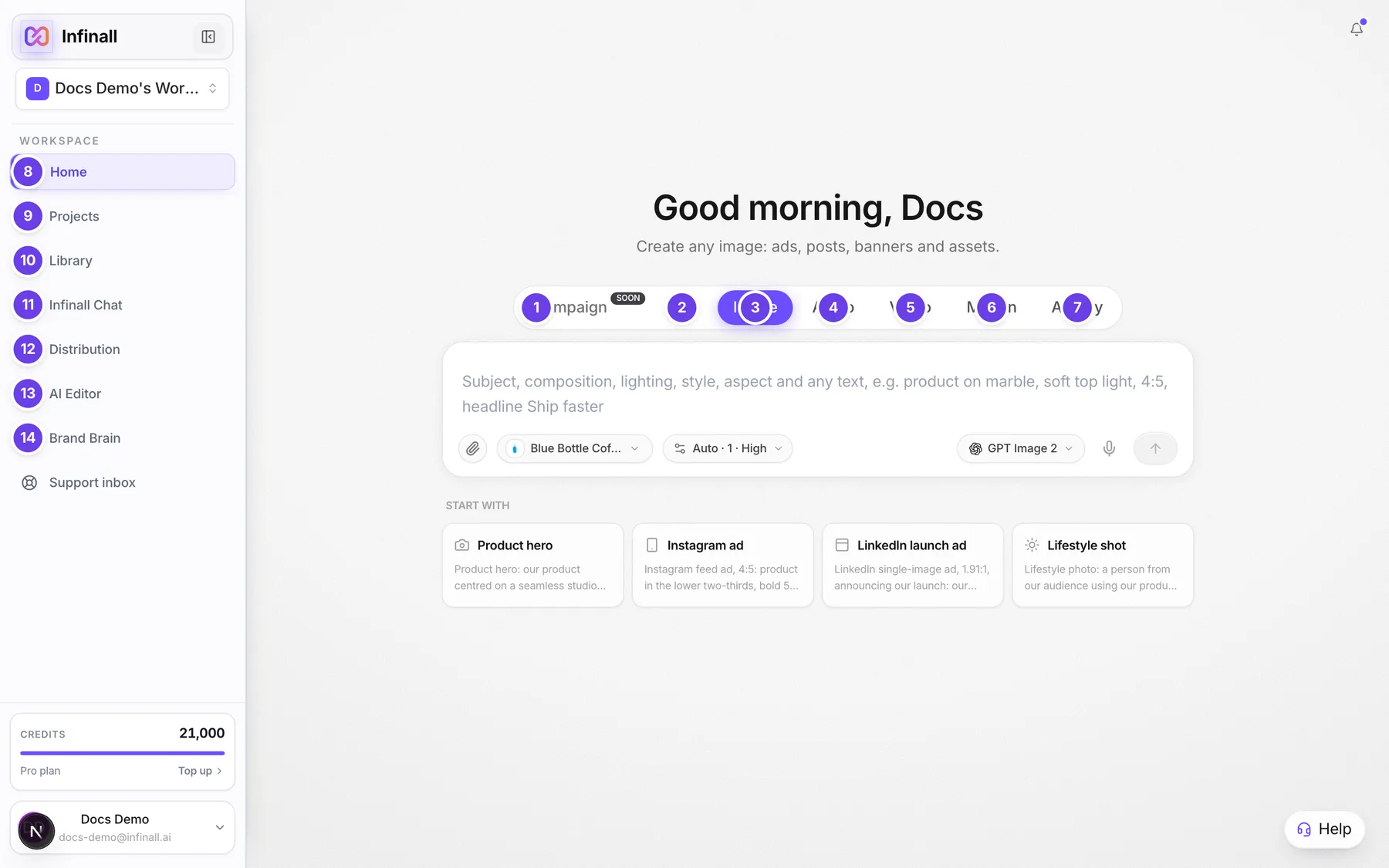
| # | Name in the app | What it does | Plan |
|---|---|---|---|
| 1 | Campaign | A mode tab on Home. Campaign docs are coming soon. | See the tab |
| 2 | Chat | Ask questions and get plans, research and copy. It opens Infinall Chat. | Both |
| 3 | Image | Create images, ads and design assets. | Both |
| 4 | Audio | Create voiceovers, scripts and captions. | Both |
| 5 | Video | Create videos from a prompt. | Pro |
| 6 | Motion | Create motion graphics and short videos from a prompt. | Both |
| 7 | Ad Spy | See the ads any brand is running right now. | Both |
| 8 | Home | Sidebar item. The screen with the prompt box. | Both |
| 9 | Projects | Sidebar item. Your saved work. | Both |
| 10 | Library | Sidebar item. Browse real ads and save them. | Both |
| 11 | Infinall Chat | Sidebar item. The full chat screen. | Both |
| 12 | Distribution | Sidebar item. Plan and publish posts and ads. | Both |
| 13 | AI Editor | Sidebar item. Edit videos on a timeline. | Both |
| 14 | Brand Brain | Sidebar item. Your saved brands. | Both |
A lock on a mode tab means your plan does not include that mode. Clicking it opens an upgrade dialog and keeps you where you were.
#How to understand the main parts
- Home is where you start. Pick a mode tab, describe what you want and send it.
- Brand Brain holds your brand: name, colours, voice and audience. Add it once from your website address and pick it in the Brand chip next to the prompt box.
- Projects keeps what you made. Open a project to see it on the canvas, change it and download it.
- The Credits card at the bottom of the sidebar shows your balance, live.
#Options explained
Modes. Each tab on Home is one kind of work: Campaign, Chat, Image, Audio, Video, Motion and Ad Spy. Ad Spy searches ads that Meta, Google and LinkedIn brands run. The other networks shown there are marked Coming soon.
Brand Brain is optional. Image, Audio and Motion work without a brand. You can pick No brand in the Brand chip.
Workspaces. The sidebar header has a workspace switcher. Each workspace keeps its own work. See The sidebar.
#Limits
- A Free account starts with 1,000 credits, set back to that amount on day 1 of each month.
- A Pro account gets 3,000 credits every month.
- The AI Editor needs a screen at least 1,024 pixels wide.
#When something goes wrong
| Message in the app | What it means | What to do |
|---|---|---|
| Insufficient credits. Purchase more to continue. | Your balance is too low for this action. | On Pro, buy a credit pack. On Free, wait for the 1st of the month or upgrade to Pro. |
| Can't reach our servers right now. Check your connection and try again. | Your device could not reach Infinall. | Check your internet connection and try again. |
#Questions
#Do I need a brand to start?
No. Image, Audio and Motion work without one. A brand makes results match your site, so add one when you can.
#Is Infinall free?
You can sign up free and you start with 1,000 credits. Making things uses credits. Pro adds more credits and some extra features.
#Where is my work saved?
In Projects in the sidebar.
#What can I do with Chat?
Chat gives plans, research and copy. Start it from the Chat tab on Home or open Infinall Chat in the sidebar.
#Is there a mobile version?
The app works in a phone browser. The sidebar becomes a menu you open with the button in the top bar. The AI Editor needs a larger screen.
Last checked against the app on . View as Markdown