
Caption limits per platform
How many characters each platform allows in a caption, how many images or videos each takes, and what the app does when a post is too long.
#What it is
Every platform has its own limit for caption length and for the number of images or videos in one post. The composer counts characters for you, warns you when you go over, and blocks scheduling until each platform fits.
#Who can use it
Everyone. The limits are the same on Free and Pro.
#Cost
Free, no credits.
#Where to find it
Open Distribution > Calendar and click New post. The counters sit under the caption box, and the media limit shows in the Image or video box.
#Buttons and controls
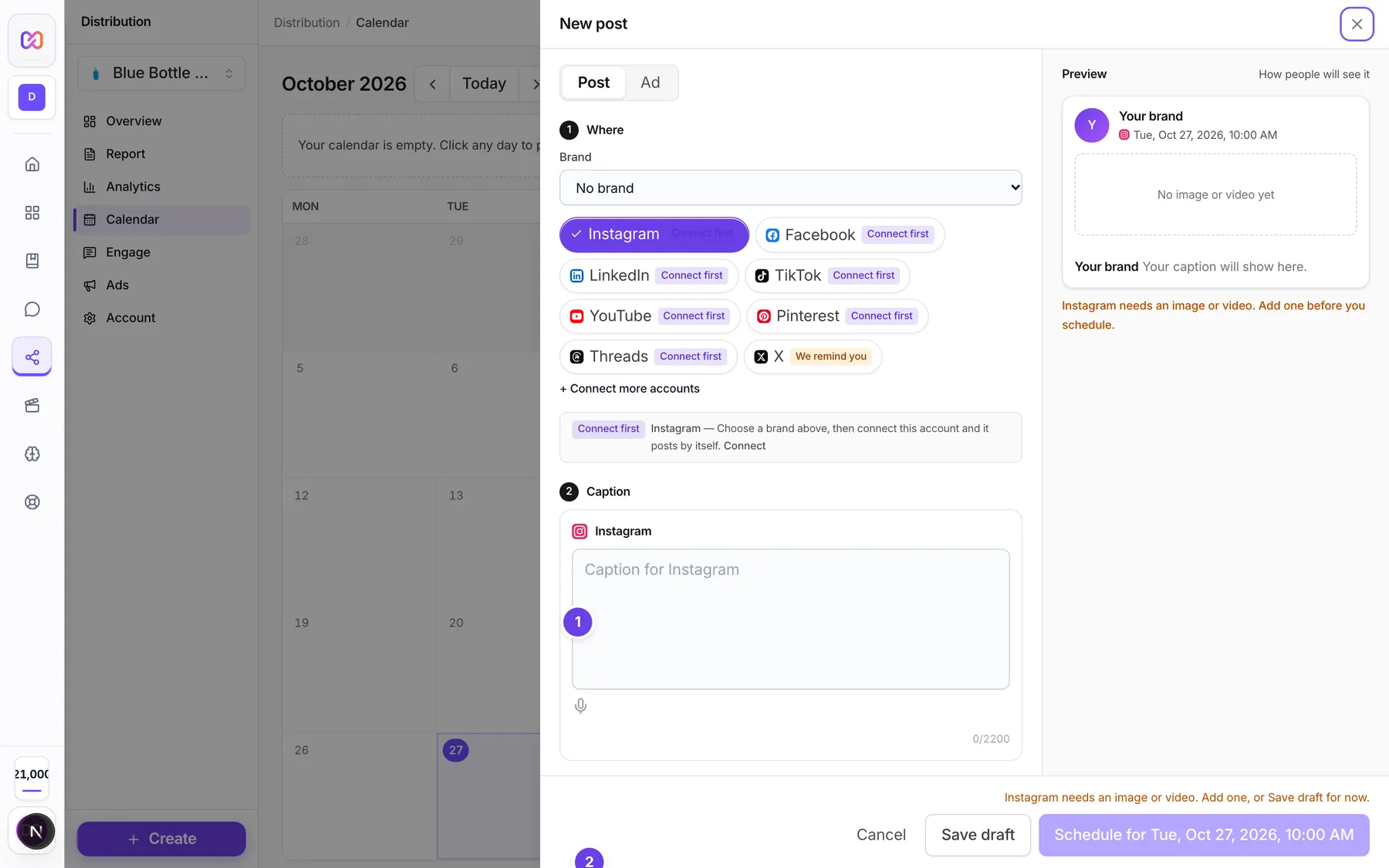
| # | Name in the app | What it does | Plan |
|---|---|---|---|
| 1 | Caption | The caption section of a new post. With one platform picked you see one box with a counter. | Both |
| Write once for all | A switch. On, one caption goes to every platform. Off, each platform has its own box with its own counter. It shows only when two or more platforms are picked. | Both | |
| Shared caption | The one caption box when Write once for all is on. | Both | |
| (Platform) caption | One box per platform when Write once for all is off. | Both | |
| Counter (for example 120/2200) | Shows how many characters you used and the limit. It turns red when you are over. In the shared box you see one small counter per platform. | Both | |
| Restore | Puts the shared caption back in one platform's box. | Both | |
| Same as | Copies another platform's caption into this one. | Both | |
| 2 | Add image or video | Opens the upload window. The line under it shows how many files the platforms you picked allow. | Both |
| Media per platform | Shows when a post has more files than one platform takes. You choose which files go to that platform. | Both |
#How to write one caption that fits every platform
- Open a new post and pick your platforms.
- Keep Write once for all on and type in Shared caption.
- Watch the small counters. Any one that turns red is a platform you are over on.
- Shorten the text, or switch Write once for all off and shorten only that platform's caption.
#How to give one platform a shorter caption
- Switch Write once for all off.
- Open that platform's caption box. It shows Customized once it differs from the shared text.
- Write the short version. Click Restore to go back to the shared caption.
#Options explained
Characters allowed per platform. Every caption is also capped at 5,000 characters overall. The smaller of the two numbers applies.
| Platform | Characters allowed |
|---|---|
| 2,200 | |
| 63,206 | |
| 3,000 | |
| X | 280 |
| TikTok | 2,200 |
| YouTube | 5,000 |
| 800 | |
| Threads | 500 |
Where the text is cut off. On some platforms people only see the start of a caption before a "more" link. The composer tells you when you pass that point and reminds you to put the important part first.
| Platform | Characters shown before "more" |
|---|---|
| 125 | |
| 477 | |
| 210 | |
| TikTok | 100 |
Images and videos per post. One post holds up to 20 files in total, and each platform has a smaller limit of its own.
| Platform | What one post can hold | Notes |
|---|---|---|
| Up to 10 images or videos | Needs at least one image or video. You can mix images and videos. | |
| Up to 10 images, or one video | Do not mix images and a video. | |
| Up to 20 images, or one video, or one PDF document | A PDF cannot be combined with other media and needs a title. If you leave the title empty, the first line of the caption is used. | |
| X | Up to 4 images, or one video | Do not mix images and a video. X is a reminder platform. |
| TikTok | Up to 35 photos, or one video | Needs at least one image or video. Do not mix. |
| Threads | Up to 10 images or videos | You can mix images and videos. |
| One image or one video | Needs media and a board. | |
| YouTube | One video | Needs a video. Images are not accepted. |
If a post has more files than a platform takes, you pick which files go to that platform in Media per platform. Nothing is trimmed without you choosing.
Aspect ratio. The caption box preview frames your media at the shape each platform likes, for example 4:5 for Instagram, square for Facebook and Threads, 1.91:1 for LinkedIn, 9:16 for TikTok, 16:9 for X and YouTube, and 2:3 for Pinterest.
#Limits
- Overall caption cap: 5,000 characters.
- Files per post: 20.
- LinkedIn PDF: up to 100 MB and 300 pages. The document title is up to 200 characters.
- First comment: up to 2,200 characters.
#When something goes wrong
| Message in the app | What it means | What to do |
|---|---|---|
| Caption too long for (platforms). | A caption is over the limit for one or more platforms. | Shorten it, or write a separate caption for that platform. |
| The (platform) caption is (number) characters; (platform) allows (number). Shorten it or write a separate caption for (platform). | The save was refused because of the limit. | Shorten it, or write a separate caption. |
| (Platform) needs at least one image or video. | The platform will not publish text alone. | Add media. |
| (Platform) needs a video. | The post has no video. | Add a video, or leave the platform out. |
| (Platform) takes a video only. Leave the images out for (platform). | YouTube does not accept images. | Remove the images for that platform. |
| (Platform) takes up to (number) images per post. You have (number). Pick which ones go to (platform). | You added more files than the platform takes. | Choose files in Media per platform. |
| (Platform) cannot mix images and a video in one post. Pick either the images or the video for (platform). | The platform takes images or a video, not both. | Pick one kind. |
| Choose a Pinterest board. | A Pinterest post needs a board. | Pick a board in the Add to calendar form. |
| A LinkedIn document needs a title. | A PDF has no title and the caption is empty. | Type a title or write a caption. |
#Questions
#What is the shortest limit I have to think about?
X is the shortest. Threads and Pinterest are short too. See the table above.
#Do I have to write a different caption per platform?
No. Keep Write once for all on. Write a separate caption only for a platform where the shared one is too long.
#Does a link or emoji count?
The counter counts every character you type, including spaces, links and emoji.
#Why does Schedule stay greyed out after I shortened the caption?
Another platform can still be over, or a platform needs media. The reason shows right above the button.
Last checked against the app on . View as Markdown