
What uses credits and what is free
Learn which actions use credits and which are always free, such as saving, exporting, downloading and viewing.
#What it is
Credits pay for work that makes something new with Infinall AI. Looking at things, saving them and moving them out of the app does not use credits. This page sorts the app into those two groups.
#Who can use it
Everyone. Both plans use credits the same way. Some features that use credits are only open on Pro, see Free vs Pro.
#Cost
Mixed. Making new things uses credits. Saving, exporting, downloading and viewing are free.
#Where to find it
You see a price chip or a price card before work that uses credits. Free actions show no price, or a Free chip on some edit tools.
#Buttons and controls
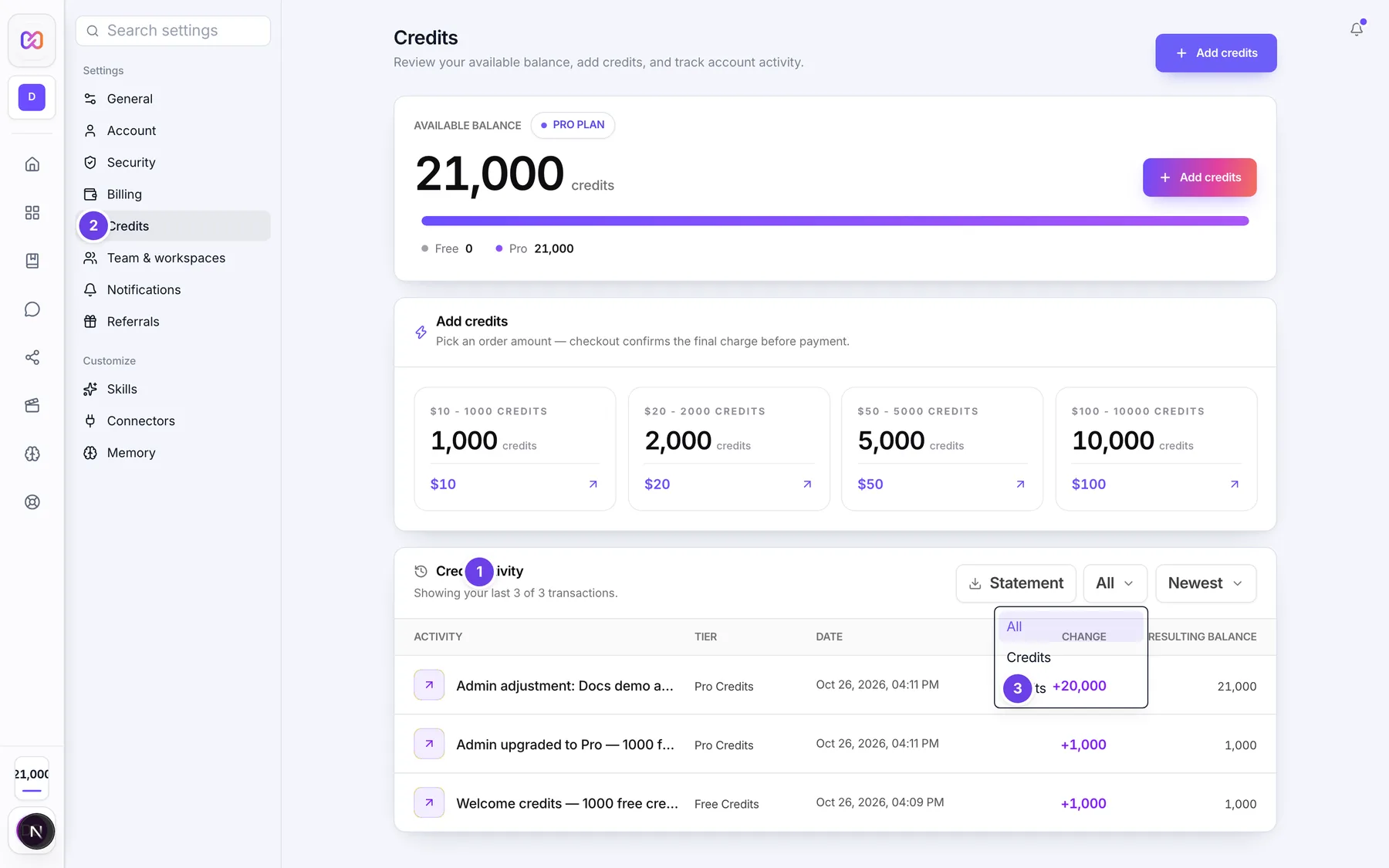
| # | Name in the app | What it does | Plan |
|---|---|---|---|
| 1 | Credit activity | The list on Settings > Credits that shows every deduction, grant and refund. Use it to see what an action cost. | Both |
| 2 | Credits | In the filter menu (the button that shows All). Filters Credit activity to additions only. | Both |
| 3 | Debits | Filters Credit activity to spending only. | Both |
#How to see what you were charged
- Open Settings, then Credits.
- In Credit activity, choose Debits.
- Read the description on each row. Choose Show all transactions for older rows.
#Options explained
#What uses credits
Work that makes new content or text with Infinall AI, charged once when the work is done:
- Making images, and edits that make new images.
- Videos made with generated footage.
- Motion videos. The price depends on what the video uses.
- Audio that makes new sound or text: Voice over, Two speakers, Compare voices, Translate & speak, Write a script, Transcribe, Music brief and the Pro audio modes.
- Speaking with a cloned voice.
- AI actions in the editor: chat, picture and voice.
- Infinall Chat replies, based on the model that answered. Images made in chat, and transcribing a file, also use credits.
- Suggested replies in Messages and to reviews, and questions to the AI analyst in Analytics.
- Connecting accounts after the free ones (2 are free): each costs 300 credits a month. Every live ad costs 2 credits a month.
- Extra tracked competitor slots in Ad Spy: 300 each.
- Campaign mode. Campaign docs are coming soon.
#What is always free
- Saving: saving to your Library, saving a project, saving a brand version.
- Exporting and downloading: Export for platforms, Mix with music, downloading an image, a video or an audio take, and exporting a video file you already made. You paid when you made it.
- Restoring an older version of an image.
- Moving a take around the canvas.
- Viewing your balance, activity and payment history, and downloading a statement.
- Browsing the Library: Discover search, folders and My creations. Cloning an image from Discover into a project costs 0 credits.
- Searching Ad Spy, browsing ads already stored, and your recent searches. Searching is free for now while usage grows, and pricing may return later.
- Importing, editing and exporting in the AI editor. Only the AI actions cost credits.
- Opening a project in the AI editor.
- Cloning a voice. Only speaking with the clone costs credits.
- Writing captions and planning your month in Calendar with Infinall AI.
- Auto mode in chat. It never takes credits, but it has a fair use limit.
- Selecting an area with Auto select in an image.
- Previewing a Motion video and exporting its file.
- Reconnecting an account you already connected, or resuming a paused ad in a month you already paid for.
#Limits
- One edit request can cost at most 100 credits.
- One chat message can spend at most 100 credits on images.
- One AI editor request stops after 100 credits. Say continue to keep going.
- Auto mode in chat: 6 messages a minute, 60 an hour and 300 a day.
#When something goes wrong
| Message in the app | What it means | What to do |
|---|---|---|
| Insufficient credits. Purchase more to continue. | You do not have enough credits for this action. | Buy a credit pack on Pro, or wait for the 1st on Free. |
| Out of credits. Add credits in Settings > Credits to make videos. | You ran out of credits while making a video. | Add credits, then start again. |
| Not enough credits. Top up, then try again. | An Ad Spy action needs credits you do not have. | Top up, then try again. |
| You do not have enough credits for this search. | A search needs more credits than you have. | Top up, then search again. |
#Questions
#Does exporting or downloading cost credits?
No. You already paid when you made the item. Exporting, downloading and saving are free.
#Does it cost credits to look at my work?
No. Viewing, browsing and opening your projects never uses credits.
#Are failed tasks charged?
No. If a task fails, the credits held for it are returned. See Price before you confirm.
#Is chat free?
Auto mode is free and never takes credits. Other models use credits per reply, based on the model that answered. The app does not show a price for each model.
#Do tracked competitors cost credits?
On Pro, 3 tracked competitors are included. Extra slots cost 300 each.
Last checked against the app on . View as Markdown