
Clone a Library image into a project
Send a Discover image to Image Studio as a reference. Cloning works for images only, not videos, and costs no credits.
#What it is
Clone copies a Discover image into an Image Studio project and attaches it as a reference. You can then describe what you want and make your own version.
Clone works for images only. Videos cannot be cloned. It is offered for Discover images, not for Spy ads.
#Who can use it
Everyone, on Free and Pro. You need a workspace role that can write (not Viewer).
#Cost
Free, no credits. Cloning uses 0 credits. Making a new image afterwards uses credits and you see the exact price before you confirm.
#Where to find it
Open Library > Discover, choose an image, and look for Clone to project in the right panel.
#Buttons and controls
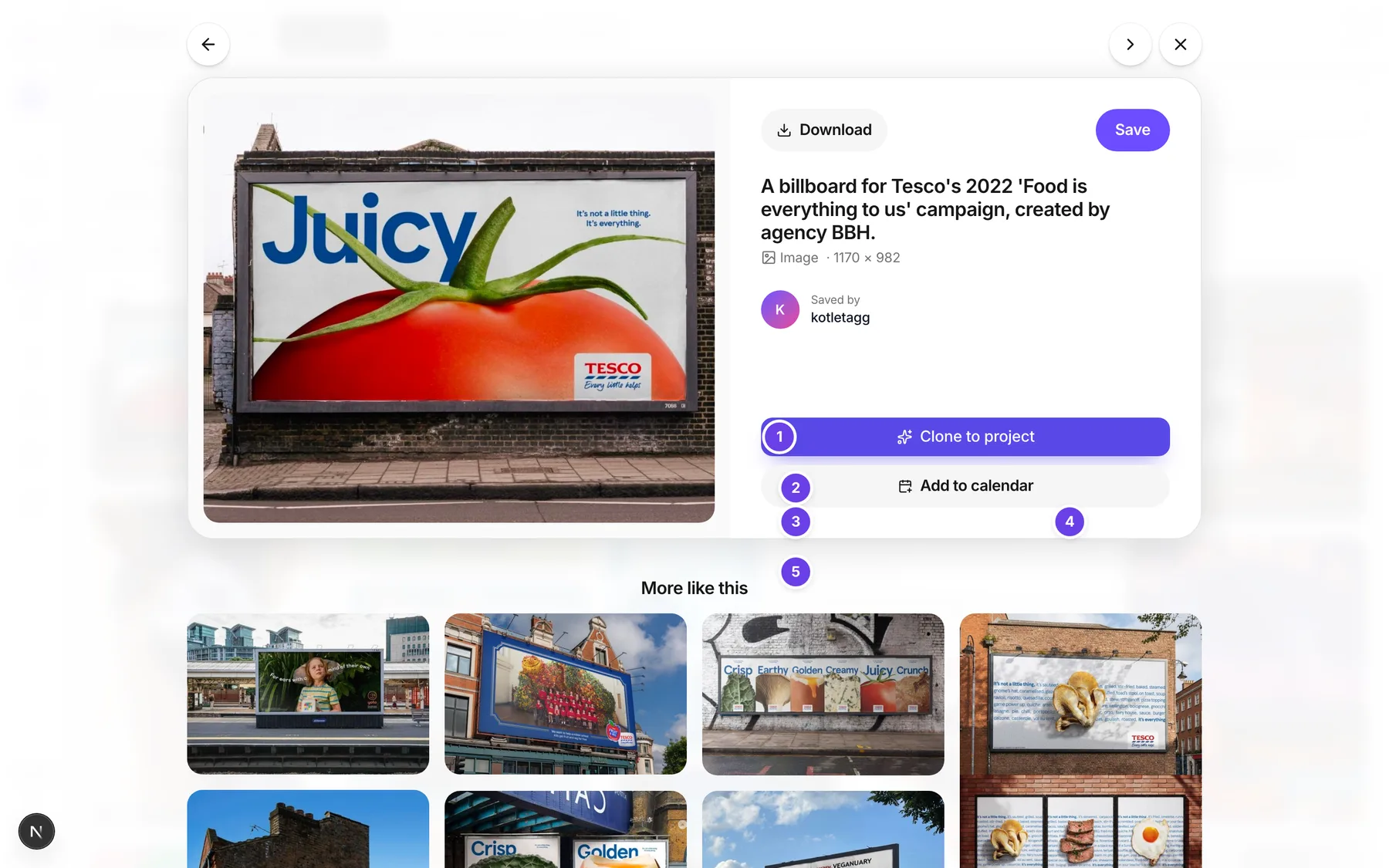
| # | Name in the app | What it does | Plan |
|---|---|---|---|
| 1 | Clone to project | Opens the project picker. | Both |
| 2 | Create new project | The top part of the picker. | Both |
| 3 | Project name | Type a name for a new project. | Both |
| 4 | Clone | Makes the new project and attaches the image. Greyed out until you type a name. | Both |
| 5 | Existing projects | The list of your projects, newest first, each with Updated and how long ago. | Both |
| 6 | Filter projects | A search box that shows when you have more than 8 projects. | Both |
| Add to calendar | Below the Clone button. Not part of cloning. | Both |
#How to clone into a new project
- Open Library, then Discover.
- Choose an image to open it.
- Choose Clone to project.
- Under Create new project, type a Project name.
- Choose Clone.
- You land in Image Studio with the image attached as a reference.
#How to clone into an existing project
- Open the image and choose Clone to project.
- Under Existing projects, choose a project. Use the arrow keys and Enter if you prefer the keyboard.
- You land in that project with the image attached.
#How to make your own version
- After you clone, Image Studio opens with the image attached as a reference.
- Describe the image you want in your own words.
- Check the price shown before you confirm. See Create an image.
#Options explained
Reference. The cloned image is attached as a reference, not as the finished picture. Your new image is made from your prompt, using the reference as a guide.
Image only. Clone refuses videos. For a video, download it or save it to a folder.
Spy ads. Spy ads cannot be cloned. Use Recreate and boost on a Spy ad instead. See Recreate a competitor ad.
Projects list. The newest project is at the top. If you have none, the list says so and you can clone into a new one.
#Limits
- The image can be at most 25 MB.
- A new project name is up to 80 characters.
- The filter box shows once you have more than 8 projects.
- Cloning uses 0 credits.
#When something goes wrong
| Message in the app | What it means | What to do |
|---|---|---|
| Cloning video assets is not supported | You tried to clone a video. | Clone an image instead. |
| The image is too large to clone | The image is bigger than the size limit. | Pick a smaller image. |
| Could not fetch the source image | The image could not be copied. | Try again later. |
| The source image was not a supported format | The image type cannot be used. | Pick another image. |
| Pick an existing project or type a new project name | You did not choose where to clone. | Pick a project or type a name. |
| Project name is too long | The new name is over the limit. | Use a shorter name. |
| Image project not found | The project you picked no longer exists. | Pick another project. |
| You have no projects yet. Clone into a new one above. | You have no projects. | Type a Project name and choose Clone. |
| No projects match "your filter" | The filter found nothing. | Change the filter. |
| Library is busy, try again in a few minutes | The collection is busy. | Wait and try again. |
| Something went wrong. Please try again. | A general failure. | Try again. |
#Questions
#Can I clone a video?
No. Clone works for images only.
#Does clone make a copy of the image as my own?
It attaches the image as a reference in your project. Your new image comes from your own description.
#Does cloning cost credits?
No. Making a new image from the reference uses credits, and you see the price first.
#Can I clone an ad from Spy?
No. Clone is for Discover images. For Spy, use Recreate and boost.
#Why is Clone to project missing?
It shows in the opened image from Discover. Open an image first.
#Can I clone into a project I already use?
Yes. Choose it under Existing projects.
Last checked against the app on . View as Markdown