
Download and export your work
Save images, videos and audio to your computer, in a ZIP, as a LinkedIn PDF, or in platform-ready sound files.
#What it is
You can save what you make to your computer. One item downloads as its own file. Several go into a ZIP. You can also make a LinkedIn PDF from images, and export sound files with the loudness each platform expects.
#Who can use it
Everyone. Free and Pro accounts can download and export the same way.
#Cost
Free, no credits. Downloading, making a ZIP, making a LinkedIn PDF and exporting sound files never use credits.
#Where to find it
On the canvas, select an item and use the selection bar at the top. Or click Image actions on a picture, or right-click it. Audio takes have Export under the take. Videos have a download button on the card.
#Buttons and controls
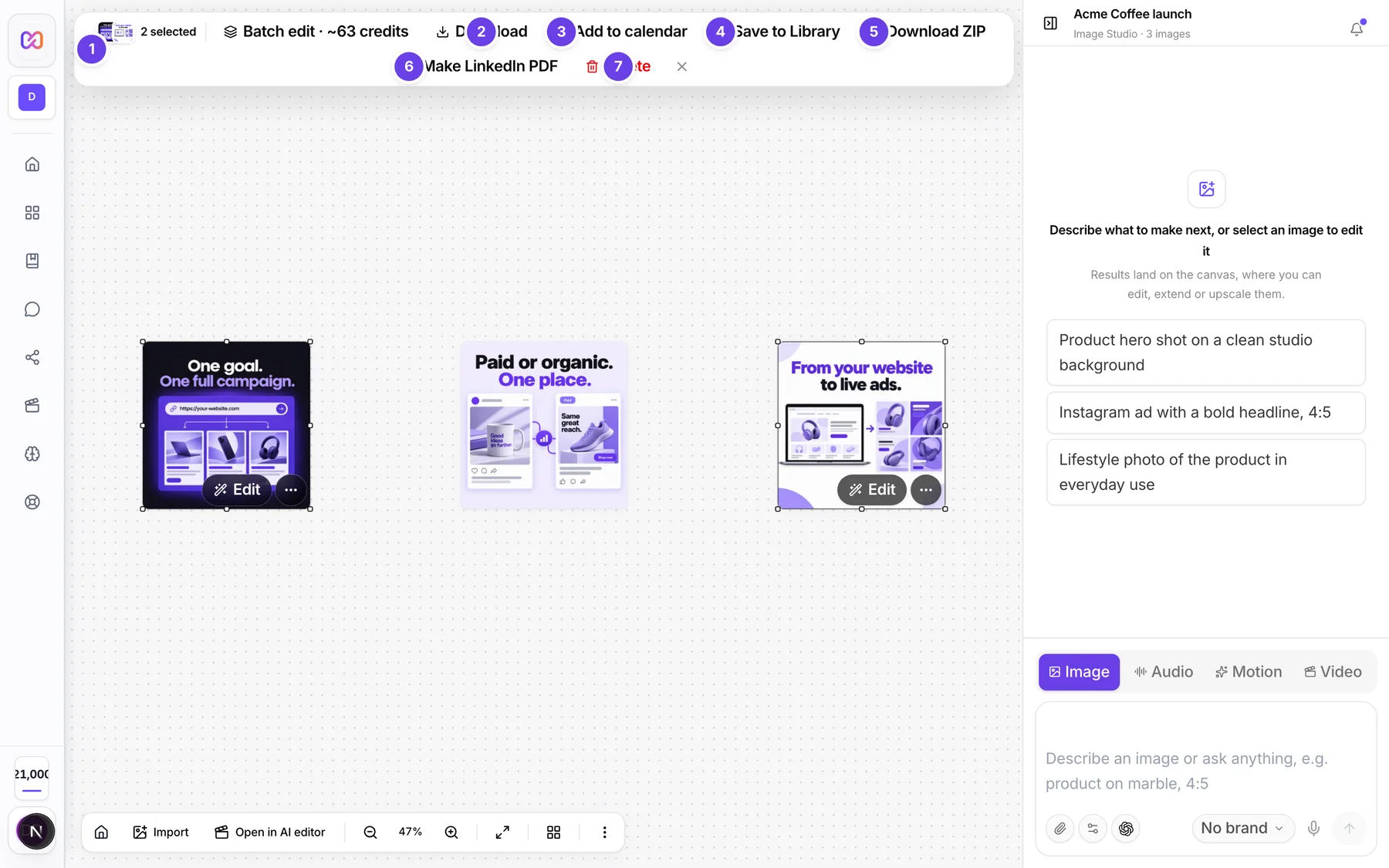
| # | Name in the app | What it does | Plan |
|---|---|---|---|
| 1 | {n} selected | Shows how many items you picked. | Both |
| 2 | Download | In the selection bar. Saves each selected item. | Both |
| 3 | Add to calendar | In the selection bar. Not a download. It makes a post draft. | Both |
| 4 | Save to Library | Saves the selected items to a Library folder. | Both |
| 5 | Download ZIP | Puts the selected items in one ZIP file. | Both |
| 6 | Make LinkedIn PDF | Builds a PDF of square pages from the selected images. | Both |
| 7 | Delete | Removes the selected items, see rename and delete. | Both |
| Image actions | The button on a picture. Its menu has Download, Add to calendar, Save to Library, Download ZIP and Make LinkedIn PDF. | Both | |
| Motion video actions | The menu on a motion video. It has Add to calendar, Save to Library and Download. | Both | |
| Download | The arrow on a motion video that already has an MP4. | Both | |
| Export MP4 | On a finished motion video with no MP4 yet. Makes the MP4 file. | Both | |
| Download video | The arrow on a video card. Saves the .mp4. | Both | |
| Download | The arrow on an audio take. Saves the file. | Both | |
| Export | A button under a finished audio take. Opens Export for platforms. | Both |
#How to download images
- Select one or more images. Hold Shift and click to pick several.
- Click Download in the selection bar at the top.
- One image downloads on its own. Each selected image downloads as a separate file in turn.
You can also click Image actions on a picture, then Download.
#How to download several items as one ZIP
- Select the items.
- Click Download ZIP.
- A notice says how many files went into the ZIP. If some were left out, it names up to three of them.
#How to make a LinkedIn PDF
- Select images and click Make LinkedIn PDF.
- Type a Document title. It shows at the top of the document on LinkedIn.
- Check the pages. For each page you can choose Fit or Fill, move it up or down, or remove it. Fit shows the whole image on white. Fill crops it to the square and lets you set the zoom and position.
- Click Download PDF, or click Add to calendar to make a post.
Only images can go in a PDF. Videos and audio cannot.
#How to export sound for a platform
- Wait for the audio take to finish.
- Click Export under the take. The panel is called Export for platforms.
- Click the platforms you want. YouTube is on to start.
- Click Export. The button shows how many platforms you picked.
- Click each file link in the list to save it.
#How to get a motion video file
- When a motion video is done, it says it is ready. Click Export MP4.
- Wait while it shows Exporting MP4....
- When it ends, click the download arrow on the card, or Download in Motion video actions.
Making the MP4 is something you start yourself. Nothing exports on its own.
#Options explained
Platforms for sound export. Each platform lowers or raises loudness when you upload. Exporting at its target stops that. The choices are YouTube, Meta (FB/IG), TikTok, LinkedIn and Broadcast (EBU R128). Each gives you one file.
What each item saves as. Images save as PNG files named by their id. Videos save as .mp4. Audio takes save as audio files.
Scripts and transcripts are text. They have no sound to export.
Fit and Fill in the PDF: see How to make a LinkedIn PDF.
#Limits
- A LinkedIn PDF holds up to 300 pages.
- The PDF title can be up to 200 characters.
- A new Library folder name can be up to 60 characters long.
#When something goes wrong
| Message in the app | What it means | What to do |
|---|---|---|
| Nothing could be downloaded. | No selected item could be saved. | Try one item at a time. |
| Nothing could be downloaded. Motion videos need Export MP4 first. | The ZIP only held motion videos with no MP4. | Click Export MP4 on the card, then try again. |
| This motion video has no MP4 yet. Click Export MP4 on the card first, then download. | You tried to download a motion video before its MP4 exists. | Click Export MP4 first. |
| The download failed. Try it again. | The file did not save. | Try again. |
| The ZIP could not be made. | The ZIP did not build. | Try again. |
| Could not download the video. | The .mp4 did not save. | Try again. |
| Only a finished audio take can be exported. This one is still processing or failed. | The take is not finished. | Wait for it, or make it again. |
| This is text, not audio, so it cannot be exported as a sound file. | You tried to export a script or transcript. | Export an audio take instead. |
| No export could be produced. | Every platform you picked failed. | Try again or pick other platforms. |
| Audio cannot go on a social post. Pick an image or a video. | You picked Add to calendar with only audio. | Pick an image or a video. |
| This video isn't finished yet | You pressed Export MP4 too early. | Wait until the video is ready. |
#Questions
#Does downloading cost credits?
No. Downloads and exports are free.
#What file does an image download as?
A PNG file named by its id.
#Can I download several images at once?
Yes. Select them and click Download to save each one, or Download ZIP for one file.
#Why can I not put audio in a LinkedIn PDF?
The PDF is built from images only.
#Do I need to sign in to download a shared campaign?
Yes. Downloads on a shared page ask the visitor to sign in first, see share and review.
Last checked against the app on . View as Markdown